Google Drive vs OneDrive: Key Differences
Introduction
Cloud storage has become an essential tool for individuals and businesses alike, providing a convenient and secure way to store and access files from anywhere. Two of the most popular cloud storage services are Google Drive and OneDrive, offered by tech giants Google and Microsoft, respectively. Both services offer a range of features, including file storage, sharing, and collaboration tools. However, there are key differences between the two services that can make one more suitable for your needs than the other. In this article, we will explore the key differences between Google Drive and OneDrive, including their pricing, storage limits, and integration with other services. Whether you are an individual looking for a personal cloud storage solution or a business seeking a robust and secure platform for your team, understanding the differences between these two services is crucial. Google Drive and OneDrive have been constantly evolving, with new features and updates being added regularly, making it essential to stay up-to-date with the latest developments.
The choice between Google Drive and OneDrive ultimately depends on your specific needs and preferences. If you are already invested in the Google ecosystem, with services like Gmail and Google Docs, then Google Drive may be the more convenient choice. On the other hand, if you are a Windows user or rely heavily on Microsoft Office, then OneDrive may be the better option. Both services offer free storage, with Google Drive providing 15 GB and OneDrive offering 5 GB, making them accessible to everyone. Furthermore, both services have robust security features, including encryption and two-factor authentication, to ensure that your files are protected.
Google Drive
Google Drive is a cloud storage service that allows users to store and access their files from anywhere. It offers a range of features, including file sharing, collaboration tools, and integration with other Google services like Google Docs and Google Sheets. Google Drive also has a robust search function, making it easy to find specific files, even if you have a large collection of documents and media. Additionally, Google Drive has a feature called Google Drive for Desktop, which allows users to sync their files across all their devices, including desktops, laptops, and mobile devices.
OneDrive
OneDrive is a cloud storage service offered by Microsoft, designed to integrate seamlessly with Windows and Microsoft Office. It offers a range of features, including file storage, sharing, and collaboration tools, as well as integration with other Microsoft services like Outlook and Word. OneDrive also has a feature called Files On-Demand, which allows users to access their files without having to download them to their device, saving storage space and reducing clutter. Furthermore, OneDrive has a robust photo management feature, making it easy to store, share, and edit your photos.
Key Differences
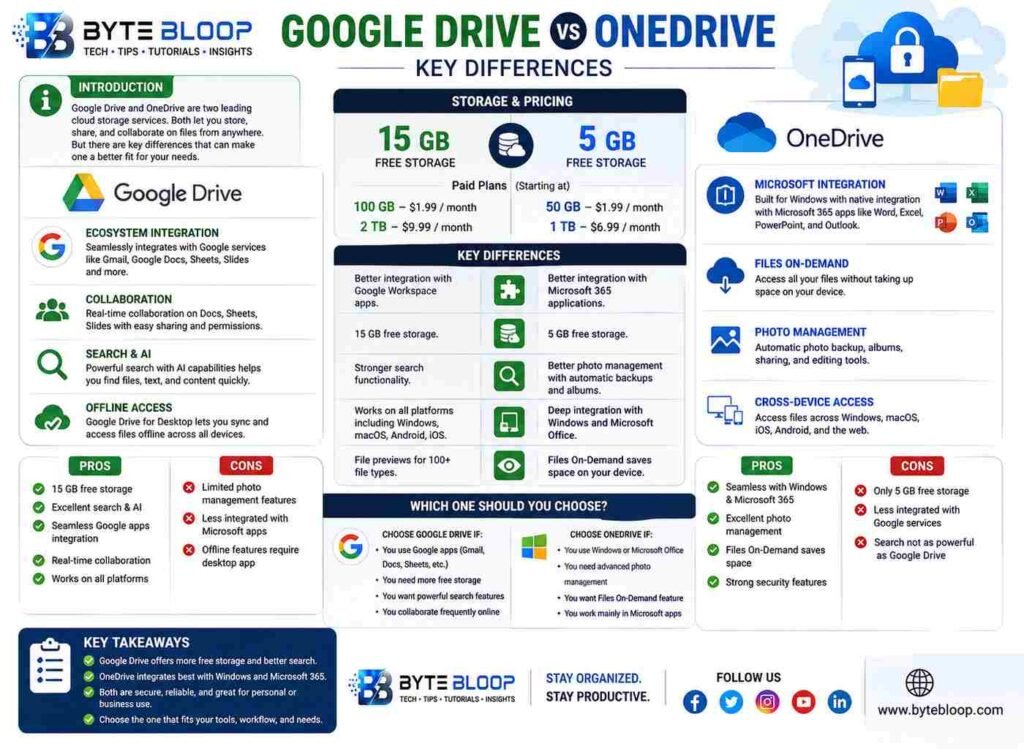
One of the main differences between Google Drive and OneDrive is their pricing and storage limits. Google Drive offers 15 GB of free storage, while OneDrive offers 5 GB. However, both services offer additional storage options, with Google Drive starting at $1.99 per month for 100 GB and OneDrive starting at $1.99 per month for 50 GB. Another key difference is their integration with other services, with Google Drive integrating seamlessly with Google services like Google Docs and Google Sheets, and OneDrive integrating with Microsoft services like Word and Outlook.
Performance/Features
Both Google Drive and OneDrive offer a range of features, including file sharing, collaboration tools, and integration with other services. However, Google Drive has a more robust search function, making it easier to find specific files. On the other hand, OneDrive has a more robust photo management feature, making it easier to store, share, and edit your photos. Additionally, both services have robust security features, including encryption and two-factor authentication, to ensure that your files are protected.
Pros and Cons
Google Drive has several pros, including its robust search function, seamless integration with Google services, and generous free storage. However, it also has some cons, including its limited photo management features and lack of integration with Microsoft services. On the other hand, OneDrive has several pros, including its robust photo management feature, seamless integration with Microsoft services, and Files On-Demand feature. However, it also has some cons, including its limited free storage and lack of integration with Google services.
Which One Should You Choose?
- If you are already invested in the Google ecosystem, with services like Gmail and Google Docs, then Google Drive may be the more convenient choice.
- If you are a Windows user or rely heavily on Microsoft Office, then OneDrive may be the better option.
- If you need more storage, Google Drive may be the better choice, with 15 GB of free storage compared to OneDrive’s 5 GB.
- If you need more robust photo management features, OneDrive may be the better choice.
Key Takeaways
- Google Drive and OneDrive are two popular cloud storage services with different features and pricing plans.
- Google Drive offers 15 GB of free storage, while OneDrive offers 5 GB.
- OneDrive has a more robust photo management feature, while Google Drive has a more robust search function.
- Both services have robust security features, including encryption and two-factor authentication.
- The choice between Google Drive and OneDrive ultimately depends on your specific needs and preferences.
Frequently Asked Questions
What is the main difference between Google Drive and OneDrive?
The main difference between Google Drive and OneDrive is their pricing and storage limits, as well as their integration with other services.
Which service is better for photo management?
OneDrive is better for photo management, with a more robust feature set and seamless integration with Microsoft services.
Which service is better for Google users?
Google Drive is better for Google users, with seamless integration with Google services like Google Docs and Google Sheets.
How much free storage does each service offer?
Google Drive offers 15 GB of free storage, while OneDrive offers 5 GB.
What are the pros and cons of each service?
Google Drive has pros like its robust search function and generous free storage, but cons like limited photo management features. OneDrive has pros like its robust photo management feature and Files On-Demand feature, but cons like limited free storage and lack of integration with Google services.
How do I choose between Google Drive and OneDrive?
The choice between Google Drive and OneDrive ultimately depends on your specific needs and preferences, including your operating system, productivity software, and storage needs.
Conclusion
Based on the available information and industry analysis, Google Drive and OneDrive are both robust cloud storage services with different features and pricing plans, and the choice between them ultimately depends on your specific needs and preferences. By considering factors like storage limits, integration with other services, and photo management features, you can make an informed decision and choose the service that best fits your needs.
Related Reading
- Cloud Storage Comparison: Google Drive, OneDrive, and Dropbox
