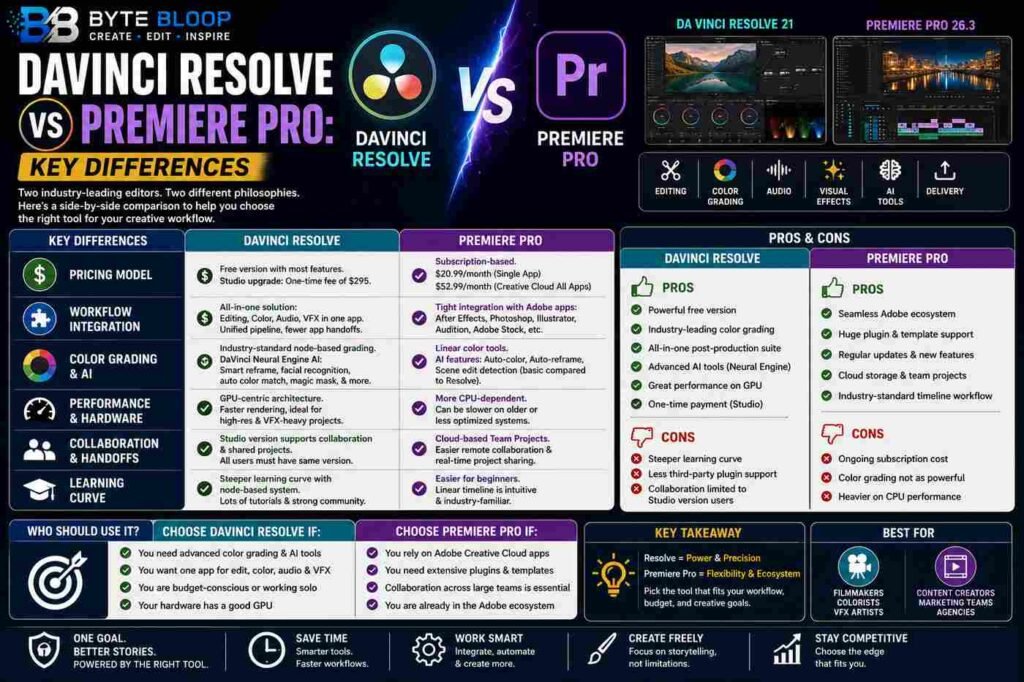
DaVinci Resolve vs Premiere Pro: Key Differences
Introduction
When it comes to professional video editing, two names dominate the conversation: DaVinci Resolve and Adobe Premiere Pro. Both have evolved from niche tools into full-featured suites, yet they cater to different priorities. Resolve shines with its industry‑standard color grading, AI‑powered tools, and a generous free tier, making it a favorite for editors who need precision and cost efficiency. Premiere Pro, meanwhile, integrates tightly with Adobe’s Creative Cloud, offering a familiar interface for designers, motion graphics artists, and those who rely on templates and plugins. Understanding the core distinctions between these platforms—price, workflow, performance, and ecosystem—helps editors choose the right tool for their projects.
In this guide we break down the key differences that set Resolve and Premiere Pro apart, backed by recent reviews and industry data. Whether you’re a freelancer, a studio professional, or a hobbyist, the comparison will clarify which software aligns best with your creative needs.
DaVinci Resolve
Resolve’s 2026 release, version 21, continues to build on its reputation as a comprehensive post‑production solution. The free version includes almost every feature you’ll need: non‑linear editing, advanced color correction, Fairlight audio, Fusion visual effects, and even a robust media management system. The paid Studio upgrade unlocks multi‑GPU rendering, 3D tools, and collaboration features for teams.
Resolve’s color grading engine is industry‑standard, offering precise control over hue, saturation, and luminance with a node‑based workflow. The AI suite—DaVinci Neural Engine—provides smart re‑frame, facial recognition, and automated color matching, which can dramatically reduce post‑production time. Performance-wise, Resolve leverages GPU acceleration heavily, making it ideal for high‑resolution footage and complex visual effects.
Premiere Pro
Premiere Pro 26.3, part of Adobe’s Creative Cloud subscription, is known for its flexible licensing model and seamless integration with After Effects, Photoshop, and Illustrator. The subscription includes regular updates, cloud storage, and access to Adobe Stock, which can streamline asset workflows.
While Premiere’s color tools are competent, they’re generally considered less powerful than Resolve’s node‑based system. However, Premiere offers a vast ecosystem of plugins and templates, and its timeline is highly customizable for editors who prefer a linear, drag‑and‑drop interface. Audio editing is handled by the integrated Audition plugin, but many users still turn to dedicated audio workstations for complex sound design.
Key Differences
Pricing Model
Resolve’s free tier is a major draw, especially for independent creators. The Studio upgrade costs a one‑time fee of $295, which is cheaper than the annual subscription for Premiere Pro, which starts at $20.99/month for a single app or $52.99/month for the full Creative Cloud suite.
Workflow Integration
Premiere’s tight integration with Adobe’s ecosystem makes it the go‑to for teams that rely on After Effects templates, Photoshop graphics, or Illustrator vector assets. Resolve, on the other hand, offers a unified pipeline from editing to color to audio, reducing the need to switch between separate applications.
Color Grading and AI
Resolve’s node‑based grading and Neural Engine AI tools provide unmatched precision and automation. Premiere’s color tools are linear and less flexible, though recent updates have added basic AI features like auto‑color and auto‑re‑frame.
Performance and Hardware
Resolve’s GPU‑centric architecture delivers faster rendering on compatible hardware, especially with multi‑GPU setups. Premiere relies more on CPU, which can be a bottleneck on older machines.
Collaboration and Handoffs
Resolve’s Studio version supports collaborative editing and shared projects across teams, but it requires all users to have the same version. Premiere’s cloud‑based project sharing and integration with Team Projects make remote collaboration smoother for larger teams.
Learning Curve
Resolve’s node system can be intimidating for newcomers, whereas Premiere’s linear timeline is more intuitive for users transitioning from other editors or beginners. However, Resolve offers a comprehensive set of tutorials and a strong community forum.
Which One Should You Choose?
Choose Resolve if:
- You need advanced color grading and AI tools.
- You prefer a single application for editing, audio, and effects.
- You’re budget‑conscious or working solo.
- Your hardware supports GPU acceleration.
Choose Premiere Pro if:
- You rely on Adobe Creative Cloud apps.
- You need extensive plugin support and templates.
- Collaboration across a large team is essential.
- You’re already subscribed to Creative Cloud.
Key Takeaways
- Resolve offers a powerful free tier and industry‑standard color grading.
- Premiere Pro excels in Adobe ecosystem integration and plugin availability.
- Resolve’s GPU‑centric performance outpaces Premiere on high‑resolution projects.
- Premiere’s subscription model can be more cost‑effective for long‑term users.
- The learning curve differs: Resolve’s node system vs Premiere’s linear timeline.
Frequently Asked Questions
What is the main advantage of DaVinci Resolve’s free version?
It includes almost all core editing, color, audio, and effects tools, making it a complete post‑production suite without a subscription.
What are the key features of Premiere Pro’s AI tools?
Premiere Pro offers auto‑color, auto‑re‑frame, and basic scene detection, but lacks the depth of Resolve’s Neural Engine.
What are the best use cases for DaVinci Resolve?
High‑budget film grading, independent filmmakers needing cost control, and teams that want a single application for all post‑production stages.
What are the pros and cons of Premiere Pro?
Pros: tight Adobe integration, extensive plugin ecosystem, and cloud collaboration. Cons: higher ongoing costs, less powerful native color grading, and heavier CPU usage.
How does collaboration differ between the two?
Resolve requires all users to run the Studio version, while Premiere offers cloud‑based Team Projects for seamless remote editing.
Conclusion
Based on the available information and industry analysis, DaVinci Resolve and Adobe Premiere Pro each offer distinct strengths that cater to different editing workflows. Resolve’s free, all‑in‑one platform with industry‑standard color grading makes it ideal for cost‑conscious professionals and colorists, while Premiere’s tight Adobe ecosystem integration and extensive plugin library serve teams that rely on cross‑app workflows and long‑term subscription models. Choosing between them ultimately depends on your project needs, budget, and preferred workflow.
Related Reading
- Top 5 Color Grading Plugins for Premiere Pro
