Supabase: Explained
Introduction (Supabase Explained)
Supabase Explained is a topic worth understanding well. Supabase has surged in popularity as a free, open‑source alternative to Firebase, offering a complete backend stack built on Postgres. Developers can spin up a database, authentication, real‑time subscriptions, and serverless functions in minutes, all with a single command line interface. The platform’s promise is to let teams focus on business logic instead of plumbing infrastructure, while still maintaining the power and reliability of a relational database.
In practice, Supabase delivers a RESTful API, GraphQL, and instant WebSocket updates, making it a versatile choice for web, mobile, and IoT applications. The community has embraced Supabase for its transparent licensing, extensive documentation, and active contribution model. This guide walks you through the core concepts, demonstrates a sample project, and highlights common pitfalls and best practices.
What is Supabase?
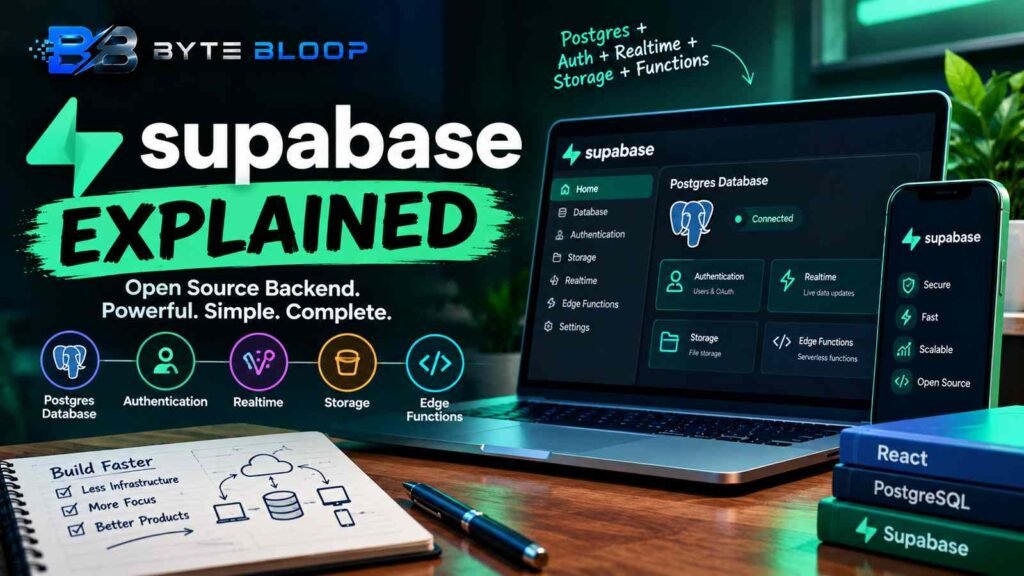
According to the Supabase Tutorial for Beginners 2026, Supabase is a Postgres development platform that bundles database, authentication, storage, real‑time, and Edge Functions into a single, developer‑friendly package. The platform exposes a REST API and a real‑time layer built on Postgres’s logical replication, allowing instant updates to connected clients. Supabase’s open‑source nature means you can self‑host or use the managed cloud offering, giving you control over data residency and cost.
Core Components
1. Postgres Database
At its heart, Supabase uses a standard Postgres instance. You can create tables, define relationships, and enforce constraints just as you would in any SQL environment. The Supabase dashboard provides a GUI for schema design, while the CLI supports migrations.
This matters directly for anyone exploring supabase explained.
2. Authentication
Supabase Auth supports email/password, OAuth providers, and magic links. It integrates with the database via Row Level Security (RLS) policies, ensuring that only authorized rows are visible to each user. The Auth API is exposed through a lightweight SDK that can be used in React, Vue, or native mobile apps.
Getting supabase explained right can make a real difference.
3. Real‑time
Real‑time updates are powered by Postgres logical replication. Subscriptions can be set up on any table or query, and changes are pushed to clients over WebSockets. This eliminates the need for polling and simplifies collaborative features.
That is a core part of understanding supabase explained.
4. Storage
Supabase Storage offers an S3‑compatible interface for file uploads. You can store images, videos, or documents, and control access with signed URLs or RLS policies.
Many readers look into supabase explained for exactly this reason.
5. Edge Functions
Edge Functions allow you to run serverless code close to your users. They can be written in JavaScript or TypeScript and are invoked via HTTP or as part of database triggers.
It is worth revisiting supabase explained as things develop.
Getting Started: A Minimal CRUD App
Below is a quick walkthrough of creating a simple “tasks” table, exposing it via Supabase, and consuming it in a React app.
Supabase Explained remains highly relevant here.
1. Create a Supabase Project
# Install the Supabase CLI
npm install -g supabase

# Create a new project
supabase init
supabase link --project-ref YOUR_PROJECT_REF
2. Define the Schema
# In supabase/migrations/20260923_create_tasks.sql
CREATE TABLE tasks (
  id uuid PRIMARY KEY DEFAULT gen_random_uuid(),
  title text NOT NULL,
  completed boolean DEFAULT false,
  created_at timestamp with time zone DEFAULT now()
);
3. Apply Migrations
supabase db push
4. Enable Row Level Security
supabase rls enable tasks
5. Add a Policy
CREATE POLICY "Users can read their tasks"
  ON tasks
  FOR SELECT
  USING (auth.uid() = user_id);
6.
Consume in React
import { createClient } from '@supabase/supabase-js';

const supabase = createClient('https://xyz.supabase.co', 'public-anon-key');

async function fetchTasks() {
  const { data, error } = await supabase
    .from('tasks')
    .select('*')
    .order('created_at', { ascending: false });
  if (error) console.error(error);
  return data;
}
With these steps, you have a fully functional backend that handles data storage, authentication, and real‑time updates—all without writing server code.
This is a key consideration when it comes to supabase explained.
Common Pitfalls
- Ignoring RLS: Forgetting to enable Row Level Security can expose sensitive data. Always review policies after schema changes.
- Over‑privileged APIs: Exposing raw database tables to the client can lead to accidental data leaks. Use Supabase’s built‑in security or create dedicated API endpoints.
- Storage Misconfiguration: Storage buckets default to public access. Explicitly set bucket policies to restrict uploads and downloads.
Best Practices
- Use migrations for schema changes to keep the database versioned.
- Leverage Supabase’s real‑time features for collaborative UIs, but throttle updates if you have high write volumes.
- Combine Supabase Auth with custom claims to implement role‑based access control.
- Monitor usage in the dashboard to spot unexpected spikes that could indicate abuse.
Key Takeaways
- Supabase bundles Postgres, Auth, Realtime, Storage, and Edge Functions into a single platform
- It offers instant REST and GraphQL APIs without server code
- Row Level Security is essential for protecting data at the row level
- Real‑time updates use Postgres logical replication for low‑latency sync
- Edge Functions enable serverless logic close to users
- Self‑hosting is possible for data‑sensitive projects
Frequently Asked Questions
What is Supabase?
Supabase is an open‑source backend platform that provides a Postgres database, authentication, real‑time subscriptions, storage, and serverless Edge Functions, all accessible via a unified API.
This matters directly for anyone exploring supabase explained.
What are the key features of Supabase?
Key features include instant REST/GraphQL APIs, real‑time updates via WebSockets, OAuth and magic‑link authentication, S3‑compatible storage, and Edge Functions for serverless logic.
Getting supabase explained right can make a real difference.
What are the best use cases for Supabase?
Supabase excels in building rapid prototypes, real‑time collaborative apps, mobile backends, and any project that benefits from a relational database with minimal server management.
That is a core part of understanding supabase explained.
What are the pros and cons of using Supabase?
Pros: quick setup, open source, Postgres reliability, extensive documentation. Cons: potential cost if scaling beyond free tier, learning curve for advanced Postgres features, reliance on a single vendor for managed hosting.
Conclusion
Based on the available information and industry analysis, Supabase provides a compelling, open‑source alternative to proprietary backend services by unifying a Postgres database with authentication, real‑time, storage, and Edge Functions. Its rapid‑deployment model and strong community support make it an attractive choice for developers seeking to focus on application logic rather than infrastructure, while still maintaining control over data and scaling options.
Related Reading
- Building Real‑Time Apps with Supabase Realtime
Sources & References
- Supabase Tutorial #1 - What is Supabase? — Supabase Tutorial for Beginners 2026: How to Use Supabase. Every Programming Language Explained in 16 Minutes
- Supabase Tutorial for Beginners 2026: How to Use ... — ... guide covers everything you need to get started with Supabase
- Supabase Docs — Learn how to get up and running with Supabase through tutorials, APIs and platform resources
- Supabase in 2026: The Complete Developer Guide to ... — This guide covers everything you need to know about building with Supabase in 2026: auth, real-time, storage, Edge Functions, and the patterns ...
- Supabase | The Postgres Development Platform — Build production-grade applications with a Postgres database, Authentication, instant APIs, Realtime, Functions, Storage and Vector embeddings
Related Articles