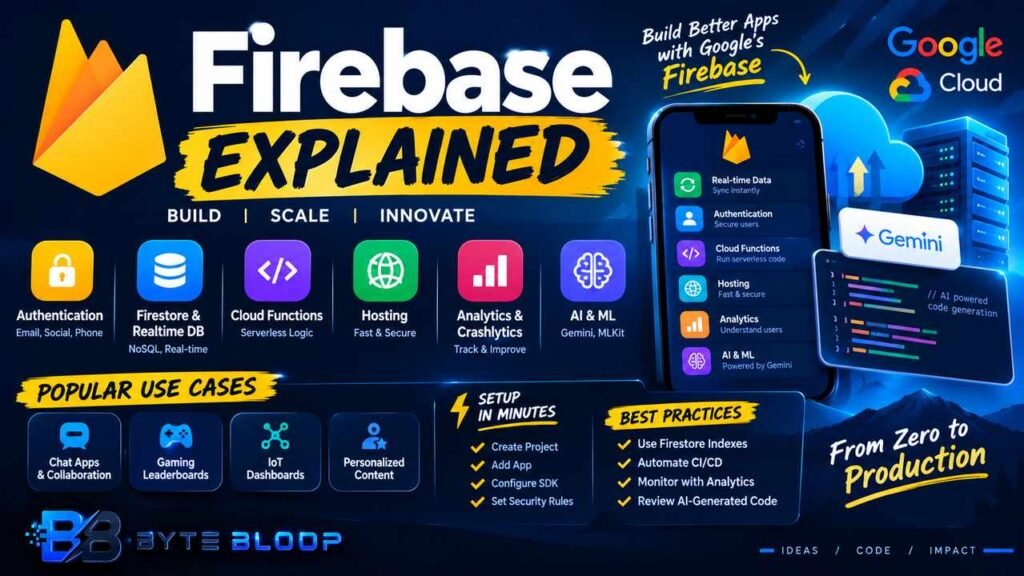
Firebase: Explained
Introduction (Firebase Explained)
Firebase Explained is a topic worth understanding well. Firebase is a cloud‑based platform from Google that bundles a suite of services—real‑time databases, authentication, cloud functions, hosting, and AI‑powered tools—into a single developer experience. Since its acquisition in 2014, Firebase has become the go‑to backend for mobile and web applications that require instant data sync, secure user management, and scalable infrastructure without the overhead of server maintenance. The platform’s server‑less architecture lets developers focus on feature delivery while Firebase handles scaling, replication, and security.
In addition, recent updates announced at Google I/O 2026 have expanded Firebase’s AI capabilities, allowing developers to generate Firestore code, integrate Gemini models, and automate security rule creation. These enhancements position Firebase as a full‑stack solution that can accelerate prototyping, reduce operational costs, and empower cross‑platform teams. For anyone building a new app or modernizing an existing one, understanding Firebase’s core components and how they interoperate is essential to make the most of its capabilities.
This guide walks you through the fundamentals, practical setup steps, common pitfalls, and best practices for mastering Firebase in 2026.
Core Firebase Services
Firebase’s value lies in its tightly integrated services:
- Authentication – Email/password, social logins, phone auth, and custom token support.
- Realtime Database & Firestore – Two NoSQL options: a legacy, event‑driven Realtime Database and the newer, scalable Firestore.
- Cloud Functions – JavaScript/TypeScript serverless code that responds to events.
- Hosting – Fast, secure static and dynamic content delivery.
- Analytics & Crashlytics – Built‑in telemetry for user behavior and error tracking.
- AI & ML – Gemini integration, on‑device MLKit, and code generation for Firestore schemas.
Getting Started: Project Setup
Follow these steps to bootstrap a Firebase project for a web or Flutter app.
This matters directly for anyone exploring firebase explained.
- Create a Firebase project – Visit the Firebase Console, click “Add project,” and follow the wizard. Enable Google Analytics if desired.
- Register your app – Choose the platform (iOS, Android, Web, or Flutter). For Flutter, add the Firebase SDK by running
flutter pub add firebase_coreandflutter pub add firebase_authin the terminal. - Initialize Firebase – In web, add the config snippet from the console into
index.htmland callfirebase.initializeApp(config). In Flutter, callawait Firebase.initializeApp();inmain(). - Set up security rules – Start with the default rules and tighten them as the app grows. The new AI rule generator announced in 2026 can scaffold rules based on data access patterns.
Common Use Cases
Firebase shines in scenarios that demand real‑time interaction and rapid iteration:
Getting firebase explained right can make a real difference.
- Chat and collaboration apps – Firestore’s real‑time listeners keep conversations in sync across devices.
- Gaming leaderboards – Realtime Database offers low‑latency updates for live scores.
- IoT dashboards – Cloud Functions can process sensor data and push updates to Firestore.
- Personalized content – Cloud Functions trigger MLKit or Gemini models to generate user‑specific recommendations.
Common Pitfalls and How to Avoid Them
Even seasoned developers fall into a few traps when working with Firebase. Below are the most frequent issues and practical fixes.
That is a core part of understanding firebase explained.
- Over‑privileged security rules – Granting read/write access to all users can expose data. Use
auth != nullchecks and field‑level rules. - Ignoring offline persistence – For mobile apps, enable offline caching to prevent data loss during connectivity hiccups.
- Misusing Realtime Database vs Firestore – Realtime Database is optimal for simple, flat data, while Firestore supports richer queries and scaling.
- Cold starts in Cloud Functions – Deploy functions with
--memory=256MBand keep dependencies minimal to reduce latency.
Best Practices for Production
Adopting a disciplined approach ensures reliability, security, and maintainability.
Many readers look into firebase explained for exactly this reason.
- Version your Firestore indexes – Use the Firebase CLI to generate
firestore.indexes.jsonand commit it to source control. - Automate CI/CD – Integrate
firebase deployinto your pipeline and use pre‑deploy checks. - Monitor with Analytics and Crashlytics – Set up custom events for critical flows and review crash reports weekly.
- Use AI‑generated code sparingly – The new code generation feature can speed prototyping but review output for best‑practice adherence.
Key Takeaways
- Firebase bundles authentication, real‑time data, and AI tools into a single platform.
- Firestore offers scalable, query‑friendly NoSQL storage while Realtime Database excels at low‑latency updates.
- Security rules are the first line of defense; AI rule generators help but require manual review.
- Cloud Functions enable serverless logic that scales automatically with traffic.
- Integrating Firebase with Flutter or web is straightforward via SDKs and the Firebase Console.
- Continuous monitoring with Analytics and Crashlytics keeps production apps healthy.
Frequently Asked Questions
What is Firebase?
Firebase is a Google‑backed platform that provides a suite of cloud services—authentication, real‑time databases, cloud functions, hosting, analytics, and AI tools—to help developers build, ship, and grow apps quickly.
It is worth revisiting firebase explained as things develop.
What are the key features of Firebase?
Key features include real‑time data sync with Firestore or Realtime Database, secure authentication methods, serverless Cloud Functions, fast hosting, built‑in analytics and crash reporting, and AI integrations like Gemini and MLKit.
Firebase Explained remains highly relevant here.
What are the best use cases for Firebase?
Firebase is ideal for chat apps, gaming leaderboards, IoT dashboards, real‑time collaboration tools, and any application that benefits from instant data updates and rapid prototyping.
This is a key consideration when it comes to firebase explained.
What are the pros and cons of using Firebase?
Pros: rapid development, managed infrastructure, real‑time capabilities, and AI tools. Cons: vendor lock‑in, limited control over scaling limits, potential cost spikes with heavy usage, and learning curve for complex security rules.
This matters directly for anyone exploring firebase explained.
Conclusion
Based on the available information and industry analysis, Firebase provides a comprehensive, server‑less backend that accelerates app development, reduces operational overhead, and offers AI‑powered features that keep pace with modern developer demands. By mastering its core services and adhering to best practices, teams can deliver secure, scalable, and feature‑rich applications across web, mobile, and cross‑platform ecosystems.
Related Reading
- Building a Real‑Time Chat App with Firestore
- Optimizing Firebase Cloud Functions for Low Latency
Sources & References
- Firebase Documentation
- What’s new from Firebase at Google I/O 2026
- What is Firebase? A Beginner’s Guide to Google’s Platform
- Firebase – Ultimate Beginner’s Guide
- How to Add Firebase to a Flutter App: 2026 AI Backend
- Best Firebase Tutorials and Projects in 2026
Related Articles
- Best Complete Password manager reviews features tested
- Best Definitive Fiber Internet Explained
- Best Proven Angel investment explained
- Best Proven Generative ai key features
Getting firebase explained right can make a real difference.