Database Indexing Explained
Introduction
Database Indexing Explained is a topic worth understanding well. When a database grows, the sheer volume of rows can turn a simple lookup into a costly operation. Database indexing is the technique that transforms this bottleneck into a streamlined lookup, dramatically reducing disk reads and CPU cycles. At its core, an index is a data structure that maps key values to the physical location of rows, enabling the database engine to jump directly to the needed data instead of scanning the entire table. This concept, first formalized in the early days of relational databases, remains vital for performance tuning in modern systems ranging from MySQL to PostgreSQL and beyond.
Understanding how indexes work, the various types available, and when to apply them can mean the difference between a sluggish application and a responsive one. In this guide, we’ll unpack the fundamentals of database indexing, walk through common index types with code examples, highlight typical pitfalls, and share best‑practice tips that developers and DBAs alike can apply immediately.
What Is an Index?
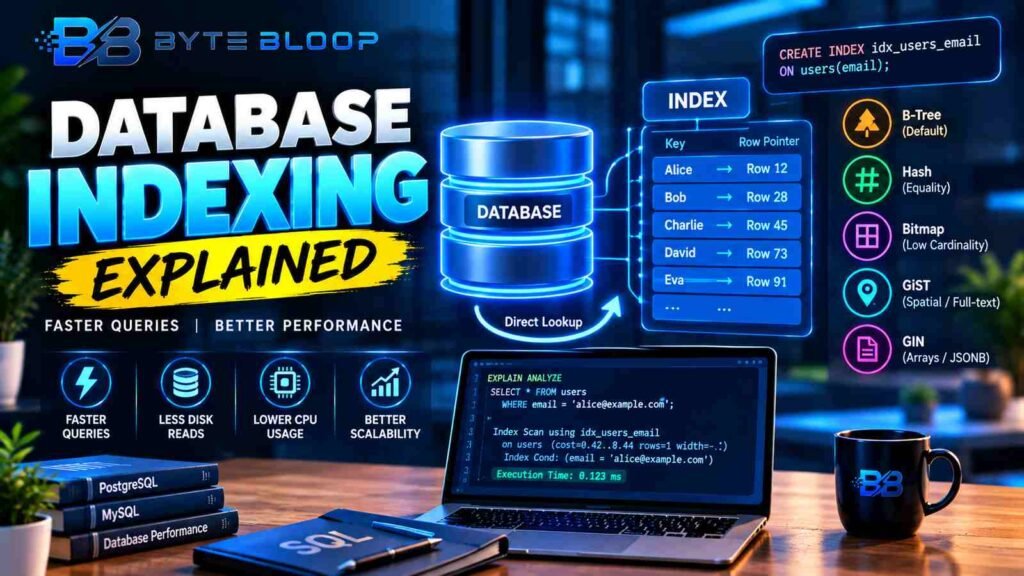
An index is a separate data structure that stores a sorted list of key values and pointers to the corresponding rows in the base table. Think of it as the index at the back of a book: you look up a term, see the page number, and jump straight there. In databases, this lookup is done in milliseconds, even for tables with millions of rows.
This matters directly for anyone exploring database indexing explained.
How Indexes Speed Up Queries
When a query contains a filter on an indexed column, the database engine can use a binary search on the index tree to locate the matching key. The engine then follows the pointer to the exact row(s) in the table. This process is far faster than a full table scan, which reads every row sequentially. The cost of maintaining the index is offset by the performance gains for read‑heavy workloads.
Getting database indexing explained right can make a real difference.
Common Index Types
- B‑Tree – The default for most RDBMS. It supports range queries, equality, and ordered scans.
- Hash – Optimized for equality checks on a single column; not suitable for range queries.
- Bitmap – Useful for low‑cardinality columns (e.g., gender, status) in analytical workloads.
- GiST (Generalized Search Tree) – Flexible structure for spatial data, full‑text search, and more.
- GIN (Generalized Inverted Index) – Ideal for array or JSONB columns where elements need to be searched individually.
Example: Creating a B‑Tree Index in PostgreSQL
CREATE INDEX idx_users_email ON users(email);This index allows the database to find a user by email in O(log n) time instead of scanning every row.
That is a core part of understanding database indexing explained.
When to Add an Index
Indexes are most beneficial for columns that appear in WHERE, JOIN, ORDER BY, or GROUP BY clauses. However, indiscriminate indexing can degrade write performance, increase storage usage, and complicate maintenance.
Many readers look into database indexing explained for exactly this reason.
Common Mistakes and How to Avoid Them
- Indexing Every Column – Each index adds write overhead. Focus on high‑frequency read columns.
- Ignoring Composite Indexes – A single composite index can replace multiple single‑column indexes if queries filter on multiple columns.
- Not Updating Statistics – Most engines rely on statistics to choose the right index. Keep them fresh with
ANALYZEor equivalent.
Best Practices for Index Management
- Start with the most selective columns.
- Use
EXPLAINto verify that the optimizer is using the index. - Drop unused indexes regularly; they only add cost.
- Consider partial indexes for predicates that filter a small subset of rows.
Key Takeaways
- Indexes are data structures that map keys to row locations, cutting query time from seconds to milliseconds.
- B‑Tree indexes are the default and support a wide range of queries, while hash, bitmap, GiST, and GIN serve specialized needs.
- Adding indexes boosts read performance but can slow writes; balance is key.
- Composite and partial indexes can replace multiple single‑column indexes for complex queries.
- Regularly analyze tables and drop unused indexes to keep the system lean.
Frequently Asked Questions
What is database indexing explained?
Database indexing is a technique that creates a data structure mapping key values to row locations, enabling the database to retrieve data without scanning the entire table.
It is worth revisiting database indexing explained as things develop.
What are the key features of B‑Tree indexes?
B‑Tree indexes maintain a balanced tree structure, support equality, range, and ordered queries, and are the default in most relational databases.
Database Indexing Explained remains highly relevant here.
What are the best use cases for bitmap indexes?
Bitmap indexes excel on low‑cardinality columns in analytical workloads, such as gender or status fields, where quick set operations are needed.
What are the pros and cons of adding too many indexes?
Pros: faster read queries; Cons: increased storage, slower writes, higher maintenance overhead, and potential optimizer confusion.
Conclusion
Based on the available information and industry analysis, database indexing provides a powerful mechanism to accelerate data retrieval by reducing disk I/O and CPU usage. By selecting appropriate index types, applying them judiciously, and maintaining them with regular statistics updates, developers and DBAs can achieve significant performance gains while keeping storage and write costs in check.
Related Reading
- Mastering SQL Joins for Performance
Sources & References
- Indexing in Databases — 2026
- Database Indexes Explained: Types, Use Cases and Best Practices
- How Does Indexing Work — Unlock the essentials of database indexing to boost your query efficiency with this guide which covers the basics of effective database performance.
- Database Indexing Explained: 6 Types & Performance Impact
- Database Indexing Guide: Techniques and Best Practices …
Related Articles