Introduction
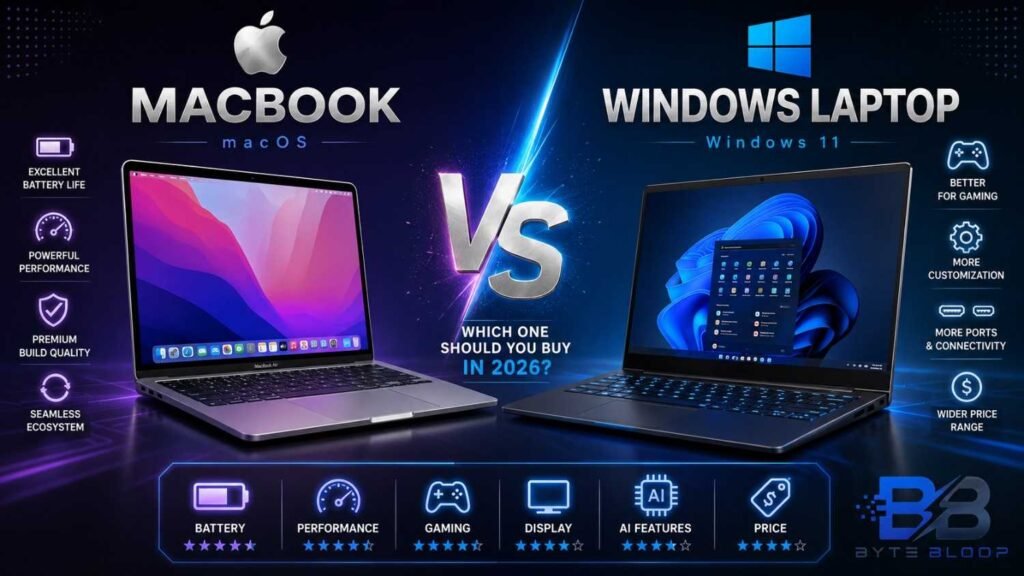
Choosing between a MacBook and a Windows laptop is one of the most important decisions for students, professionals, developers, gamers, and content creators. Both platforms have improved significantly over the years, offering faster processors, AI-powered features, premium displays, and impressive battery life.
MacBooks are well known for their seamless integration with the Apple ecosystem, outstanding battery efficiency, and premium design. Windows laptops, on the other hand, provide greater flexibility, more hardware choices, dedicated gaming machines, and options for almost every budget.
If you’re planning to buy a new laptop in 2026, this detailed comparison will help you understand the strengths and weaknesses of both platforms so you can make the right decision.
MacBook vs Windows Laptop: Quick Overview
Before diving into the detailed comparison, here’s a simple overview of how both platforms differ.
Choose a MacBook if you:
- Already use an iPhone, iPad, or other Apple devices.
- Need exceptional battery life.
- Edit videos or photos professionally.
- Prefer a clean and simple user experience.
- Want long software support.
Choose a Windows Laptop if you:
- Play PC games regularly.
- Need engineering or CAD software.
- Want more hardware options.
- Have a limited budget.
- Prefer upgrading RAM or storage in the future.
MacBook Overview
MacBooks are Apple’s premium laptop lineup powered by Apple Silicon processors. They are designed to deliver high performance while maintaining excellent battery life and quiet operation.
MacBooks are widely used by:
- Students
- Developers
- Video Editors
- Graphic Designers
- Business Professionals
- Content Creators
Why Choose a MacBook?
- Premium aluminum design
- Outstanding battery life
- Quiet fanless operation on many models
- Beautiful Retina display
- Long software support
- Excellent Apple ecosystem integration
Windows Laptop Overview
Windows laptops are manufactured by several companies, including Dell, HP, Lenovo, ASUS, Acer, MSI, Samsung, and Microsoft.
Because multiple manufacturers compete in the market, Windows laptops are available across almost every price segment.
Why Choose a Windows Laptop?
- Huge variety of models
- Budget-friendly options
- Powerful gaming laptops
- Easy hardware upgrades
- More connectivity ports
- Excellent software compatibility
Price Comparison
Price is one of the biggest differences between the two platforms.
MacBooks are generally positioned in the premium segment with fewer budget-friendly options.
Windows laptops are available in every category, from affordable entry-level devices to premium ultrabooks and high-performance gaming machines.
Winner
🏆 Windows Laptop
If budget and flexibility are important, Windows offers significantly more choices.
Design & Build Quality
MacBook
Apple is known for producing laptops with premium aluminum construction, minimalist aesthetics, and excellent durability.
Highlights
- Slim and lightweight
- Premium metal chassis
- Excellent build quality
- Comfortable keyboard
- Large precision trackpad
Windows Laptop
Design quality depends on the manufacturer and price category.
Premium Windows laptops from Dell, ASUS, Lenovo, HP, and Microsoft can compete directly with MacBooks, while budget models may use plastic construction.
Highlights
- Wide variety of designs
- Foldable and 2-in-1 options
- Touchscreen availability
- Gaming-focused designs
- Business-focused ultrabooks
Winner
🏆 MacBook
Apple delivers one of the most consistent premium laptop designs available today.
Display Comparison
Both MacBook and Windows laptops offer excellent displays, but they target different users.
MacBook Strengths
- Retina display
- Excellent color accuracy
- Mini-LED technology on supported models
- HDR support
- Great brightness
Windows Laptop Strengths
- OLED displays
- Touchscreen options
- Higher refresh rates
- Wider model selection
- Larger variety of screen sizes
Winner
🏆 Windows Laptop
Windows laptops provide far more display choices, including OLED, touchscreen, and high-refresh-rate panels.
Performance
Both platforms deliver flagship-level performance.
MacBook Performs Best For
- Video editing
- Programming
- Graphic design
- Music production
- AI-powered creative workflows
Windows Laptop Performs Best For
- Gaming
- Engineering software
- CAD applications
- 3D rendering
- Machine learning development
Winner
🏆 Tie
The better choice depends on your workflow rather than raw performance alone.
Battery Life
Battery efficiency remains one of Apple’s biggest strengths.
MacBooks consistently offer some of the longest battery life available in premium laptops thanks to Apple Silicon processors.
Windows battery life has improved significantly, but it varies depending on the manufacturer, processor, and graphics hardware.
Winner
🏆 MacBook
For users who work while traveling or attend long classes and meetings, MacBooks usually provide better real-world battery life.
Gaming Performance
Gaming is an area where Windows laptops continue to dominate.
Choose MacBook if you:
- Play casual games.
- Focus mainly on productivity.
- Don’t require AAA gaming.
Choose Windows Laptop if you:
- Play competitive games.
- Want RTX graphics.
- Need high frame rates.
- Use VR headsets.
- Stream games professionally.
Winner
🏆 Windows Laptop
Windows remains the best platform for PC gaming.
Software Experience
Choose macOS if you prefer:
- Simple interface
- Stable performance
- Seamless updates
- Apple ecosystem integration
Choose Windows if you prefer:
- Better compatibility
- More customization
- Wider software support
- Greater hardware flexibility
Winner
🏆 Tie
macOS focuses on simplicity, while Windows provides greater flexibility.
AI Features
Artificial Intelligence has become an important part of both operating systems.
MacBook AI Features
- Apple Intelligence
- Writing Tools
- Image Playground
- Smarter Siri
- AI-powered productivity features
Windows AI Features
- Microsoft Copilot
- AI Image Creator
- Live Captions
- Recall (supported devices)
- AI-powered productivity tools
Winner
🏆 Tie
Both companies are investing heavily in AI-powered experiences.
Ports & Connectivity
MacBooks now rely heavily on USB-C connectivity, while Windows laptops typically provide a wider range of built-in ports.
MacBook
- USB-C / Thunderbolt
- MagSafe charging (supported models)
- HDMI on selected models
Windows Laptop
- USB-A
- USB-C
- HDMI
- Ethernet (many models)
- SD Card Reader
- Audio Jack
Winner
🏆 Windows Laptop
Windows laptops offer greater flexibility without requiring multiple adapters.
Upgradeability
MacBook
Most MacBook models cannot be upgraded after purchase, so RAM and storage should be chosen carefully.
Windows Laptop
Many Windows laptops allow users to upgrade RAM and SSD storage later, extending the lifespan of the device.
Winner
🏆 Windows Laptop
Upgradeability gives Windows laptops a significant long-term advantage.
Security
Both platforms include advanced security technologies.
MacBook Security
- FileVault encryption
- Touch ID
- Secure Enclave
- Gatekeeper
Windows Security
- Windows Hello
- BitLocker
- TPM
- Microsoft Defender
Winner
🏆 Tie
Both operating systems provide strong security features for personal and professional users.
Pros & Cons
MacBook Pros
- Premium build quality
- Excellent battery life
- Outstanding performance
- High-quality display
- Long software support
- Seamless Apple ecosystem
MacBook Cons
- Premium pricing
- Limited gaming support
- No hardware upgrades after purchase
Windows Laptop Pros
- Available at every budget
- Excellent gaming performance
- Hardware upgrade options
- Wide range of models
- Better port selection
Windows Laptop Cons
- Battery life varies by model
- Build quality depends on manufacturer
Which Laptop Should You Buy?
Buy a MacBook if you:
- Already own Apple devices.
- Need long battery life.
- Edit videos or photos professionally.
- Prefer a polished and simple operating system.
Buy a Windows Laptop if you:
- Play games.
- Use engineering or CAD software.
- Want more hardware options.
- Have a limited budget.
- Plan to upgrade RAM or storage later.
Frequently Asked Questions
Is MacBook better than Windows?
It depends on your needs. MacBooks excel in battery life, software optimization, and ecosystem integration, while Windows laptops offer greater flexibility, gaming support, and a wider range of hardware choices.
Which laptop is best for students?
Budget-conscious students often prefer Windows laptops, while students already using Apple devices may find a MacBook more convenient.
Which laptop is better for gaming?
Windows laptops are the clear winner because they support dedicated graphics cards and a much larger gaming library.
Which laptop is better for coding?
Both platforms are excellent for programming. The right choice depends on your preferred development tools and operating system.
Which laptop offers better value for money?
Windows laptops generally provide more choices across different price segments, making them the better value for most buyers.
Final Verdict
MacBook and Windows laptops are both excellent choices in 2026, but they are designed for different types of users.
Choose a MacBook if you value premium build quality, exceptional battery life, a polished software experience, and seamless integration with the Apple ecosystem.
Choose a Windows laptop if you need gaming performance, hardware flexibility, better upgrade options, or a device that fits a wider range of budgets.
Rather than asking which platform is universally better, focus on the one that best matches your daily workflow, software requirements, and long-term needs.

vidIQ
