AWS Development: Explained
Introduction
Amazon Web Services (AWS) has become the backbone of modern cloud computing, offering a vast array of services that enable developers to build, deploy, and scale applications with unprecedented flexibility. For many, the promise of AWS is alluring, but the sheer breadth of options can feel overwhelming. AWS development refers to the end‑to‑end process of creating cloud‑native applications—from designing architecture and writing code to automating deployment pipelines and ensuring security compliance—all within the AWS ecosystem. Understanding the core components of AWS development is essential for developers who want to leverage the platform’s full potential, reduce operational overhead, and accelerate time‑to‑market.
At its heart, AWS development is about treating infrastructure as code, integrating continuous integration/continuous deployment (CI/CD) workflows, and adopting serverless or containerized patterns where appropriate. By embracing these practices, teams can achieve faster iteration cycles, lower costs, and higher resilience. This guide walks you through the foundational concepts, popular tools, and practical steps that make AWS development efficient and scalable.
Core Concepts of AWS Development
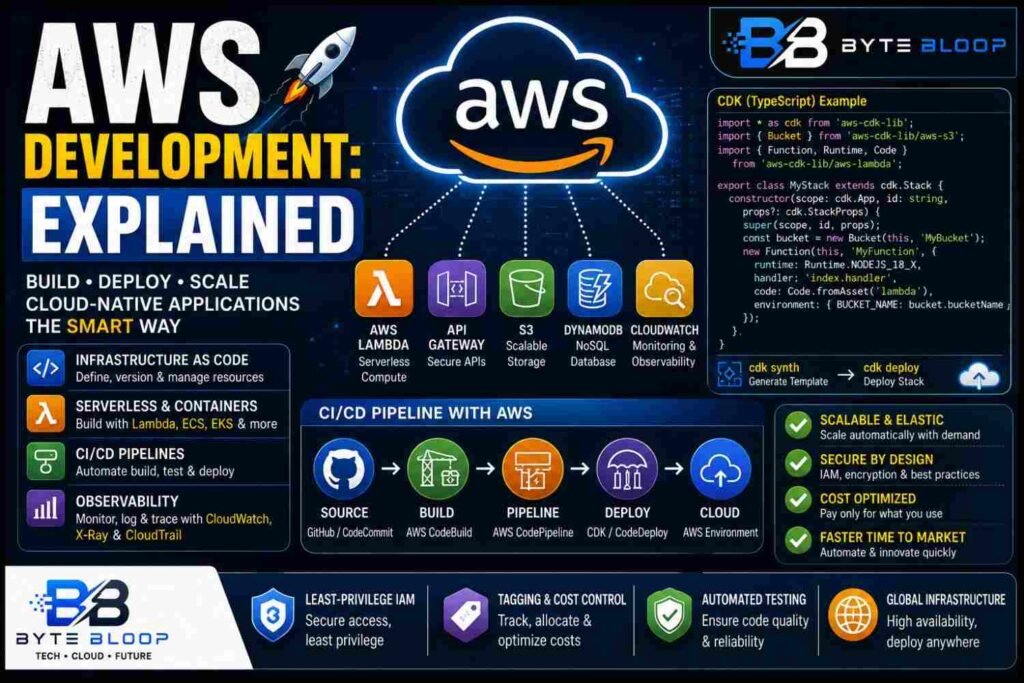
1. Infrastructure as Code (IaC): Defining resources in code rather than manual console operations. IaC promotes reproducibility, version control, and auditability.
2. Serverless & Containerization: Leveraging services like AWS Lambda, API Gateway, and Amazon ECS/EKS to run code without managing servers.
3. CI/CD Pipelines: Automating build, test, and deployment stages with tools such as AWS CodePipeline, CodeBuild, and third‑party services.
4. Observability: Using CloudWatch, X-Ray, and CloudTrail to monitor performance, troubleshoot, and maintain compliance.
Choosing the Right Development Framework
While you can interact with AWS services directly via the SDKs, most developers prefer higher‑level frameworks that abstract complexity. The AWS Cloud Development Kit (CDK) is a popular choice. According to the official AWS CDK page, it is an open‑source framework that allows you to model and provision cloud resources using familiar programming languages such as TypeScript, JavaScript, Python, Java, and C#/.NET.
Example: A simple CDK stack in TypeScript that creates an S3 bucket and a Lambda function.
import * as cdk from 'aws-cdk-lib';
import { Bucket } from 'aws-cdk-lib/aws-s3';
import { Function, Runtime, Code } from 'aws-cdk-lib/aws-lambda';

export class MyStack extends cdk.Stack {
  constructor(scope: cdk.App, id: string, props?: cdk.StackProps) {
    super(scope, id, props);
    const bucket = new Bucket(this, 'MyBucket');
    new Function(this, 'MyFunction', {
      runtime: Runtime.NODEJS_18_X,
      handler: 'index.handler',
      code: Code.fromAsset('lambda'),
      environment: { BUCKET_NAME: bucket.bucketName }
    });
  }
}
Running cdk synth generates a CloudFormation template, while cdk deploy provisions the stack. This workflow demonstrates how code becomes the single source of truth for both application logic and infrastructure.
Building CI/CD Pipelines with AWS Tools
Once your code and IaC are ready, the next step is automation. AWS CodePipeline orchestrates the stages, CodeBuild compiles and tests, and CodeDeploy or CDK handles the actual deployment. A typical pipeline might look like:
- Source: GitHub or CodeCommit trigger.
- Build: CodeBuild runs unit tests and packages the application.
- Deploy: CDK deploys the stack to a target environment.
Integrating security scans, linting, and performance checks within the pipeline further strengthens the development lifecycle.
Common Pitfalls and How to Avoid Them
- Over‑provisioning Resources: Deploying large EC2 instances or excessive Lambda concurrency can inflate costs. Use autoscaling and provisioned concurrency wisely.
- Ignoring IAM Best Practices: Granting broad permissions can lead to security risks. Adopt the principle of least privilege and use role policies.
- Neglecting Observability: Without proper logging and metrics, debugging becomes a nightmare. Enable CloudWatch Logs and X‑Ray tracing from the start.
Best Practices for AWS Development
- Use IaC to keep infrastructure reproducible.
- Adopt serverless where latency and scaling are critical.
- Implement automated tests in the CI pipeline.
- Apply tagging and naming conventions for cost allocation.
- Regularly review and rotate credentials.
Key Takeaways
- Treat infrastructure as code for reproducibility
- Use CDK to write cloud resources in familiar languages
- Automate CI/CD with CodePipeline and CodeBuild
- Prioritize security with least‑privilege IAM
- Leverage serverless for scalable, low‑ops workloads
Frequently Asked Questions
What is AWS development explained?
AWS development refers to the complete process of designing, coding, deploying, and managing cloud applications using AWS services, often with infrastructure as code and automated pipelines.
What are the key features of AWS CDK?
AWS CDK lets developers define cloud infrastructure using standard programming languages, generates CloudFormation templates, and supports multiple languages like TypeScript, Python, Java, and C#.
What are the best use cases for serverless on AWS?
Serverless is ideal for event‑driven workloads, microservices, and APIs that require rapid scaling without server management, such as Lambda with API Gateway or Fargate tasks.
What are the pros and cons of using AWS CodePipeline?
Pros include seamless integration with AWS services, visual pipeline management, and built‑in security. Cons can be limited customization compared to third‑party tools and potential cost overhead for complex pipelines.
Conclusion
Based on the available information and industry analysis, AWS development provides a robust, scalable framework that empowers developers to build cloud‑native applications efficiently. By embracing infrastructure as code, automated CI/CD pipelines, and serverless patterns, teams can reduce operational overhead, accelerate delivery, and maintain high security standards across their deployments.
Related Reading
- Getting Started with AWS Lambda
- Mastering AWS IAM for Secure Development
Sources & References
- AWS Cloud Development Kit
- What is the AWS CDK?
- Welcome to AWS Documentation
- The Ultimate Guide To AWS DevOps As A Service (2026)
- The Ultimate AWS Roadmap for Beginners to Become …
- AWS Developer Associate Syllabus: Here’s What’s Actually …
- What is AWS? Amazon Web Services Explained (2026)
- AWS Developer Tools