Accounting Software Explained: 10 Key Features, Benefits & How It Works in 2026
Introduction
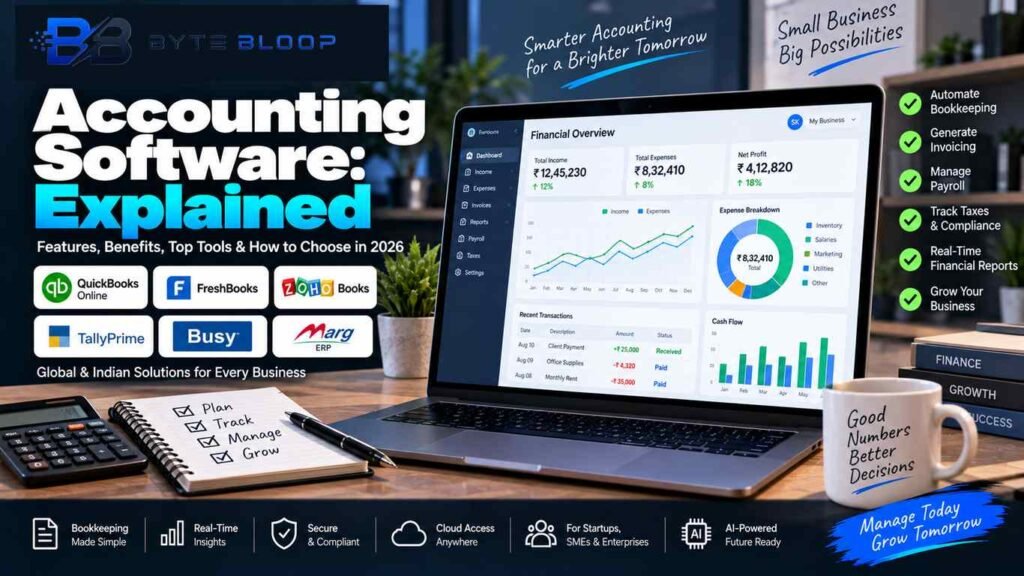
Accounting software explained in simple terms, it is a digital system that helps businesses record, organize, manage, and report financial transactions. Instead of maintaining every transaction manually in spreadsheets or paper records, businesses can use accounting software to centralize invoices, expenses, payments, bank transactions, reports, and other financial information.
Modern accounting platforms can support businesses of different sizes, from freelancers and small businesses to growing companies with multiple departments, locations, or users. Depending on the software, features can include invoicing, expense tracking, bank reconciliation, financial reporting, inventory, payroll, tax-related workflows, and integrations with other business systems.
Automation is another important part of modern accounting software. Automating repetitive financial tasks can reduce manual work and help businesses maintain more consistent records. It does not remove the need for proper accounting controls, review, or professional advice, but it can make everyday financial management more organized.
In this accounting software explained guide, we will cover the main features, benefits, automation, software selection, implementation, security, future trends, and examples of widely used accounting platforms.
What Is Accounting Software?
Accounting software is an application designed to help businesses manage financial records and accounting-related workflows.
A typical system can store information about sales, purchases, expenses, customers, suppliers, payments, and other transactions. More advanced platforms can also connect accounting data with banking, inventory, payroll, e-commerce, payment, and reporting systems.
The exact capabilities vary from one product to another. Some platforms focus mainly on invoicing and small-business bookkeeping, while others combine accounting with inventory management, tax workflows, or broader business-management functionality.
Core Functions of Accounting Software
Modern accounting platforms can combine many financial tasks inside one system.
Bookkeeping and General Ledger
Accounting software can record financial transactions and organize them into accounts and ledgers.
Depending on the platform, businesses may be able to manage:
- Sales transactions
- Purchase transactions
- Expense records
- Journal entries
- Customer balances
- Supplier balances
- Account reconciliation
- General ledger information
Keeping these records in one system can make it easier to review financial activity and prepare reports.
Invoicing and Accounts Receivable
Invoicing tools help businesses create and track invoices sent to customers.
Common capabilities can include:
- Invoice creation
- Custom invoice templates
- Payment reminders
- Recurring invoices
- Payment tracking
- Customer records
- Invoice status monitoring
QuickBooks, for example, provides invoicing, expense tracking, bank feeds, reporting, and other small-business accounting features.
Accounts Payable
Accounts payable tools help businesses manage amounts they owe to suppliers and service providers.
Depending on the software, businesses may be able to:
- Record bills
- Track due dates
- Manage vendors
- Monitor outstanding balances
- Schedule payments
- Match bills with payments
These workflows can help businesses keep better track of upcoming financial obligations.
Expense Tracking
Expense management allows businesses to record and categorize spending.
Some systems also provide receipt capture, transaction imports, bank connections, or automated categorization.
For example, QuickBooks provides expense tracking and receipt organization, while FreshBooks includes expense management and other small-business accounting functions.
Financial Reporting
Accounting software can generate reports that help businesses understand their financial position.
Common reports include:
- Profit and loss
- Balance sheet
- Cash flow
- Trial balance
- Accounts receivable
- Accounts payable
- Expense reports
- Sales reports
FreshBooks, for example, provides financial reports such as Profit and Loss, Balance Sheet, and Trial Balance reports.
Tax and GST Workflows
Some accounting platforms provide tools for tax-related calculations, records, reporting, and compliance workflows.
For businesses operating in India, GST-related capabilities may include GST invoices, tax calculations, HSN/SAC information, reconciliation, return preparation, e-invoicing, and e-way bill workflows, depending on the product.
TallyPrime provides tools for configuring GST details and managing related invoicing workflows, while BUSY provides GST accounting, billing, inventory, e-invoicing, e-way bill, and reporting functionality.
Businesses should still verify their specific tax and compliance requirements with qualified professionals or official government resources.
Why Automation Matters
Manual financial data entry can become difficult as transaction volumes increase.
Accounting automation can help by reducing repetitive tasks such as entering invoices, categorizing transactions, sending reminders, importing bank data, and generating recurring reports.
Automation may provide benefits such as:
- Less repetitive manual work
- More consistent data entry
- Faster access to financial information
- Easier transaction tracking
- More organized records
- Better visibility into outstanding payments
However, automation does not guarantee that every accounting record will be correct. Businesses should still review important transactions, reconcile accounts, maintain appropriate controls, and investigate unusual entries.
Choosing Accounting Software: A Step-by-Step Approach
The right software depends on business size, industry, transaction volume, budget, accounting requirements, and existing tools.
1. Identify Your Business Requirements
Start by identifying what the business actually needs.
Consider whether you need:
- Basic bookkeeping
- Invoicing
- Inventory management
- Payroll
- GST support
- Multi-currency accounting
- Multiple users
- Project billing
- E-commerce integration
- Mobile access
- Advanced reporting
A freelancer and a manufacturer may require very different accounting workflows.
2. Map Essential Features
Create a list of the features that are essential rather than selecting software based only on popularity.
For example, a retail business may need inventory and point-of-sale integration, while a consulting business may place more emphasis on invoicing, expenses, project billing, and time tracking.
3. Compare Pricing
Accounting software may use monthly, annual, per-user, or tiered pricing models.
When comparing plans, look beyond the base subscription price.
Check:
- User limits
- Payroll costs
- Inventory features
- Payment processing fees
- Premium integrations
- Data migration costs
- Support plans
- Additional reporting features
Pricing can also change over time, so verify current pricing directly with the vendor before purchasing.
4. Test the Software
A trial or demo can help you understand whether the platform fits your workflow.
Test tasks such as:
- Creating an invoice
- Recording an expense
- Connecting a bank account
- Generating a financial report
- Importing existing data
- Managing users
- Exporting records
A feature list alone does not always show how easy a system is to use for your particular business.
5. Check Security and Compliance
Financial information is sensitive, so security should be part of the selection process.
Review:
- User permissions
- Multi-factor authentication
- Backup systems
- Data encryption
- Activity logs
- Account recovery
- Data export options
- Vendor security documentation
For businesses in India, also verify whether the selected product supports the GST and invoicing workflows that your business actually requires.
Accounting Software Examples for 2026
There are many accounting platforms available, and their capabilities vary by region and subscription plan.
QuickBooks Online
QuickBooks provides features including invoicing, expense tracking, bank feeds, financial reports, inventory-related tools, multi-currency support, mobile access, and integrations. Exact features can depend on the plan and region.
Official website:
https://quickbooks.intuit.com/
FreshBooks
FreshBooks focuses on small-business accounting workflows and provides tools for invoicing, payments, expenses, reports, time tracking, projects, payroll-related capabilities, and integrations.
Official website:
https://www.freshbooks.com/accounting
Zoho Books
Zoho Books provides accounting functionality covering areas such as transactions, expenses, bills, payments, banking, journals, reporting, automation, user roles, and data management.
Official website:
https://www.zoho.com/books/
TallyPrime
TallyPrime is widely used in India and provides accounting and GST-related workflows. Its documentation includes GST configuration, HSN/SAC settings, GST reporting, and related business processes.
Official website:
https://tallysolutions.com/
BUSY
BUSY provides accounting, GST billing, inventory, bank reconciliation, reporting, e-invoicing, and e-way bill-related workflows for Indian businesses.
Official website:
https://busy.in/
Marg ERP
Marg ERP provides accounting, billing, inventory, GST, e-invoicing, and business-management functionality, with particular offerings for Indian retail, distribution, pharmaceutical, and FMCG businesses.
Official website:
https://margcompusoft.com/
The examples above are not a universal ranking. The appropriate platform depends on the organization’s requirements, location, accounting processes, budget, integrations, and compliance needs.
Cloud Accounting vs Desktop Accounting
Accounting software can be delivered through different deployment models.
Cloud Accounting
Cloud-based accounting software is accessed through the internet and is generally designed to allow users to work from supported devices.
Potential advantages include:
- Remote access
- Automatic updates
- Easier collaboration
- Centralized data
- Browser-based workflows
Desktop Accounting
Desktop accounting software is installed locally on a computer or internal network.
Potential advantages can include:
- Local control
- Offline workflows
- Existing hardware integration
- Familiar desktop environments
The right model depends on the business’s infrastructure, connectivity, security requirements, collaboration needs, and IT processes.
Implementation Best Practices
Selecting accounting software is only the first step.
Data Migration
Before importing financial records, clean and validate the source data.
Review:
- Customer records
- Supplier records
- Opening balances
- Chart of accounts
- Outstanding invoices
- Expense categories
- Inventory information
Poor-quality migration data can create problems after the new system is deployed.
User Training
Different users may need different levels of access and training.
For example, sales staff may mainly work with invoices, while accountants may need access to journals, reconciliation, tax settings, and financial reports.
Ongoing Support
Choose a vendor with documentation and support options that fit your organization.
Regular updates and clear support procedures can make software maintenance easier.
Integrations
Accounting software increasingly connects with other business systems.
Common integrations can include:
- Banking platforms
- Payment gateways
- E-commerce stores
- Payroll systems
- CRM platforms
- Inventory systems
- Expense tools
- Business analytics platforms
Integrations can reduce duplicate data entry and help different parts of a business share information.
However, businesses should review permissions, data-sharing settings, and security before connecting financial software to external services.
Accounting Software Security
Financial software contains sensitive business information, so security should be treated as an important part of implementation.
Businesses should consider:
- Strong passwords
- Multi-factor authentication
- Role-based access
- Regular backups
- Secure devices
- Software updates
- Access reviews
- Audit logs
- Data retention policies
Users should also avoid sharing accounting credentials and should remove access for former employees or external users when it is no longer required.
No software platform can eliminate every security risk, so security also depends on user behavior, configuration, infrastructure, and organizational controls.
Future Trends in Accounting Software
Artificial intelligence and automation are becoming increasingly important areas in business software.
Possible developments include:
- Automated transaction classification
- Intelligent invoice processing
- Anomaly detection
- Cash-flow forecasting
- Natural-language reporting
- Automated reminders
- Smarter reconciliation
- AI-assisted financial analysis
The exact capabilities available to businesses will depend on the software provider, subscription plan, location, and connected services.
AI can assist accounting workflows, but important financial decisions and compliance activities may still require human review and professional oversight.
Benefits of Accounting Software
Accounting software can offer several practical benefits for businesses.
Faster Financial Workflows
Automation can reduce repetitive data-entry tasks and make common financial workflows faster.
Better Financial Visibility
Centralized records and dashboards can make it easier to review sales, expenses, outstanding invoices, and other financial information.
Easier Reporting
Automated reports can save time compared with preparing financial statements manually from multiple spreadsheets.
Improved Organization
A centralized system can make it easier to search, categorize, and review financial transactions.
Scalability
Businesses can choose platforms with additional users, integrations, reporting, inventory, or other capabilities as their operational needs change.
Limitations of Accounting Software
Accounting software is useful, but it also has limitations.
Learning Curve
More advanced systems may require training and configuration.
Subscription Costs
Cloud accounting platforms often use recurring subscriptions, which should be included in the long-term software budget.
Migration Effort
Moving from spreadsheets or an older system can require data cleaning and validation.
Configuration Problems
Incorrect tax settings, account mappings, permissions, or integrations can create inaccurate results.
Dependence on Technology
Cloud platforms depend on internet access and vendor availability, while desktop systems depend on local hardware and backup procedures.
Who Should Use Accounting Software?
Accounting software can be useful for:
- Freelancers
- Small businesses
- Retailers
- Service companies
- E-commerce businesses
- Manufacturers
- Professional firms
- Growing companies
- Multi-user finance teams
The ideal feature set will vary depending on the business model and financial processes.
For more technology and software guides, explore the ByteBloop Software Guides section:
Who May Not Need Advanced Accounting Software?
Not every organization needs a large accounting platform.
A freelancer with a small number of monthly transactions may only need basic invoicing and bookkeeping tools.
A larger organization with inventory, payroll, multiple locations, tax requirements, and complex reporting may need a more comprehensive platform.
The goal should be to choose software that fits the business rather than paying for features that are not required.
Frequently Asked Questions
What is accounting software?
Accounting software is a digital system used to record, organize, manage, and report financial transactions.
What does accounting software do?
Depending on the platform, it can support bookkeeping, invoicing, expenses, accounts payable and receivable, reporting, banking, inventory, payroll, tax workflows, and integrations.
What are the benefits of accounting software?
Common benefits include reduced repetitive work, better financial organization, faster reporting, centralized information, and improved visibility into business finances.
Is accounting software difficult to use?
Simple accounting software can be relatively easy to learn, while advanced platforms may require more setup and training.
Can accounting software handle GST in India?
Some accounting platforms provide GST-related features such as GST invoices, tax settings, reporting, reconciliation, e-invoicing, and e-way bill workflows. Availability depends on the specific software and plan. TallyPrime and BUSY, for example, document GST-related functionality for Indian businesses.
Is cloud accounting better than desktop accounting?
Neither model is automatically right for every business. Cloud accounting can offer remote access and centralized updates, while desktop accounting may suit organizations that prefer local systems or offline workflows.
Can accounting software replace an accountant?
Accounting software can automate many tasks, but it does not automatically replace professional accounting judgment, financial review, tax advice, or compliance responsibility.
Does accounting software provide real-time financial information?
Many modern platforms can provide updated dashboards and reports based on available transaction data. The accuracy and timing depend on data entry, bank connections, integrations, reconciliation, and the software itself.
Which accounting software is best?
There is no single accounting platform that is best for every business. The appropriate choice depends on features, location, industry, users, integrations, budget, and accounting requirements.
Is accounting software secure?
Reputable accounting platforms generally provide security controls, but users must also configure permissions, authentication, backups, and access policies correctly.
Can accounting software integrate with e-commerce?
Many platforms provide integrations or APIs for e-commerce, payments, inventory, CRM, payroll, and other business systems. The exact integration options vary by product.
Can AI be used in accounting software?
Yes. AI can be used for tasks such as automation, transaction classification, document processing, anomaly detection, forecasting, and natural-language analysis, depending on the software provider and plan.
Key Takeaways
- Accounting software helps businesses record, organize, and report financial transactions.
- Common features include bookkeeping, invoicing, expenses, accounts payable, accounts receivable, reporting, and tax-related workflows.
- Automation can reduce repetitive manual work and improve financial organization.
- GST and tax features vary between software products and regions.
- Cloud and desktop accounting systems have different advantages and requirements.
- Software selection should be based on business needs rather than popularity alone.
- Data migration, user training, security, and integrations are important parts of implementation.
- AI is becoming a growing part of accounting automation and financial analysis.
- Accounting software can support financial management, but important accounting and compliance decisions may still require professional review.
Conclusion
Accounting software explained simply is a digital platform that helps businesses manage financial records, transactions, reports, and related workflows.
Modern accounting platforms can combine bookkeeping, invoicing, expenses, banking, reporting, inventory, tax workflows, and integrations in one system. Automation can reduce repetitive work and help businesses access financial information more efficiently.
At the same time, accounting software is not a complete substitute for good financial controls or professional accounting judgment. Businesses still need accurate data, proper configuration, regular reconciliation, secure access, and appropriate compliance processes.
The right accounting software depends on the company’s size, industry, location, budget, transaction volume, integrations, and reporting requirements. Taking the time to compare those requirements can make implementation easier and help the business choose a system that can support its future growth.
Related Reading
ByteBloop Software Guides
https://bytebloop.com/category/software/
Laravel Explained: Features, MVC, AI SDK and How It Works in 2026
https://bytebloop.com/laravel-explained/
Sources & References
QuickBooks — Accounting Software Features
https://quickbooks.intuit.com/global/features/
FreshBooks — Accounting Software
https://www.freshbooks.com/accounting
Zoho Books — Product Documentation
https://www.zoho.com/in/books/help/getting-started/zoho-books.html
TallyPrime — GST Setup
https://help.tallysolutions.com/setting-up-gst-in-tallyprime/
BUSY — Accounting & GST Software
https://busy.in/
Marg ERP — Accounting Software
https://margcompusoft.com/accounting-software.html