Video Editing Apps: Explained
Introduction
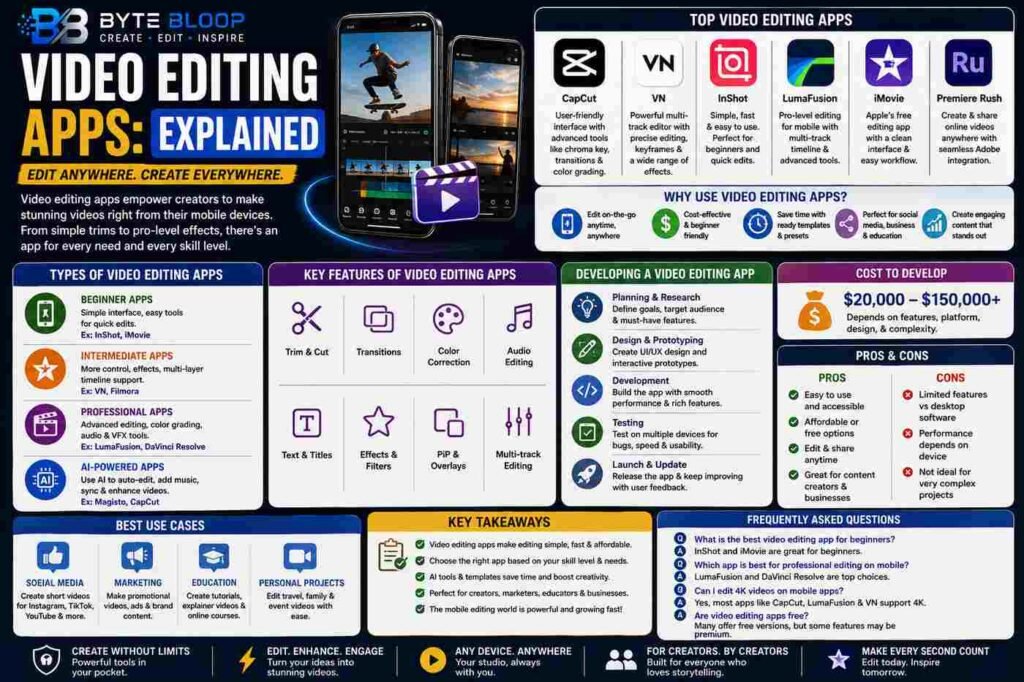
Video editing apps have become an essential tool for content creators, allowing them to produce high-quality videos on-the-go. With the rise of social media, the demand for engaging and visually appealing videos has increased, making video editing apps a must-have for many users. These apps offer a range of features, from basic trimming and cutting to advanced color correction and audio editing. Some popular video editing apps include CapCut, VN, InShot, and LumaFusion, each with its unique features and strengths. For instance, CapCut is known for its user-friendly interface and advanced features like chroma keying and color grading. On the other hand, InShot is popular for its simplicity and ease of use, making it a great option for beginners. The development of video editing apps has also become a significant area of interest, with many companies investing in creating their own video editing apps.
The process of developing a video editing app involves several steps, including planning, designing, and testing. The cost of developing a video editing app can vary greatly, ranging from $20,000 to $150,000, depending on the features and complexity of the app. Some video editing apps, like Magisto, use AI-powered technology to make the editing process faster and easier. These apps can automatically edit videos, add music, and even sync audio with the video. Moreover, many video editing apps offer a range of templates and presets, making it easy for users to create professional-looking videos without requiring extensive editing experience.
Types of Video Editing Apps
There are several types of video editing apps available, each catering to different needs and skill levels. Some apps, like iMovie and Adobe Premiere Rush, are designed for beginners and offer a simple and intuitive interface. Others, like DaVinci Resolve and Wondershare Filmora, are more advanced and offer a range of features like color correction, audio editing, and visual effects. Additionally, some apps, like Filmm, specialize in specific areas like color grading and filter effects.
Features of Video Editing Apps
Video editing apps offer a range of features that make it easy to create and edit videos. Some common features include trimming and cutting, color correction, audio editing, and visual effects. Many apps also offer advanced features like chroma keying, color grading, and multi-track editing. Furthermore, some apps allow users to add music, transitions, and other effects to their videos, making it easy to create professional-looking videos.
Benefits of Video Editing Apps
Video editing apps offer several benefits, including convenience, ease of use, and cost-effectiveness. These apps allow users to edit videos on-the-go, without requiring a computer or expensive editing software. Many video editing apps are also free or low-cost, making them an affordable option for individuals and businesses. Moreover, video editing apps can help users create high-quality videos, which can be used for a range of purposes, including social media, marketing, and education.
Key Takeaways
- Video editing apps offer a range of features, from basic trimming and cutting to advanced color correction and audio editing.
- The cost of developing a video editing app can vary greatly, depending on the features and complexity of the app.
- Some video editing apps use AI-powered technology to make the editing process faster and easier.
- Many video editing apps offer a range of templates and presets, making it easy for users to create professional-looking videos.
- Video editing apps can help users create high-quality videos, which can be used for a range of purposes, including social media, marketing, and education.
Frequently Asked Questions
What is a video editing app?
A video editing app is a software application that allows users to edit and manipulate video footage on a mobile device.
What are the key features of video editing apps?
Common features include trimming and cutting, color correction, audio editing, and visual effects.
What are the best use cases for video editing apps?
Video editing apps can be used for a range of purposes, including social media, marketing, education, and personal projects.
What are the pros and cons of using video editing apps?
Pros include convenience, ease of use, and cost-effectiveness, while cons include limited features and functionality compared to desktop editing software.
Conclusion
Based on the available information and industry analysis, video editing apps provide a convenient and cost-effective way for users to create and edit high-quality videos on-the-go, making them an essential tool for content creators and businesses alike.
Related Reading
- The Best Mobile Video Editing Apps for 2026