PDF Apps: Explained
Introduction
PDF apps have become indispensable tools for professionals, students, and casual users alike. They let you view, edit, annotate, and share documents on the go, turning a simple smartphone into a portable office. In 2026, the market has expanded beyond basic readers to include AI‑powered summarizers, voice‑to‑text converters, and cloud‑sync capabilities that streamline workflows across devices. These apps are built on robust frameworks—often leveraging native iOS and Android SDKs—to deliver smooth performance and secure data handling. Understanding what makes a PDF app effective involves looking at its core functions, integration options, and user experience design. Whether you need to sign contracts, study lecture notes, or manage a large file library, the right PDF app can save time and reduce paper waste. This guide explains the essential features, compares popular options, and offers practical tips for choosing the best app for your needs.
Core Functions of Modern PDF Apps
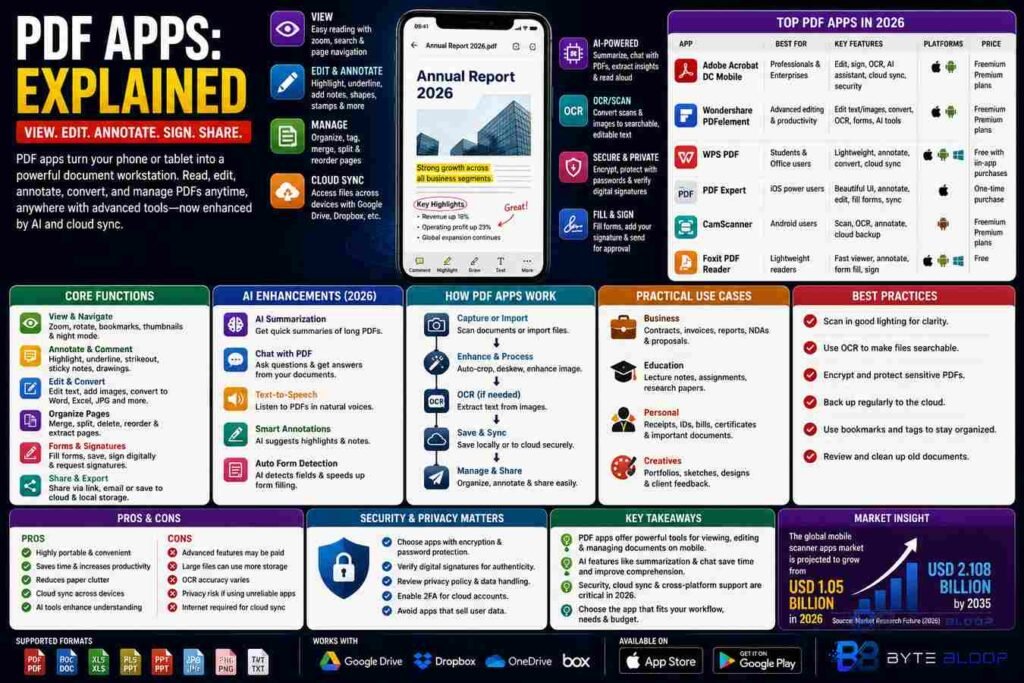
At their heart, PDF apps perform three primary tasks: viewing, editing, and managing documents. Most readers support zoom, page navigation, and text search. Editing capabilities range from simple annotations—highlighting, underlining, and adding sticky notes—to full document manipulation such as merging, splitting, and reordering pages. Management features include folder organization, tagging, and cloud integration with services like Google Drive, Dropbox, and OneDrive. Advanced apps also offer OCR (optical character recognition) to convert scanned images into searchable text, and form filling tools that capture data into PDF fields.
AI Enhancements in 2026
Artificial intelligence has transformed PDF apps into smart assistants. One popular example is the AI‑powered PDF Reader that can summarize long documents, answer questions through a chat interface, and even read PDFs aloud using text‑to‑speech. These features reduce cognitive load and allow users to extract key insights quickly. AI can also auto‑detect form fields, suggest annotations, and provide predictive text when filling out forms. Developers integrate machine learning models via cloud APIs or on‑device inference, ensuring privacy while delivering real‑time assistance.
Cross‑Platform Compatibility and Security
Security is a top concern when handling sensitive documents. Modern PDF apps implement end‑to‑end encryption, password protection, and digital signature verification. Many apps also support secure cloud storage with two‑factor authentication. Cross‑platform compatibility ensures that a file opened on an iPhone can be edited on an Android tablet without data loss. Developers use platform‑agnostic libraries like PDFKit for iOS and AndroidX for Android to maintain feature parity and consistent performance.
Choosing the Right PDF App for Your Workflow
When evaluating PDF apps, consider the following criteria:
- Feature Set: Does the app offer the editing tools you need?
- Performance: Can it handle large PDFs without lag?
- Integration: Does it sync with your preferred cloud services?
- Security: Are encryption and digital signatures supported?
- Cost: Is the price justified by the features?
For light users, free readers like the “PDF App for Android” provide essential viewing and annotation. Professionals may prefer paid suites such as Adobe Acrobat DC Mobile, which combine advanced editing, cloud collaboration, and enterprise‑grade security. Students often benefit from apps that support bulk annotation and note‑taking, while designers may need tools that preserve vector graphics and allow precise layout adjustments.
Practical Tips for Maximizing PDF App Efficiency
1. Use bookmarks and tags to locate sections quickly.
2. Leverage OCR for scanned documents to enable full-text search.
3. Set up cloud sync to keep files updated across devices.
4. Enable auto‑backup to protect against data loss.
5. Explore keyboard shortcuts on tablets with external keyboards for faster navigation.
Future Trends in PDF Mobile Apps
As 2027 approaches, developers are focusing on deeper integration with augmented reality, enabling users to overlay annotations in 3D space. Voice‑controlled editing is also gaining traction, allowing hands‑free document manipulation. Additionally, blockchain‑based notarization is emerging as a secure way to verify document authenticity directly within the app.
Key Takeaways
- PDF apps combine viewing, editing, and cloud management in one mobile interface.
- AI features like summarization and chat can dramatically speed up information extraction.
- Security—encryption, password protection, and digital signatures—is essential for professional use.
- Cross‑platform consistency ensures seamless workflow across iOS and Android.
- Choosing an app depends on feature needs, performance, integration, and budget.
- Future developments point toward AR, voice control, and blockchain notarization.
Frequently Asked Questions
What is a PDF app?
A PDF app is a mobile application that lets users view, edit, annotate, and manage PDF documents on smartphones or tablets.
What are the key features of modern PDF apps?
Core features include zoom, page navigation, text search, annotation tools, form filling, OCR, cloud sync, encryption, and AI‑powered summarization or chat.
What are the best use cases for PDF apps?
They are ideal for professionals needing to sign contracts, students annotating lecture notes, designers preserving vector graphics, and anyone who needs to access documents on the go.
What are the pros and cons of using PDF apps?
Pros: portability, integrated editing, cloud collaboration, and security. Cons: some advanced features require paid subscriptions, and large PDFs can strain device memory.
Conclusion
Based on the available information and industry analysis, PDF apps have evolved from simple readers into comprehensive mobile workstations that combine AI, cloud integration, and robust security. This evolution enables users to perform complex document workflows directly from their handheld devices, reducing reliance on desktop computers and fostering greater productivity across professional, academic, and personal contexts.
Related Reading
- Best PDF Editors for iOS and Android