Scanner Apps: Explained
Introduction
In an era where paper still dominates many workflows, scanner apps have become indispensable tools for turning physical documents into searchable, shareable digital files. These apps leverage smartphone cameras, optical character recognition (OCR), and cloud connectivity to provide a seamless scanning experience that rivals traditional flatbed scanners. Whether you’re a student organizing lecture notes, a professional archiving contracts, or a parent digitizing receipts, a good scanner app can save time, reduce clutter, and enhance productivity.
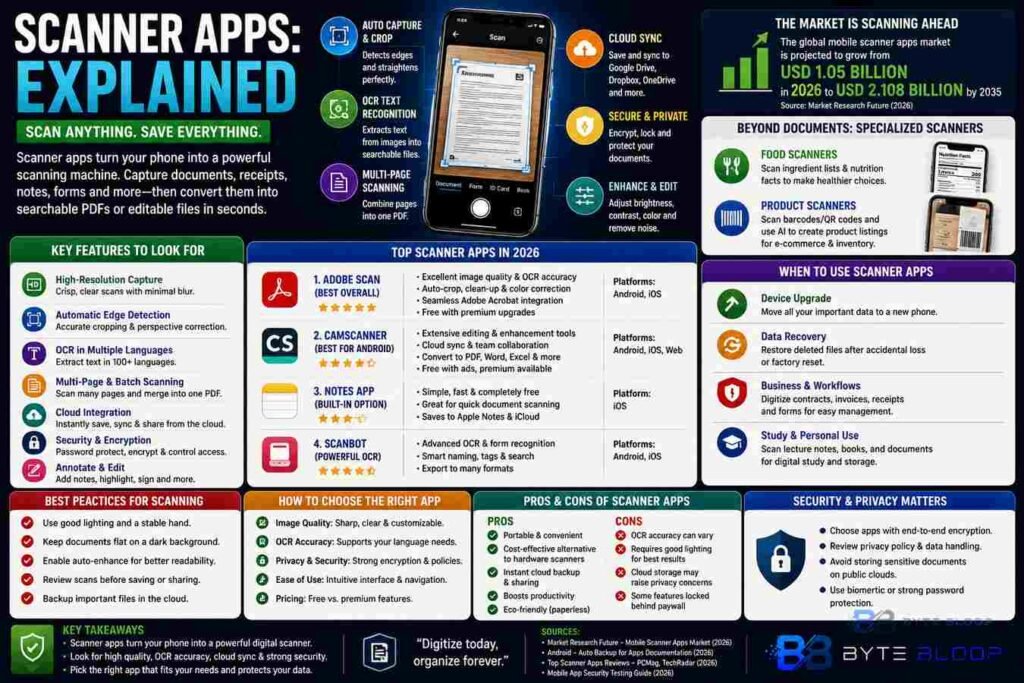
At their core, scanner apps capture images of documents, automatically crop and straighten them, and then convert the visual data into PDFs or other editable formats. Modern versions go beyond simple image capture: they offer noise reduction, color correction, multi‑page stitching, and integration with cloud storage services. Additionally, many apps now include AI‑powered features such as automatic text extraction, form recognition, and even barcode or QR code decoding. These capabilities open up new use cases—from digitizing old tax records to creating instant product catalogs for e‑commerce sellers.
Choosing the right scanner app depends on several factors. The most critical criteria include image quality, OCR accuracy, user interface, privacy policies, and pricing models. A recent buyer’s guide highlighted that native app performance and language support are also decisive, especially for users who need multilingual OCR. Market research indicates that the global mobile scanner apps market is projected to grow from USD 1.05 billion in 2026 to USD 2.108 billion by 2035, underscoring the rising demand for robust mobile solutions.
Among the top performers in 2026, Adobe Scan consistently tops reviews for its intuitive design, high‑resolution output, and deep integration with Adobe’s ecosystem. For Android users, CamScanner remains popular due to its extensive editing tools and cloud sync options. On iOS, the built‑in Notes app offers a lightweight but effective scanning feature, while dedicated apps like Scanbot provide advanced OCR and form‑recognition capabilities.
Beyond document scanning, specialized apps have emerged to cater to niche markets. Food scanner apps, for example, analyze ingredient lists and nutritional content, helping users make healthier choices. Product scanner apps combine barcode reading with AI to generate detailed product listings, a feature that is especially valuable for small retailers building online catalogs. These examples illustrate how the core scanning technology can be adapted to diverse contexts.
Security is another important consideration. Mobile app security testing frameworks suggest evaluating an app’s data handling practices, encryption standards, and compliance with privacy regulations. Users should verify that scanned documents are stored securely, preferably with end‑to‑end encryption, and that the app does not share sensitive data with third parties without explicit consent.
In practice, the best scanner app is one that balances ease of use with powerful features. A well‑designed interface reduces the learning curve, while high OCR accuracy ensures that extracted text is reliable for editing or search. Integration with cloud services like Google Drive, Dropbox, or OneDrive further extends the app’s utility by enabling instant backup and collaboration.
Key Takeaways
- High‑resolution capture and automatic cropping reduce manual editing
- OCR accuracy is crucial for searchable PDFs and editable documents
- Integration with cloud storage streamlines workflow and backup
- Security and privacy policies protect sensitive data
- Specialized scanners (food, product) expand use cases beyond documents
Frequently Asked Questions
What is a scanner app?
A scanner app uses your smartphone’s camera to capture images of documents, automatically crops and straightens them, and converts the result into a PDF or editable format, often with OCR to extract text.
What are the key features of top scanner apps?
Key features include high‑resolution capture, automatic edge detection, OCR in multiple languages, multi‑page stitching, cloud integration, and security measures such as encryption.
What are the best use cases for scanner apps?
Common uses include digitizing receipts, contracts, academic notes, business forms, and product catalogs; specialized apps also support food ingredient scanning and barcode decoding.
What are the pros and cons of using scanner apps?
Pros: convenience, portability, cost savings, and instant cloud backup. Cons: variable OCR accuracy, privacy concerns if data is stored in the cloud, and occasional need for manual correction.
Conclusion
Based on the available information and industry analysis, scanner apps provide a powerful, mobile‑first solution for digitizing paper documents, streamlining workflows, and enhancing accessibility. Their continued growth reflects a broader shift toward digital document management, with advanced OCR and AI features expanding the range of applications beyond simple scanning. By selecting a reputable app that balances quality, security, and integration, users can transform their paper‑centric tasks into efficient, cloud‑enabled processes.
Related Reading
- Top 5 Document Management Apps for Professionals
- How OCR Technology Is Shaping the Future of Mobile Scanners