Introduction
Artificial Intelligence has become an essential part of the Android experience. From writing emails and editing photos to translating languages, creating videos, and generating code, AI-powered apps can significantly improve productivity and creativity.
Whether you own a Samsung Galaxy, Google Pixel, OnePlus, Xiaomi, Nothing Phone, Motorola, or any other Android smartphone, there are plenty of AI tools available to help you complete tasks faster and more efficiently.
In this guide, we’ll explore the best AI apps for Android in 2026, highlighting their features, strengths, and ideal use cases.
Why AI Apps Matter on Android
Modern Android smartphones are more powerful than ever, and AI apps help unlock their full potential.
Using AI tools on Android allows you to:
- Write emails and documents faster
- Generate AI images
- Edit photos professionally
- Create social media content
- Translate languages instantly
- Solve homework problems
- Summarize PDFs
- Generate code
- Automate daily tasks
- Improve productivity
Best AI Tools for Android
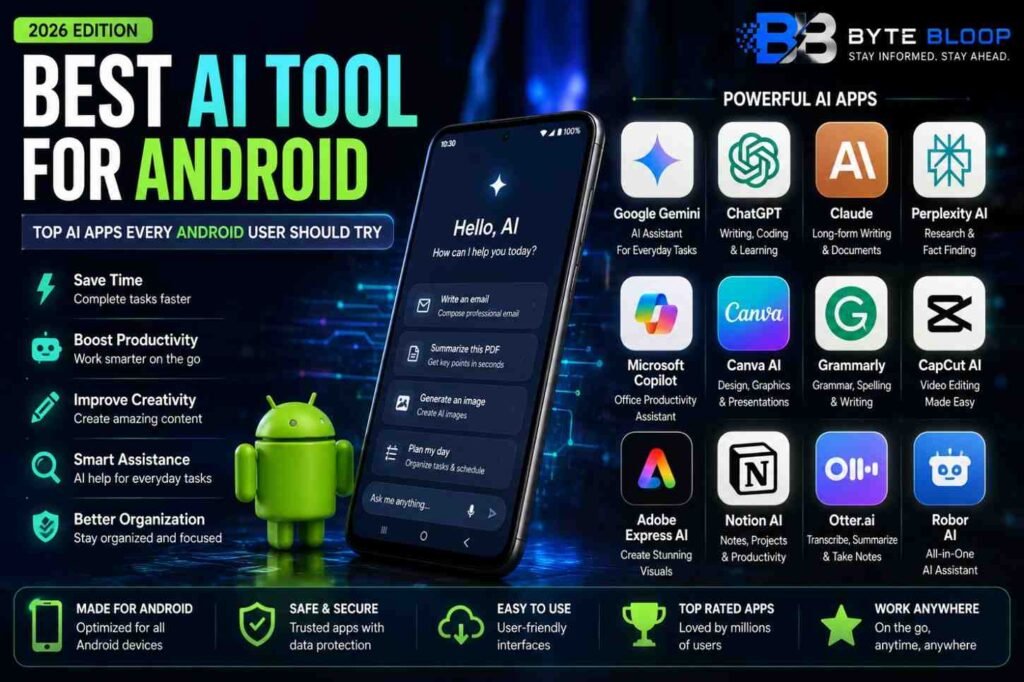
1. Google Gemini
Best For: Everyday AI assistance
Google Gemini is deeply integrated into Android, making it one of the best AI assistants available. It helps users answer questions, summarize content, generate text, and manage daily tasks.
Key Features
- AI Assistant
- Writing Help
- Voice Commands
- Image Understanding
- Google Workspace Integration
2. ChatGPT
Best For: Writing, coding, and learning
ChatGPT is one of the most popular AI apps on Android. It helps users write articles, solve programming problems, brainstorm ideas, summarize documents, and answer complex questions.
Key Features
- AI Chat
- Coding Assistance
- Writing Tools
- Document Analysis
- Image Support
3. Claude
Best For: Long-form writing
Claude is an excellent option for users who frequently work with lengthy documents, reports, and research papers.
Key Features
- Long Context Window
- AI Writing
- Summarization
- Research Assistance
4. Perplexity AI
Best For: Research
Perplexity AI combines AI with web search, providing accurate answers backed by sources.
Key Features
- Web Search
- Source Citations
- AI Research
- Fast Answers
5. Microsoft Copilot
Best For: Office productivity
Copilot integrates with Microsoft services and helps create documents, presentations, spreadsheets, and emails.
Key Features
- AI Writing
- Excel Assistance
- Word Support
- Image Generation
6. Canva AI
Best For: Graphic design
Canva AI allows Android users to create presentations, Instagram posts, YouTube thumbnails, logos, posters, and social media graphics.
Key Features
- AI Design
- Templates
- Magic Studio
- Image Editing
7. Grammarly
Best For: Grammar checking
Grammarly improves grammar, spelling, readability, and writing quality across multiple Android apps.
Key Features
- Grammar Correction
- Tone Detection
- Writing Suggestions
- Spell Check
8. CapCut AI
Best For: Video editing
CapCut AI has become one of the most popular AI-powered video editing apps for Android users.
Key Features
- Auto Captions
- AI Video Editing
- Background Removal
- AI Effects
- Templates
9. Adobe Express AI
Best For: Creative content
Adobe Express offers AI-powered tools for creating social media graphics, marketing materials, flyers, and short videos.
Key Features
- AI Image Generation
- Templates
- Background Removal
- Text Effects
10. Notion AI
Best For: Productivity
Notion AI helps Android users organize notes, create documents, manage projects, and summarize information.
Key Features
- AI Notes
- Project Management
- Document Writing
- Task Planning
Comparison Table
| AI Tool | Best For | Free | App |
|---|---|---|---|
| Google Gemini | AI Assistant | ✅ | 📱 |
| ChatGPT | Writing & Coding | ✅ | 📱 |
| Claude | Long Documents | ✅ | 📱 |
| Perplexity AI | Research | ✅ | 📱 |
| Microsoft Copilot | Office Work | ✅ | 📱 |
| Canva AI | Design | ✅ | 📱 |
| Grammarly | Writing | ✅ | 📱 |
| CapCut AI | Video Editing | ✅ | 📱 |
| Adobe Express AI | Creative Design | ✅ | 📱 |
| Notion AI | Productivity | Limited | 📱 |
Which AI App Should You Choose?
Choose the app based on your needs:
- Everyday AI Assistant: Google Gemini
- Writing & Coding: ChatGPT
- Long Documents: Claude
- Research: Perplexity AI
- Office Work: Microsoft Copilot
- Graphic Design: Canva AI
- Grammar: Grammarly
- Video Editing: CapCut AI
- Creative Content: Adobe Express AI
- Productivity: Notion AI
Pros & Cons
Pros
- Saves time
- Boosts productivity
- Easy to use
- Available on most Android devices
- Supports students, professionals, and creators
- Many apps offer free versions
Cons
- Some premium features require subscriptions.
- Internet connection is needed for most AI tools.
- AI-generated content should always be reviewed for accuracy.
Frequently Asked Questions
Which is the best AI app for Android?
Google Gemini and ChatGPT are among the most popular AI apps for Android, though the best choice depends on your needs.
Is ChatGPT available on Android?
Yes. ChatGPT has an official Android app that supports text, voice, and other AI features.
Can I use multiple AI apps together?
Yes. Many users combine different AI apps for writing, design, research, and productivity.
Which AI app is best for students?
Students often benefit from Google Gemini, ChatGPT, Perplexity AI, and Grammarly.
Which AI app is best for photo editing?
Canva AI and Adobe Express AI provide useful AI-powered editing tools for images and graphics.
Are AI apps free?
Most offer free plans with optional premium subscriptions for advanced features.
Final Verdict
Android users have access to a wide range of powerful AI applications that can improve productivity, creativity, communication, and learning. Whether you’re writing content, editing videos, designing graphics, conducting research, or managing projects, the right AI app can make everyday tasks faster and easier.
Choosing the best AI tool depends on your workflow, but combining multiple AI apps often delivers the best overall experience.