Introduction
Notion has become one of the world’s most popular productivity platforms, helping millions of users manage notes, projects, documents, databases, and team collaboration in one place. With the rise of artificial intelligence, Notion users can now extend its capabilities using specialized AI tools that automate writing, research, task management, coding, and workflow organization.
Whether you’re a student organizing class notes, a business owner managing projects, or a content creator planning your next article, pairing Notion with the right AI tools can dramatically improve productivity.
This guide explores the best AI tools that work well with Notion in 2026.
Why Use AI with Notion?
Although Notion AI already offers useful writing and summarization features, combining it with other AI tools unlocks even more possibilities.
Benefits include:
- Faster document creation
- Better project planning
- AI-assisted research
- Automatic meeting summaries
- Code generation
- Content writing
- Brainstorming ideas
- SEO optimization
- Workflow automation
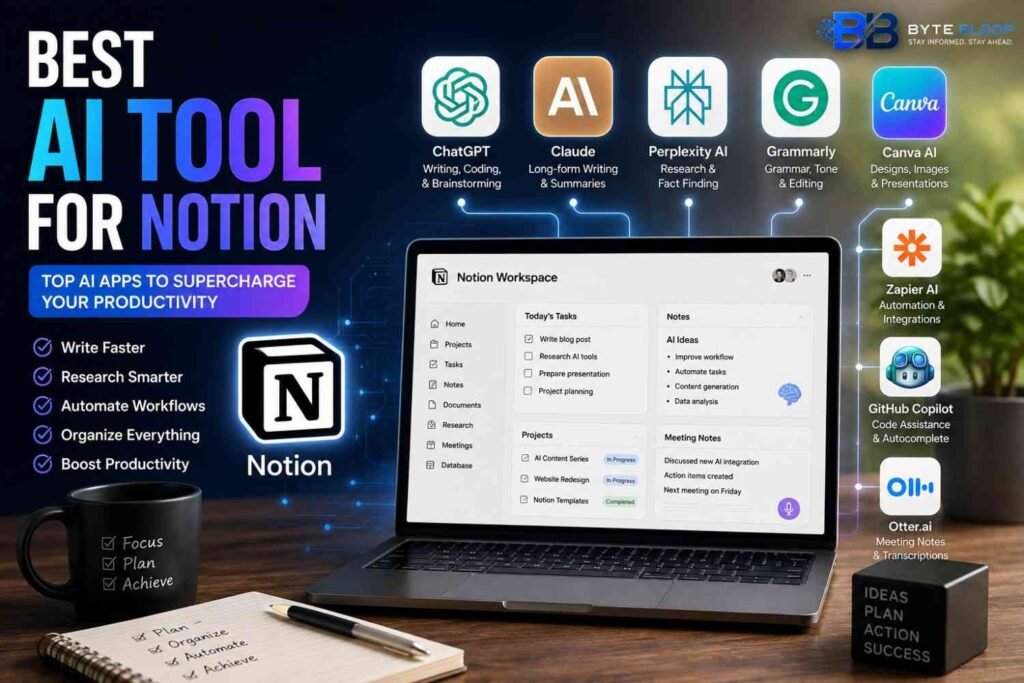
Best AI Tools for Notion
1. ChatGPT
Best For: Writing, brainstorming, coding, and document creation.
ChatGPT is one of the most versatile AI assistants available today. It works well alongside Notion for drafting articles, creating reports, generating templates, solving coding problems, and organizing ideas.
Key Features
- Content writing
- Coding assistance
- Document drafting
- Brainstorming
- Summarization
2. Claude
Best For: Long-form writing and document analysis.
Claude excels at processing lengthy documents and creating structured summaries, making it an excellent choice for researchers, writers, and professionals using Notion.
Key Features
- Large context window
- High-quality writing
- Research support
- Detailed summaries
3. Perplexity AI
Best For: Research and fact-checking.
Perplexity AI provides web-based answers with source references, making it ideal for collecting reliable information before organizing it inside Notion.
Key Features
- Live web search
- Source citations
- Research summaries
- Fast answers
4. Grammarly
Best For: Editing and proofreading.
Grammarly helps improve grammar, spelling, tone, clarity, and readability before publishing documents created in Notion.
Key Features
- Grammar correction
- Tone suggestions
- Clarity improvements
- Plagiarism tools (premium)
5. Canva AI
Best For: Visual content.
Canva AI allows users to design presentations, infographics, social media posts, and marketing assets that can be linked or embedded into Notion workspaces.
Key Features
- AI image generation
- Presentation builder
- Brand templates
- Design automation
6. Zapier AI
Best For: Workflow automation.
Zapier connects Notion with thousands of apps, allowing users to automate repetitive tasks without coding.
Key Features
- App integrations
- Workflow automation
- AI-powered actions
- Task synchronization
7. GitHub Copilot
Best For: Developers.
Developers can combine Notion for documentation with GitHub Copilot for faster software development and code completion.
Key Features
- Code suggestions
- Auto-complete
- Multiple programming languages
- IDE integration
8. Otter.ai
Best For: Meeting notes.
Otter.ai automatically records, transcribes, and summarizes meetings, making it easy to store organized notes inside Notion.
Key Features
- Live transcription
- Meeting summaries
- Speaker identification
- Searchable notes
Comparison Table
| AI Tool | Best For | Free Plan | Ideal Users |
|---|---|---|---|
| ChatGPT | Writing & Coding | Yes | Everyone |
| Claude | Long Documents | Yes | Writers & Researchers |
| Perplexity AI | Research | Yes | Students & Professionals |
| Grammarly | Editing | Yes | Writers |
| Canva AI | Design | Yes | Creators |
| Zapier AI | Automation | Limited | Businesses |
| GitHub Copilot | Coding | Limited | Developers |
| Otter.ai | Meetings | Yes | Teams |
How to Choose the Right Tool
Choose according to your workflow:
- Writing: ChatGPT or Claude
- Research: Perplexity AI
- Editing: Grammarly
- Automation: Zapier AI
- Coding: GitHub Copilot
- Design: Canva AI
- Meeting Notes: Otter.ai
Using multiple AI tools together with Notion often delivers the best productivity gains.
Pros & Cons
Pros
- Saves time
- Improves organization
- Better collaboration
- Faster research
- Higher writing quality
- Easier workflow management
Cons
- Some advanced features require paid plans.
- Integrating multiple tools can take time.
- AI-generated content should always be reviewed for accuracy.
Frequently Asked Questions
What is the best AI tool for Notion?
The best tool depends on your workflow. ChatGPT, Claude, Perplexity AI, Grammarly, and Zapier AI are among the most popular choices.
Does Notion have built-in AI?
Yes. Notion includes built-in AI features for writing, summarizing, brainstorming, and organizing content.
Can I use ChatGPT with Notion?
Yes. Many users draft or refine content with ChatGPT before storing and organizing it in Notion.
Which AI tool is best for students?
Students often benefit from combining Notion with ChatGPT, Perplexity AI, and Grammarly.
Is Notion AI free?
Notion offers AI features, but availability and limits depend on your plan.
Which AI tool is best for teams?
Zapier AI, Otter.ai, and Claude are excellent choices for collaborative workflows.
Final Verdict
Notion is already a powerful productivity platform, but pairing it with the right AI tools can take your workflow to the next level. Whether you’re writing content, managing projects, conducting research, or automating repetitive tasks, combining Notion with tools like ChatGPT, Claude, Perplexity AI, Grammarly, and Zapier AI can help you work smarter and faster.