CI/CD: Explained
Introduction
Continuous Integration and Continuous Delivery/Deployment—collectively known as CI/CD—has become the backbone of modern software engineering. The practice automates building, testing, and releasing code, turning what used to be manual, error‑prone steps into repeatable, reliable pipelines. By integrating code changes frequently, teams catch defects early, reduce integration hell, and accelerate delivery cycles. Delivery, whether to a staging environment or directly to production, becomes a predictable, auditable process that scales with team size and project complexity. In 2026, the adoption of CI/CD is not optional; it’s a competitive differentiator that aligns development, operations, and quality assurance under a single, continuous workflow. This guide demystifies the core concepts, walks through a typical pipeline, and offers best practices to help you implement CI/CD effectively in any stack.
What CI/CD Really Means
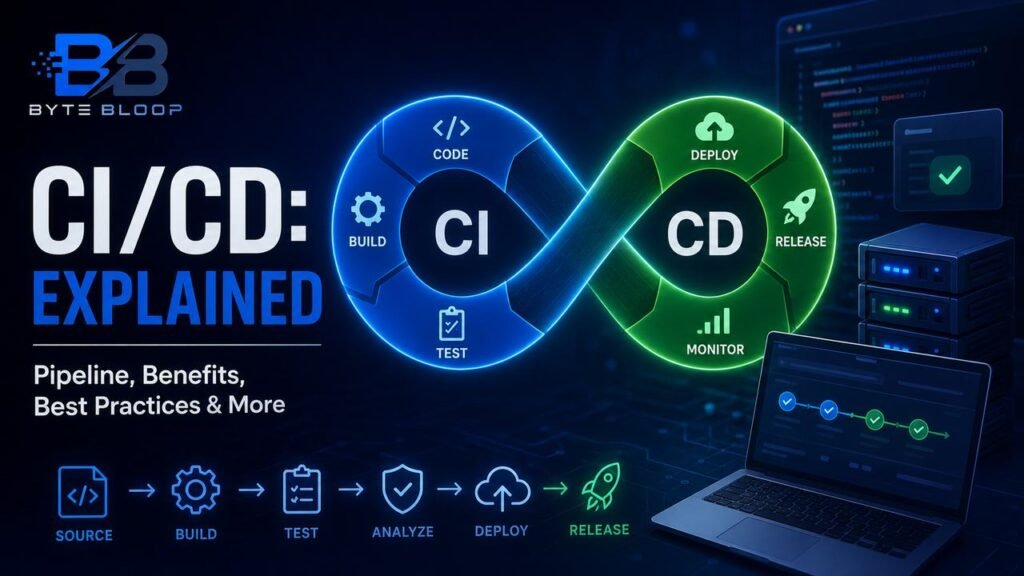
CI stands for Continuous Integration. It’s the practice of merging code changes into a shared repository multiple times a day, triggering automated builds and tests. CD can refer to Continuous Delivery (manual approval before production) or Continuous Deployment (automatic push to production). The key is that after CI passes, the code is ready for deployment at any moment. This eliminates the “it works on my machine” problem and ensures that every change is validated against the entire codebase.
Pipeline Anatomy
A typical CI/CD pipeline consists of several stages:
- Source Control – Developers push commits to a Git branch.
- Build – The pipeline compiles code, resolves dependencies, and packages artifacts.
- Test – Unit, integration, and end‑to‑end tests run automatically.
- Static Analysis – Linting, code‑style checks, and security scans enforce quality.
- Deploy – Artifacts move to a staging environment for manual or automated acceptance.
- Release – In Continuous Deployment, the final step pushes to production; in Continuous Delivery, a human gate triggers it.
Tools like Jenkins, GitHub Actions, GitLab CI, and Azure Pipelines provide visual editors to define these stages as code, enabling versioning and reproducibility.
Building a Minimal Pipeline
Below is a concise GitHub Actions workflow that illustrates a basic CI/CD flow for a Node.js project. The workflow runs on every push to main, builds, tests, and deploys to a staging server.
name: CI/CD Pipeline
on:
  push:
    branches: [ main ]
jobs:
  build:
    runs-on: ubuntu-latest
    steps:
      - uses: actions/checkout@v4
      - name: Set up Node
        uses: actions/setup-node@v4
        with:
          node-version: '20'
      - run: npm ci
      - run: npm run build
      - run: npm test
  deploy:
    needs: build
    runs-on: ubuntu-latest
    if: success()
    steps:
      - uses: actions/checkout@v4
      - name: Deploy to Staging
        run: echo "Deploying to staging…"
        # Replace with real deployment script
Notice how the deploy job depends on the successful completion of build. This dependency chain guarantees that only passing code reaches the deployment stage.
Common Pitfalls and How to Avoid Them
- Long Build Times – Cache dependencies, parallelize tests, and use lightweight containers to reduce cycle time.
- Flaky Tests – Isolate external dependencies with mocks, run tests deterministically, and monitor failure trends.
- Security Gaps – Integrate static application security testing (SAST) and dependency vulnerability scans early in the pipeline.
- Insufficient Rollback Strategy – Keep immutable artifacts and maintain a rollback plan to revert quickly if a release fails.
Best Practices for Production‑Ready Pipelines
- Version your pipeline scripts and treat them as first‑class code.
- Implement feature flags to decouple deployment from release.
- Use canary or blue/green deployments to minimize risk.
- Monitor pipeline health with metrics on build duration, failure rate, and deployment frequency.
When to Adopt CI/CD
CI/CD shines when teams iterate rapidly, have multiple contributors, and need to ship updates frequently. Even small startups benefit from automating repetitive tasks, freeing developers to focus on feature work. Larger enterprises can scale CI/CD by segmenting pipelines per microservice and enforcing governance through role‑based access controls.
Key Takeaways
- CI/CD automates build, test, and deployment, reducing manual errors.
- A typical pipeline includes source, build, test, analysis, deploy, and release stages.
- Shorter build times and reliable tests are essential for fast feedback loops.
- Security scans and rollback plans protect production stability.
- Feature flags and canary releases enable risk‑mitigated deployments.
Frequently Asked Questions
What is Continuous Integration?
Continuous Integration is the practice of merging code changes into a shared repository frequently, triggering automated builds and tests to catch defects early.
What are the key features of a CI/CD pipeline?
Key features include source control integration, automated build and test stages, static analysis, deployment to staging, and optional automated production release.
What are the best use cases for CI/CD?
CI/CD is ideal for teams that iterate quickly, have multiple contributors, and need to deliver features or bug fixes frequently while maintaining quality.
What are the pros and cons of CI/CD?
Pros: faster feedback, higher quality, reduced manual effort, and predictable releases. Cons: initial setup complexity, potential for flaky tests, and the need for disciplined test coverage.
Conclusion
Based on the available information and industry analysis, CI/CD transforms software delivery by automating repetitive tasks, enforcing quality gates, and enabling rapid, reliable deployments. By integrating code changes continuously and delivering them through well‑defined pipelines, teams can reduce defects, shorten release cycles, and maintain higher confidence in production releases. Embracing CI/CD is no longer a luxury but a strategic necessity for any organization that values speed, quality, and resilience in its software products.
Related Reading
- Automating Tests with GitHub Actions