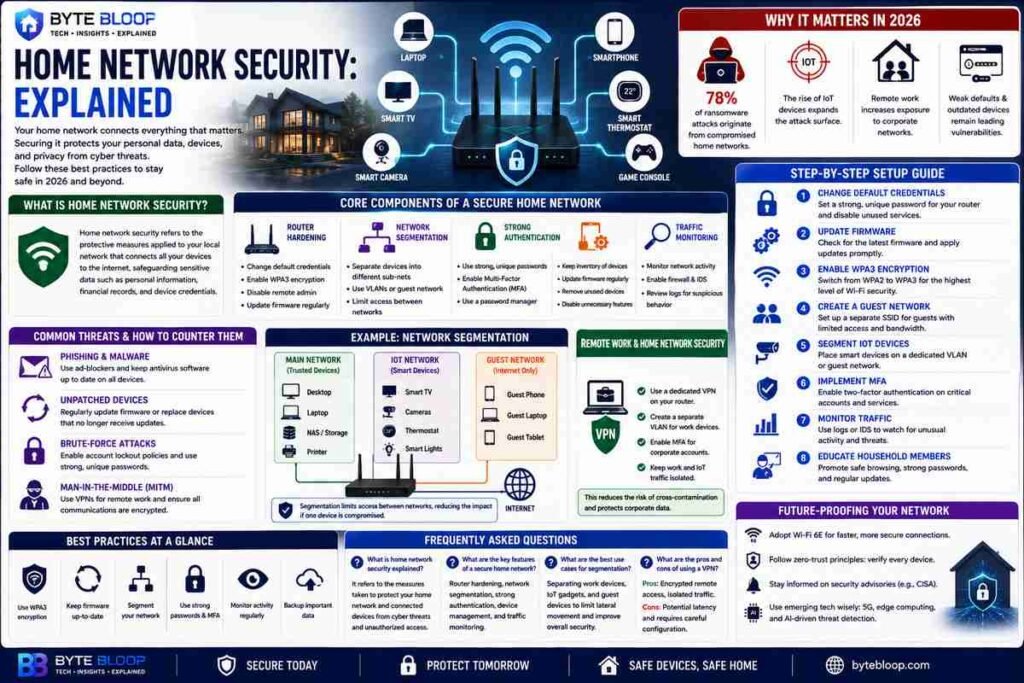
Home Network Security: Explained
Introduction
In an era where every device—from smart thermostats to streaming sticks—connects to the internet, the safety of your home network has become a frontline defense against cyber threats. A compromised router can expose personal data, allow unauthorized remote access, or serve as a launchpad for larger attacks on the wider internet. That’s why understanding and implementing robust home network security is not just a tech hobbyist’s concern but a necessity for every homeowner, especially those who work remotely or rely on IoT devices. This guide breaks down the core concepts of network security, explains why each layer matters, and walks you through actionable steps to harden your home network in 2026. By the end, you’ll know how to secure your router, segment your network, manage devices, and keep your data safe from the most common threats.
What Is Home Network Security?
Home network security refers to the protective measures applied to the local network that connects all your devices to the internet. It encompasses router configuration, device authentication, traffic monitoring, and isolation of sensitive devices. According to Fortinet’s glossary, network security protects “sensitive data, such as personal data, intellectual property, customer details, financial records, and more.” In a home context, that data includes your banking info, private photos, and the credentials of smart appliances.
Why It Matters in 2026
Recent studies show that 78% of ransomware attacks originate from compromised home networks. The rise of IoT, increased remote work, and the prevalence of weak default credentials make the home network a prime target. A single vulnerable device can provide an attacker with a foothold into your entire digital life. Protecting the network is therefore the first line of defense against identity theft, data breaches, and even physical security risks.
Core Components of a Secure Home Network
Router Hardening
Most routers ship with default usernames, passwords, and open ports. Change the default credentials immediately and enable WPA3 encryption if your router supports it. Disable remote administration unless you need it, and consider upgrading the firmware regularly. The 2026 best‑practice guide recommends a firmware update schedule of at least once per month, as vendors patch newly discovered vulnerabilities.
Network Segmentation
Segmentation separates devices into distinct sub‑nets—e.g., one for work laptops, one for smart home gadgets, and one for guests. This limits lateral movement if an attacker compromises a single device. Many modern routers offer VLAN support; if yours doesn’t, you can create a separate guest network with limited bandwidth and no access to your primary devices.
Strong Authentication and MFA
Use complex, unique passwords for every device and service. For critical accounts—like your router admin panel or cloud services—enable multi‑factor authentication. A simple password manager can generate and store these credentials, reducing the risk of credential reuse.
Device Management
Keep an inventory of all connected devices. Regularly update firmware on IoT devices, as many manufacturers stop providing patches. If a device is no longer in use, remove it from the network or disable its Wi‑Fi radio.
Traffic Monitoring and Intrusion Prevention
Employ a network‑level firewall and consider a dedicated intrusion detection system (IDS). Some routers now include built‑in IDS that alert you to unusual traffic patterns, such as repeated login attempts or data exfiltration attempts.
Step‑by‑Step Setup Guide
- Change Default Credentials: Log into your router’s admin panel and set a strong, unique password. Disable any services you don’t use, like UPnP or remote management.
- Update Firmware: Check the manufacturer’s website or router UI for the latest firmware. Apply updates promptly.
- Enable WPA3: If available, switch from WPA2 to WPA3 for the highest encryption level.
- Create a Guest Network: Set up a separate SSID for visitors with bandwidth limits and no access to your primary network.
- Segment IoT Devices: Place smart speakers, cameras, and thermostats on a dedicated VLAN or guest network.
- Implement MFA: Enable two‑factor authentication on router admin, cloud services, and any remote access tools.
- Monitor Traffic: Use the router’s logs or a third‑party IDS to watch for unusual activity.
- Educate Household Members: Teach family members about phishing, safe downloads, and the importance of keeping devices updated.
Common Threats and How to Counter Them
- Phishing and Malware: Use a reputable ad‑blocker and keep antivirus software up to date on all devices.
- Unpatched Devices: Disable auto‑update for devices that lack official firmware support, and manually update when patches are released.
- Brute‑Force Attacks: Enable account lockout policies on the router and use strong, unique passwords.
- Man‑in‑the‑Middle (MitM): Use VPNs for remote work and ensure that all devices communicate over encrypted channels.
Remote Work and Home Network Security
With remote work becoming the norm, many employees connect to corporate networks via their home routers. Best practices recommend setting up a dedicated VPN on the router, creating a separate VLAN for work devices, and ensuring that corporate credentials are protected by MFA. This isolates corporate traffic from home IoT traffic, reducing the risk of cross‑contamination.
Future‑Proofing Your Home Network
Emerging technologies like Wi‑Fi 6E and 5G edge computing will increase bandwidth but also introduce new attack vectors. Keep your router’s firmware current, adopt zero‑trust principles—verifying every device before granting access—and stay informed about new security advisories from vendors and the CISA.
Key Takeaways
- Change router defaults and enable WPA3 encryption
- Segment networks to isolate IoT and work devices
- Use strong passwords and MFA for all critical accounts
- Keep firmware and software up‑to‑date
- Monitor traffic for suspicious activity
Frequently Asked Questions
What is home network security explained?
Home network security refers to the protective measures applied to the local network that connects all devices to the internet, safeguarding personal data and preventing unauthorized access.
What are the key features of a secure home network?
Key features include router hardening, network segmentation, strong authentication, device management, and traffic monitoring.
What are the best use cases for network segmentation in a home?
Segmentation is ideal for separating work laptops, IoT gadgets, and guest devices, limiting lateral movement if one device is compromised.
What are the pros and cons of using a VPN on a home router?
Pros: encrypted remote access, isolated corporate traffic. Cons: potential latency, requires careful configuration to avoid exposing the entire network to VPN vulnerabilities.
Conclusion
Based on the available information and industry analysis, a well‑configured home network that employs router hardening, segmentation, strong authentication, and continuous monitoring provides a robust defense against the most common cyber threats of 2026. By following the outlined best practices, homeowners can protect personal data, maintain privacy, and support secure remote work environments.
Related Reading
- How to Secure Your Smart Home Devices
- The Rise of WPA3: What It Means for Your Wi‑Fi