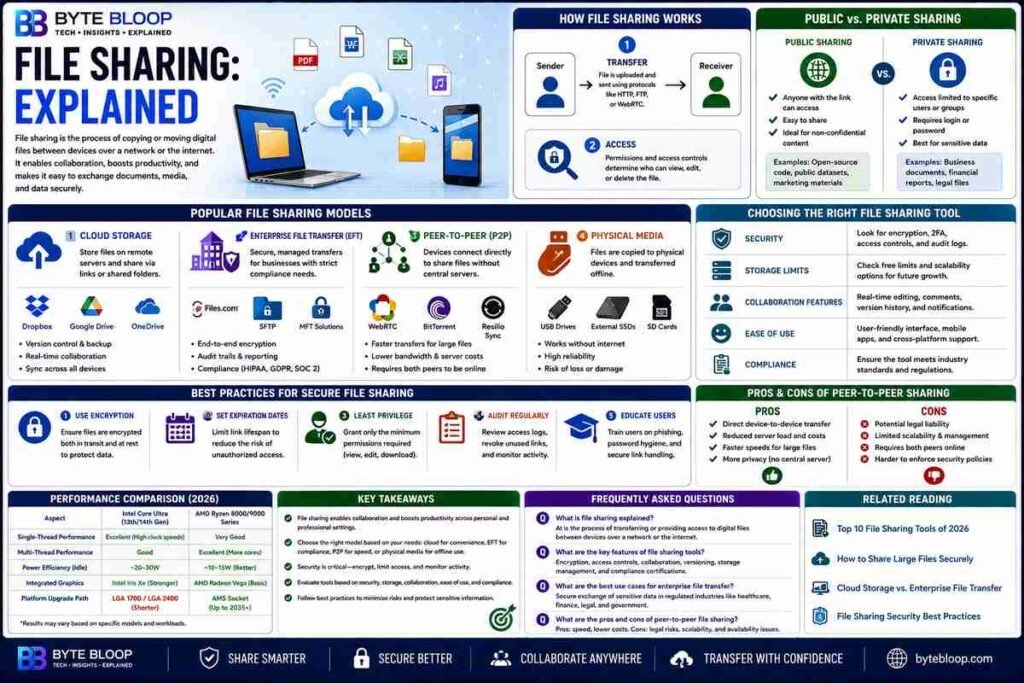
File Sharing: Explained
Introduction
File sharing is the process of copying or moving one or more digital files between devices over a network or internet connection. It enables users to exchange documents, media, and data without relying on physical media. In today’s collaborative environment, file sharing powers everything from simple photo swaps to complex enterprise workflows. Whether you’re a student sharing a group project, a freelancer exchanging design assets, or a corporation distributing confidential reports, understanding the mechanics, options, and security implications is essential. This guide breaks down the core concepts, explores popular tools, and offers practical tips for safe, efficient sharing.
How File Sharing Works
At its heart, file sharing involves two key steps: transfer and access. Transfer moves the file from one device to another, often via a protocol like HTTP, FTP, or WebRTC. Access controls determine who can view, edit, or delete the file once it’s shared. Modern systems combine these steps into a seamless experience, allowing users to upload a document to the cloud and generate a shareable link that can be sent via email or chat.
Public vs. Private Sharing
Public sharing makes a file available to anyone with the link or who discovers it in a search index. It’s common for open-source code, marketing assets, or public datasets. Private sharing restricts access to specific users or groups, often requiring authentication or a password. Most business tools default to private sharing to protect sensitive data.
Popular File Sharing Models
Cloud Storage
Services like Dropbox, Google Drive, and OneDrive let users store files online and share them through links or shared folders. They offer built‑in version control, collaboration tools, and cross‑platform sync.
Enterprise File Transfer (EFT)
EFT solutions such as Files.com or managed SFTP platforms provide secure, auditable transfers for regulated industries. They often include encryption, digital signatures, and compliance reporting.
Peer‑to‑Peer (P2P)
P2P systems use WebRTC or similar technologies to connect devices directly, bypassing central servers. This can reduce bandwidth costs and improve transfer speeds for large files.
Physical Media
Although less common, USB drives, external SSDs, and SD cards remain a reliable fallback, especially in low‑connectivity environments.
Choosing the Right Tool
When evaluating file‑sharing solutions, consider:
- Security – End‑to‑end encryption, two‑factor authentication, and audit logs.
- Storage Limits – Free tiers often cap at a few gigabytes; paid plans scale to terabytes.
- Collaboration Features – Real‑time editing, comment threads, and version history.
- Ease of Use – Intuitive UI, mobile apps, and desktop clients.
- Compliance – HIPAA, GDPR, or industry‑specific certifications.
Best Practices for Secure Sharing
1. Use encryption – Prefer tools that encrypt files at rest and in transit.
2. Set expiration dates – Limit link lifespan to reduce risk of unauthorized access.
3. Apply the principle of least privilege – Grant only the permissions needed (view, edit, download).
4. Audit regularly – Review access logs and revoke unused links.
5. Educate users – Provide training on phishing, password hygiene, and secure link handling.
Key Takeaways
- File sharing moves files across networks using transfer and access controls.
- Public links are easy but risk exposure; private links require authentication.
- Cloud storage, EFT, P2P, and physical media each serve different needs.
- Security, storage limits, collaboration, ease of use, and compliance guide tool choice.
- Best practices: encryption, expirations, least privilege, audits, user training.
Frequently Asked Questions
What is file sharing explained?
File sharing is the process of copying or moving digital files between devices over a network or internet connection, allowing users to exchange data with others.
What are the key features of popular file sharing tools?
Key features include secure transfer protocols, encryption, access controls, collaboration tools, version history, and compliance certifications.
What are the best use cases for enterprise file transfer?
Enterprise file transfer is ideal for regulated industries that need auditable, encrypted, and compliant file exchanges, such as healthcare, finance, and legal sectors.
What are the pros and cons of peer‑to‑peer file sharing?
Pros: direct device-to-device transfer, reduced server load, and speed for large files. Cons: potential legal liability, limited scalability, and reliance on both peers being online.
Conclusion
Based on the available information and industry analysis, file sharing remains a cornerstone of digital collaboration, balancing convenience with security. By selecting the right platform, enforcing robust access controls, and following best‑practice guidelines, users can share data efficiently while protecting sensitive information. Continued innovation—such as zero‑trust architectures and AI‑driven threat detection—will further enhance trust and reliability in file‑sharing ecosystems.
Related Reading
- Top 10 File Sharing Tools of 2026