File Sharing Security: Explained
Introduction
In an era where collaboration relies on rapid file exchange, the security of those transfers has become paramount. File sharing security refers to the set of controls and practices that protect data as it moves between devices, networks, and users. From preventing accidental leaks to thwarting targeted cyberattacks, robust file sharing safeguards preserve confidentiality, integrity, and availability. Modern threats such as ransomware, phishing, and insider misuse make it essential to adopt encryption, authentication, and access‑control measures from the outset. Organizations and individuals alike must understand the risks inherent in open sharing and the tools that can mitigate them. This guide unpacks the core concepts, outlines proven best practices, and offers concrete examples of how to implement secure file sharing in everyday workflows.
Why File Sharing Is a Hotspot for Breaches
File sharing platforms—whether cloud services, peer‑to‑peer apps, or internal networks—are attractive targets because they often contain sensitive or proprietary information. A single misconfigured link can expose an entire database, and many breaches stem from users sharing files without realizing the permissions attached. According to a recent best‑practice guide, “preventing exposure before it spreads” is key, emphasizing the need to reduce unnecessary access and enforce strict sharing protocols. In 2026, the regulatory landscape has also tightened, with standards like HIPAA’s Security Rule and industry‑specific transfer protocols demanding encryption, audit trails, and zero‑trust principles.
Core Components of Secure File Sharing
Encryption
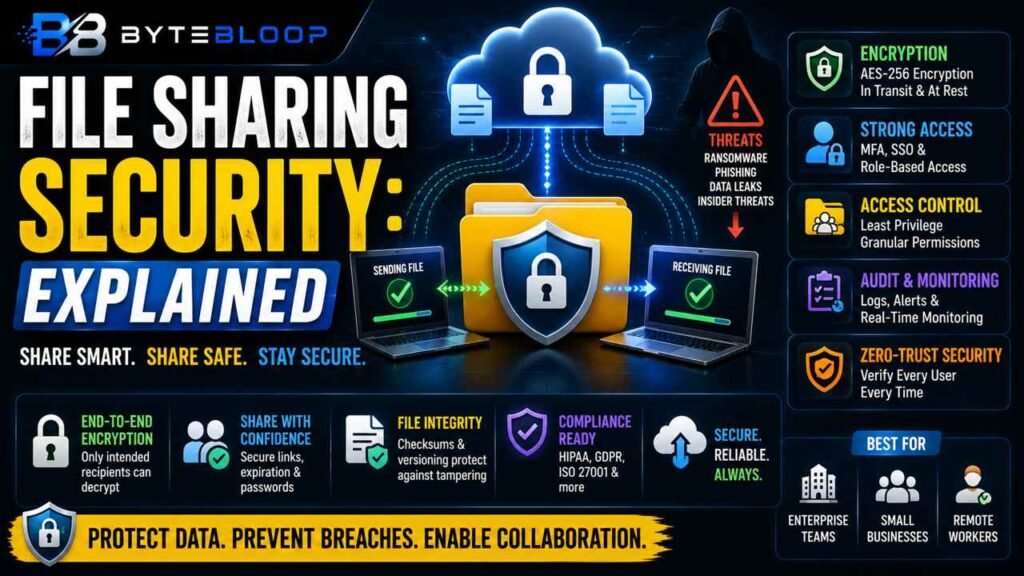
Data should be encrypted both in transit and at rest. AES‑256 is the gold standard for file‑level encryption, while SSL/TLS protects the transport layer. End‑to‑end encryption ensures that only the intended recipient can decrypt the file, even if it passes through third‑party servers.
Authentication & Authorization
Strong identity verification—multi‑factor authentication (MFA) and single sign‑on (SSO)—limits who can initiate or receive a transfer. Role‑based access controls (RBAC) further restrict permissions to the minimum necessary, preventing over‑sharing.
Audit Logging & Monitoring
Every file transfer should generate a log entry that records the sender, recipient, time, and file metadata. Continuous monitoring detects anomalies such as unusual download volumes or off‑hours access, allowing rapid response to potential breaches.
Zero‑Trust Architecture
Assuming that every user and device could be compromised, zero‑trust requires continuous verification. This means re‑authenticating users for each transfer and validating device posture before granting access.
Practical Examples of Secure File Sharing
- Enterprise Cloud Solutions: Platforms like Dropbox Business, Box, and Microsoft OneDrive for Business offer built‑in encryption, MFA, and granular sharing controls. They also integrate with compliance frameworks such as HIPAA and GDPR.
- Self‑Hosted Transfer Services: Tools like Kiteworks or FileCloud allow organizations to host their own secure transfer portal, giving full control over encryption keys and audit trails.
- Encrypted Messaging Apps: For smaller teams, encrypted file sharing via Signal or WhatsApp can be sufficient, provided the files are not highly sensitive.
Best Practices for 2026
- Use only vetted, enterprise‑grade file sharing services that support AES‑256 and TLS 1.3.
- Enable MFA for all users who can initiate or receive transfers.
- Apply the principle of least privilege—grant access only to the specific individuals who need the file.
- Implement automated alerts for large or unusual transfers.
- Regularly audit sharing permissions and revoke orphaned links.
- Encrypt sensitive files before uploading, especially when using third‑party services.
Common Pitfalls to Avoid
- Relying on default permissions that grant public access.
- Neglecting to rotate encryption keys or update MFA methods.
- Failing to monitor and log transfer activity.
- Assuming that a secure channel guarantees data safety if the file itself is unencrypted.
Key Takeaways
- Encryption (AES‑256) protects data in transit and at rest.
- Multi‑factor authentication and zero‑trust reduce insider risk.
- Granular access controls enforce the principle of least privilege.
- Audit logs enable rapid breach detection and compliance reporting.
- Regular permission reviews prevent orphaned or over‑shared links.
Frequently Asked Questions
What is file sharing security explained?
File sharing security refers to the measures and practices that protect data as it moves between devices, networks, and users, ensuring confidentiality, integrity, and availability.
What are the key features of secure file sharing?
Key features include strong encryption (AES‑256, TLS), multi‑factor authentication, role‑based access control, audit logging, and zero‑trust architecture.
What are the best use cases for secure file sharing?
Use cases range from enterprise cloud collaboration (e.g., Dropbox Business, Box) to self‑hosted transfer portals (e.g., Kiteworks) and encrypted messaging apps for smaller teams.
What are the pros and cons of using third‑party cloud file sharing services?
Pros: scalability, ease of use, built‑in compliance tools. Cons: potential data residency concerns, reliance on vendor security, risk of misconfigured links.
Conclusion
Based on the available information and industry analysis, secure file sharing is not a luxury but a necessity for protecting sensitive data in 2026. By implementing strong encryption, enforcing zero‑trust principles, and maintaining rigorous audit trails, organizations can mitigate the most common breach vectors and comply with evolving regulatory standards. The future of secure collaboration depends on continuous vigilance and the adoption of best‑practice frameworks that adapt to new threats.
Related Reading
- Top 5 Secure File Transfer Standards for Regulatory Compliance
Sources & References
- How Secure File Sharing Enhances Data Protection
- Data Security Best Practices Guide for 2026
- Secure file sharing 101: the essential guide to …
- 10 Secure File Sharing Options, Tips and Solutions
- 9 Best Practices for Secure File Sharing
- Top 5 Secure File Transfer Standards for Regulatory …
- Secure Data Sharing: The Complete Guide to Modern …
- Summary of the HIPAA Security Rule