AI for Developers Explained: 10 Powerful Uses, Tools & Best Practices in 2026
Introduction
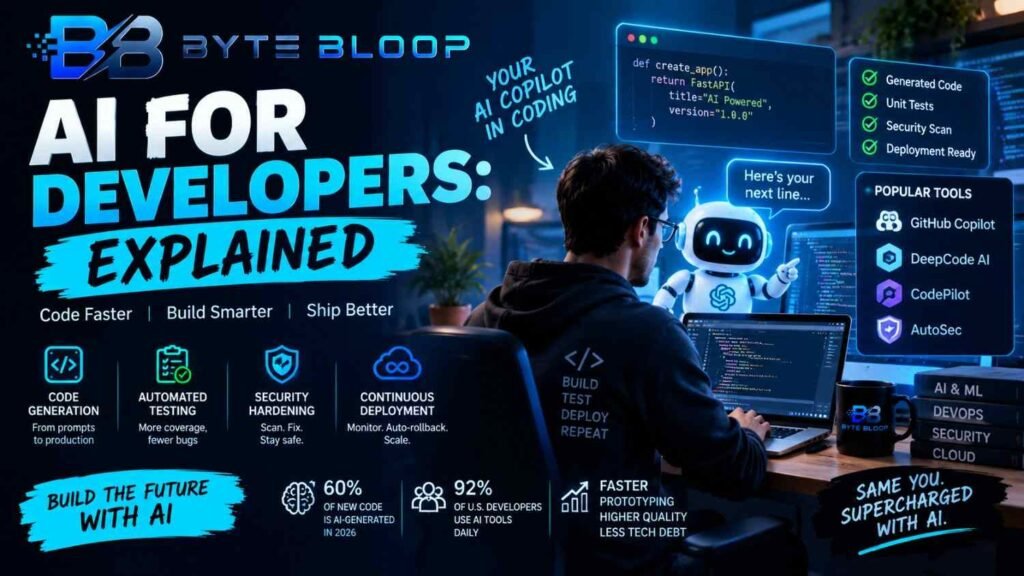
AI for developers explained in simple terms, it means using artificial intelligence throughout the software-development lifecycle to help with coding, debugging, testing, documentation, code review, research, maintenance, and other engineering tasks.
Modern AI coding tools can understand natural-language instructions, generate code, explain existing code, suggest edits, create tests, review changes, and in some cases work through multi-step development tasks using agentic capabilities.
GitHub describes Copilot as an AI assistant that can help developers write, understand, and ship software. Its current capabilities include code suggestions, codebase questions, code review, and assigned development tasks.
AI is therefore moving beyond simple autocomplete.
A developer can now ask an AI system to explain a repository, identify potential bugs, create a test, refactor a function, investigate an issue, or prepare a pull request. GitHub’s current Copilot documentation also describes cloud-agent workflows that can research a repository, plan code changes, modify files, and create a pull request for human review.
However, AI does not automatically produce correct or secure software. Developers remain responsible for reviewing generated code, testing changes, checking dependencies, validating security, and understanding what is being added to a codebase.
This guide explains how AI is used in software development, the major use cases, important AI developer tools in 2026, coding agents, testing, debugging, security, workflow integration, limitations, and best practices.
What Is AI for Developers?
AI for developers refers to artificial-intelligence tools that assist people during software-development work.
These tools can be used across multiple stages:
- Planning
- Coding
- Debugging
- Testing
- Code review
- Documentation
- Refactoring
- Security analysis
- Deployment support
- Repository research
The underlying technology can include large language models, machine-learning systems, code-analysis engines, retrieval systems, and agentic software.
The exact capabilities depend on the tool.
For example, an AI coding assistant may simply suggest the next few lines of code. A more advanced coding agent may inspect a repository, modify multiple files, execute commands, run tests, and return a proposed change for the developer to review. GitHub documents both ordinary Copilot assistance and more agentic capabilities.
How AI Coding Tools Work
An AI coding system generally combines a model with information about the developer’s current task.
1. Developer Provides a Request
The developer can provide:
- A natural-language instruction
- Existing code
- An error message
- A test requirement
- A repository issue
- A design description
For example:
“Create a REST API endpoint for retrieving published blog posts with pagination.”
2. The Tool Collects Context
Depending on the product, the AI system may use information such as:
- Current file
- Open files
- Repository structure
- Related code
- Documentation
- Terminal output
- Tests
- Issue descriptions
Context is extremely important because generated code depends on what the system understands about the surrounding project.
3. The Model Generates or Analyzes Code
The AI may:
- Complete code
- Generate a function
- Explain an error
- Suggest a fix
- Generate tests
- Refactor code
- Review changes
4. The Developer Reviews the Result
Generated code should be treated as a proposed change rather than automatically trusted output.
The developer can inspect:
- Logic
- Security
- Performance
- Dependencies
- Edge cases
- Maintainability
5. Tests and Validation Run
Tests can be executed to determine whether the change behaves as expected.
GitHub’s current Copilot tooling supports code review and validation-oriented workflows, while Amazon Q Developer can generate tests and assist with debugging and code improvements.
AI Code Generation
One of the most common AI uses in software development is code generation.
Developers can describe what they want and ask an AI tool to produce an initial implementation.
Common Examples
AI can generate:
- Functions
- Classes
- API endpoints
- SQL queries
- Unit tests
- HTML
- CSS
- JavaScript
- Python
- PHP
- Shell commands
- Configuration files
For example, a developer might ask:
Create a PHP function that validates an email address and returns structured error messages.
The AI can generate a starting point that the developer can then review and modify.
Why Code Generation Is Useful
It can reduce repetitive work such as:
- Boilerplate
- Basic CRUD operations
- Repetitive test structures
- Simple utility functions
- Documentation comments
The biggest practical value often comes from reducing low-value repetitive typing rather than replacing engineering judgment.
AI Code Completion
AI code completion works inside supported development environments.
Instead of generating a complete application from one prompt, the tool predicts or suggests code as the developer works.
GitHub Copilot currently supports popular IDEs including Visual Studio Code, Visual Studio, JetBrains IDEs, Eclipse, and Xcode.
Code completion can help with:
- Function bodies
- Variable declarations
- API calls
- Test cases
- Documentation
- Repetitive patterns
It is particularly useful when the intended implementation is already understood and the developer wants help expressing it quickly.
AI for Debugging
Debugging is another important AI use case.
A developer can provide:
- Error messages
- Stack traces
- Failing tests
- Relevant source code
- Logs
The AI can then suggest possible causes and fixes.
For example:
Error: database connection timeout
The developer can ask the AI to:
- Explain the error.
- Identify likely causes.
- Suggest debugging steps.
- Recommend code changes.
- Create a test for the failure case.
Amazon Q Developer currently documents capabilities for explaining code, generating code and tests, debugging, and refactoring.
Important Limitation
An AI explanation is still a hypothesis until verified.
The model may confidently suggest a fix that addresses the wrong problem.
Developers should therefore reproduce the issue and test proposed changes.
AI for Automated Testing
AI can assist with different types of software tests.
Unit Tests
AI can generate tests for individual functions or classes.
Integration Tests
It can help create tests involving several components.
Test Cases
AI can suggest edge cases a developer may want to test.
Test Maintenance
When code changes, AI can help identify tests that need updating.
Fuzz and Input Testing
AI can also suggest unusual inputs that may expose bugs.
However, generated tests should not automatically be considered comprehensive.
The developer still needs to determine whether the test suite actually validates the intended behavior.
AI for Code Review
AI-assisted code review can identify potential problems in pull requests.
GitHub Copilot’s current code-review system reviews pull requests and suggests fixes. It can analyze code from multiple angles and can also use agentic capabilities to gather broader repository context.
Copilot code review supports different review-effort levels, allowing teams to choose lighter or deeper analysis depending on the task.
What AI Code Review Can Check
Depending on the tool, review assistance can identify:
- Potential bugs
- Security issues
- Style problems
- Logic inconsistencies
- Missing tests
- Maintainability concerns
But AI review is not a replacement for human review.
GitHub explicitly advises developers to validate Copilot’s feedback because it can make mistakes and may not detect every problem.
AI for Refactoring
Refactoring means changing the internal structure of code without intentionally changing its external behavior.
AI can help with:
- Simplifying functions
- Renaming variables
- Splitting large methods
- Removing duplication
- Converting patterns
- Modernizing older code
For example, a developer can ask an AI tool:
“Refactor this controller so business logic is moved into a service class.”
The developer should then compare the behavior before and after the change.
AI for Documentation
Developers frequently spend time explaining existing systems.
AI can assist with:
- README files
- API documentation
- Function descriptions
- Code comments
- Release notes
- Changelogs
- Migration guides
This is especially useful for large repositories where developers need to understand unfamiliar code quickly.
However, AI-generated documentation can become inaccurate when the underlying software changes.
Documentation should therefore be reviewed and updated alongside code changes.
AI for Security
AI can assist developers with security-related tasks such as:
- Identifying potentially unsafe code
- Reviewing authentication logic
- Finding insecure patterns
- Suggesting safer alternatives
- Examining dependency usage
- Reviewing pull requests
GitHub’s Copilot code review can identify security issues as part of its review process, while Amazon Q Developer documents code-review capabilities for security vulnerabilities and code quality.
AI Security Has Limits
Developers should never assume that an AI system has found every security vulnerability.
Security review should still include appropriate:
- Static analysis
- Dependency scanning
- Secrets detection
- Tests
- Manual review
- Penetration testing where appropriate
AI for DevOps and CI/CD
AI can also assist with development operations.
Potential applications include:
- Log analysis
- Failure investigation
- Incident summaries
- Deployment assistance
- Configuration review
- Test generation
- Pull-request analysis
Some newer coding agents can work through repository tasks asynchronously and return changes for review.
GitHub’s current Copilot cloud agent can research a repository, plan changes, modify code, and create a pull request for a developer to inspect.
This can make AI useful beyond the editor itself.
AI Coding Agents
An AI coding agent is more autonomous than a traditional code-completion assistant.
Instead of asking:
“Complete this function.”
A developer might ask:
“Investigate issue #123, update the affected components, add tests, run the test suite, and prepare a pull request.”
The agent can then work through multiple steps.
GitHub currently describes Copilot cloud agent as an asynchronous agent that can research, plan, modify code, and create pull requests.
GitHub also supports third-party coding agents such as Anthropic Claude and OpenAI Codex in its Copilot environment.
AI Coding Assistant vs AI Coding Agent
These terms are related but not identical.
AI Coding Assistant
Usually helps while the developer remains in control of individual actions.
Examples include:
- Code completion
- Explanations
- Suggested edits
- Test generation
AI Coding Agent
Can take a higher-level task and perform multiple actions with more autonomy.
Examples include:
- Inspecting a repository
- Editing multiple files
- Running commands
- Running tests
- Creating branches
- Opening pull requests
The distinction matters because greater autonomy also increases the importance of permissions, sandboxing, validation, and review.
For more information, read:
Popular AI Developer Tools in 2026
There is no universal “best” AI developer tool. Different systems target different workflows.
GitHub Copilot
GitHub Copilot provides AI coding assistance inside supported development environments and GitHub workflows.
Current capabilities include code completion, explanations, code review, and agentic development tasks.
Its ecosystem is particularly relevant for teams already using GitHub repositories, issues, pull requests, and GitHub Actions.
Claude for Coding
Anthropic’s Claude ecosystem includes coding-agent capabilities.
GitHub currently supports an Anthropic Claude coding agent within Copilot’s third-party agent framework.
Claude-based coding workflows can be useful for developers who want an AI system to work through larger programming tasks rather than only autocomplete individual lines.
Gemini Code Assist
Gemini Code Assist provides AI coding assistance for Google Cloud’s Standard and Enterprise offerings.
Google’s current documentation says these plans support AI-assisted development in IDEs such as Visual Studio Code, JetBrains IDEs, and Android Studio.
There is an important 2026 change: Google’s consumer Gemini Code Assist IDE extensions and Gemini CLI stopped serving requests for consumer tiers on June 18, 2026, with users directed toward the Antigravity family. Standard and Enterprise subscriptions are not affected.
Amazon Q Developer
Amazon Q Developer is an AI assistant focused heavily on AWS and software-development workflows.
AWS documentation describes capabilities including code generation, test generation, debugging, refactoring, and code review.
AWS has also announced that Amazon Q Developer IDE plugins will reach end of support on April 30, 2027, with Kiro being the recommended path for similar current capabilities.
Choosing an AI Developer Tool
Developers should compare tools based on actual workflow requirements rather than marketing claims.
IDE Support
Check whether the tool supports your editor.
Common environments include:
- VS Code
- Visual Studio
- JetBrains
- Android Studio
- Xcode
- Eclipse
Repository Context
Some tools can understand an entire repository rather than only the currently opened file.
Agent Capabilities
Determine whether the tool can:
- Modify multiple files
- Run commands
- Execute tests
- Create pull requests
Language Support
Check whether your main programming languages are supported effectively.
Enterprise Controls
Organizations may need:
- Permissions
- Audit logs
- Policy controls
- Data-management features
- Central administration
Cost
Compare subscription costs with actual model usage and developer volume.
AI-heavy workflows can have different costs from simple autocomplete.
AI for Different Programming Languages
AI coding tools can assist across many programming languages.
Python
Useful for:
- Automation
- APIs
- Data processing
- Machine learning
- Scripts
JavaScript and TypeScript
Useful for:
- Web applications
- Frontend development
- Backend services
- APIs
- Node.js
PHP
AI can help with:
- WordPress development
- Laravel applications
- APIs
- Database queries
- Backend logic
For a framework-focused guide, see:
Laravel Explained: Features, MVC, AI SDK and How It Works in 2026
Java
AI can assist with enterprise applications, Android projects, APIs, testing, and refactoring.
C# and .NET
Developers can use AI for application development, debugging, tests, and code modernization.
C and C++
AI assistance can help with syntax, debugging, test generation, and explanation, but careful review is particularly important for memory management and low-level code.
AI for Web Development
Web developers can use AI across the entire development process.
Potential tasks include:
- HTML generation
- CSS styling
- JavaScript
- React components
- API development
- Database queries
- Form validation
- Accessibility improvements
- Debugging
For example, a developer can provide a design description and ask an AI system to produce an initial component.
That component can then be tested and refined manually.
AI for Database Development
AI can help developers write and understand SQL.
Possible tasks include:
- Query generation
- Query explanation
- Schema design suggestions
- Migration scripts
- Test data
- Query optimization ideas
Developers should carefully review generated SQL, especially when dealing with production databases.
A syntactically correct query can still:
- Return incorrect results
- Perform poorly
- Modify too many rows
- Introduce security vulnerabilities
AI for Git and GitHub Workflows
AI can assist with Git operations by explaining:
- Commit messages
- Branch strategies
- Merge conflicts
- Pull requests
- Repository changes
GitHub’s current Copilot tooling goes further by integrating AI into issue, branch, pull-request, code-review, and agent workflows.
This makes the repository itself part of the AI-assisted development environment.
AI and Software Architecture
AI can help developers think through architecture questions.
For example:
- Should this service use REST or GraphQL?
- Should this feature use a queue?
- How should caching work?
- How should an API be structured?
- How can a monolith be modularized?
AI can provide alternative approaches and explain trade-offs.
However, architecture decisions depend on:
- Existing infrastructure
- Team skills
- Performance requirements
- Budget
- Security
- Operational constraints
AI suggestions should therefore be evaluated against the real project environment.
AI and Code Quality
AI can contribute to code quality by:
- Detecting patterns
- Suggesting refactoring
- Generating tests
- Reviewing changes
- Explaining unfamiliar code
GitHub’s current Copilot code-review documentation describes feedback on issues and suggested changes, while also warning that AI review must be validated by humans.
Code quality still depends on engineering practices such as:
- Testing
- Reviews
- Version control
- Dependency management
- Monitoring
- Documentation
AI is an additional tool, not a substitute for those practices.
Risks of Using AI for Developers
Hallucinated Code
AI can produce code that looks valid but does not correctly implement the requested behavior.
Security Vulnerabilities
Generated code can contain insecure patterns.
Outdated Information
A model may provide an answer that does not match the current version of a framework, library, or API.
Incorrect Assumptions
The AI may misunderstand the project’s architecture.
Dependency Problems
Generated code may suggest packages that are:
- Unnecessary
- Abandoned
- Vulnerable
- Incompatible
Licensing Questions
Developers should evaluate third-party code, dependencies, and applicable licenses when using AI-generated or AI-assisted code.
Over-Reliance
A developer who accepts generated code without understanding it can create maintenance problems later.
How to Review AI-Generated Code
A strong review process can follow a simple sequence.
Read the Code
Do not immediately merge generated code.
Understand what it does.
Check the Requirements
Compare the implementation with the actual task.
Run Tests
Execute existing tests and add new tests where needed.
Check Edge Cases
Test unusual and invalid inputs.
Review Security
Look for:
- Injection vulnerabilities
- Authentication problems
- Authorization errors
- Secrets exposure
- Unsafe file handling
Review Dependencies
Check packages and versions before adding them.
Measure Performance
Some AI-generated implementations may be functional but inefficient.
Use Human Code Review
Important changes should receive normal engineering review.
AI for Secure Development
A responsible AI development process should combine AI assistance with traditional security practices.
Never Trust Generated Code Automatically
Treat it as code proposed by another developer.
Scan Dependencies
Check package vulnerabilities and licenses.
Run Static Analysis
Use tools such as CodeQL, linters, and security scanners where appropriate.
Protect Secrets
Never paste credentials, API keys, private certificates, or sensitive production data into an AI system without understanding the applicable data-handling controls.
Restrict Agent Permissions
Agentic systems should receive only the access they need.
Use Sandboxing
Higher-risk agentic workflows should run in controlled environments.
GitHub describes Copilot cloud agent as operating in an ephemeral, firewalled environment with automated security scanning.
AI Developer Workflow
A practical AI-assisted workflow can look like this:
Step 1: Understand the Task
Define the requirement before asking AI to write code.
Step 2: Ask for a Plan
For complicated tasks, ask the AI to explain the proposed approach first.
Step 3: Generate or Edit
Let the AI produce a draft implementation.
Step 4: Review
Inspect the change carefully.
Step 5: Test
Run unit, integration, and relevant manual tests.
Step 6: Scan
Run security and static-analysis tools.
Step 7: Refine
Ask AI to address specific problems found during testing.
Step 8: Human Review
Use normal code review before merging important changes.
AI for Legacy Code
Legacy applications are often difficult to understand.
AI can help developers:
- Explain old functions
- Summarize modules
- Trace dependencies
- Generate documentation
- Suggest refactoring
- Modernize code
Amazon Q Developer currently documents automated transformations for certain language and operating-system upgrades and code modernization tasks.
However, legacy migration should be performed gradually with strong testing because seemingly small changes can affect old dependencies and undocumented behavior.
AI for Junior Developers
AI tools can be useful learning assistants.
A junior developer can ask:
- Why does this error occur?
- Explain this function.
- Show me another approach.
- What should I test?
- Why is this query slow?
- What does this framework feature do?
The best use is educational rather than simply copying output.
Understanding the reasoning behind a solution helps developers become less dependent on the tool.
AI for Experienced Developers
Experienced engineers may use AI differently.
Instead of asking for complete applications, they might use AI for:
- Rapid prototyping
- Code review
- Repository navigation
- Refactoring
- Test generation
- Documentation
- Architecture brainstorming
- Debugging
The tool becomes an accelerator inside an established engineering process.
Measuring AI Productivity
Organizations should measure actual outcomes rather than assuming AI automatically increases productivity.
Useful metrics include:
- Development cycle time
- Pull-request turnaround
- Defect rate
- Test coverage
- Rework
- Developer satisfaction
- Code-review time
- Deployment frequency
A shorter coding time does not necessarily mean better software.
A useful evaluation should consider quality, reliability, security, maintainability, and developer experience together.
AI for Developers in 2026
In 2026, AI-assisted development is expanding from autocomplete toward repository-aware and agentic workflows.
GitHub’s current Copilot ecosystem includes code review and cloud-agent capabilities. Developers can delegate tasks, monitor agent progress, and review generated pull requests.
Google’s developer tooling is also evolving. Gemini Code Assist Standard and Enterprise continue to provide IDE-based AI assistance, while the consumer version of its previous IDE/CLI offering moved to the Antigravity family in June 2026.
AWS continues to provide Amazon Q Developer for development tasks such as code generation, testing, debugging, refactoring, and review, while its current IDE-plugin path has an announced 2027 end-of-support date.
The broader direction is clear: AI tools are becoming more integrated with repositories, development environments, testing systems, and software-delivery workflows.
Future of AI for Developers
Several trends are likely to shape software development.
More Agentic Development
AI systems will increasingly handle multi-step engineering tasks rather than only generating isolated code snippets.
Better Repository Understanding
Tools will become better at understanding relationships between files, dependencies, tests, and documentation.
More Automated Testing
AI can help generate and maintain test cases as codebases evolve.
More AI-Assisted Code Review
AI review can become a standard first layer of automated feedback while humans remain responsible for important decisions.
Stronger Security Controls
As coding agents gain more permissions, sandboxing, authentication, authorization, auditing, and secure execution will become increasingly important.
Better Developer-AI Collaboration
The future is likely to focus less on replacing developers and more on combining human engineering judgment with automated assistance.
Best Practices for Using AI in Software Development
Keep Human Ownership
Developers should understand and take responsibility for important code changes.
Give Clear Instructions
Specific prompts usually produce more useful results.
Provide Context
Include relevant architecture, requirements, constraints, and examples.
Use Small Iterations
Break large tasks into manageable steps.
Test Everything Important
Do not rely on the AI’s statement that the code “works.”
Protect Sensitive Data
Be careful when working with proprietary repositories, customer information, credentials, or private infrastructure.
Control Agent Permissions
Give agents only the tools and access necessary for their task.
Keep Documentation Updated
AI-generated documentation should be reviewed whenever software changes.
Key Takeaways
- AI for developers includes coding, debugging, testing, review, documentation, security, and development operations.
- AI coding assistants can suggest and generate code inside supported development environments.
- More advanced coding agents can research repositories, modify files, run tasks, and prepare pull requests.
- AI-generated code should always be reviewed and tested.
- AI can help generate unit tests, explain errors, refactor code, and document software.
- AI code review can identify potential bugs and security issues, but human validation remains necessary.
- GitHub Copilot, Gemini Code Assist Standard/Enterprise, Claude-based coding agents, and Amazon Q Developer are examples of current AI developer tooling.
- Agentic development increases the importance of permissions, sandboxing, auditing, and security.
- Developers should evaluate real productivity and quality outcomes rather than relying only on AI-generated claims.
- AI is best used as part of an engineering process rather than as a replacement for testing, code review, security, or human judgment.
Frequently Asked Questions
What is AI for developers?
AI for developers refers to artificial-intelligence tools that help with software development tasks such as coding, testing, debugging, documentation, code review, security, and repository analysis.
How do AI coding tools work?
They use AI models together with context from code, files, developer instructions, repositories, or other sources to generate, explain, modify, or analyze software.
Can AI write code?
Yes. AI coding systems can generate functions, classes, APIs, tests, scripts, queries, and other code, but developers should review and test the results.
Can AI debug code?
Yes. AI tools can analyze error messages, logs, stack traces, and source code and suggest possible causes or fixes.
Can AI create unit tests?
Yes. Many coding assistants can generate unit tests based on existing code and requirements.
Can AI review code?
Yes. GitHub Copilot currently provides AI-powered code review for pull requests and can suggest fixes.
What is an AI coding agent?
An AI coding agent is a more autonomous software-development system that can handle multi-step tasks such as researching a repository, editing files, running tools, and preparing changes for review.
What is the difference between an AI coding assistant and an AI coding agent?
An assistant usually helps with individual development actions, while an agent can take a broader objective and execute multiple steps with greater autonomy.
What are popular AI coding tools in 2026?
Examples include GitHub Copilot, Claude-based coding agents, Gemini Code Assist Standard/Enterprise, and Amazon Q Developer. Their features, pricing, model options, and supported workflows differ.
Can AI replace software developers?
AI can automate or accelerate certain development tasks, but software engineering still requires requirements analysis, architecture, testing, security, debugging, maintenance, and human decision-making.
Is AI-generated code always correct?
No. AI can produce code that is syntactically valid but logically incorrect, insecure, inefficient, or incompatible with the project.
Is AI-generated code secure?
Not automatically. Developers should review generated code and run appropriate security checks.
Can AI introduce vulnerabilities?
Yes. Generated code can contain insecure patterns or introduce problematic dependencies.
Should developers trust AI code review?
AI code review can be useful as an additional layer of feedback, but it should not replace human validation. GitHub explicitly recommends carefully validating Copilot’s feedback.
Can AI understand an entire codebase?
Some modern tools can use repository context and analyze larger parts of a project. The amount and quality of context varies by platform and configuration.
Can AI modify multiple files?
Yes. Agentic coding systems can modify multiple files as part of a larger task, depending on the tool and permissions.
Can AI run tests?
Some coding agents can run commands and tests within their execution environments. The exact capabilities depend on the product and configuration.
Can AI help with DevOps?
Yes. AI can help analyze logs, investigate deployment failures, generate configuration, summarize incidents, and support development workflows.
What is AI-assisted programming?
AI-assisted programming is software development in which AI tools help developers generate, understand, test, review, or modify code.
What programming languages work with AI coding tools?
Modern coding assistants support many popular languages, including Python, JavaScript, TypeScript, Java, C#, C++, PHP, Go, and others. Exact language support varies by tool.
Can AI help with PHP and Laravel?
Yes. AI coding assistants can generate and explain PHP code, Laravel controllers, routes, migrations, tests, database queries, and other framework-related code.
For more information, read:
Can AI help with WordPress development?
Yes. AI can assist with PHP functions, WordPress hooks, queries, templates, CSS, JavaScript, plugin code, and debugging.
Can AI help with database queries?
Yes. AI can generate and explain SQL and suggest query improvements, but developers should test the resulting queries carefully.
Is AI useful for junior developers?
Yes. It can help explain programming concepts, errors, code structures, and alternative approaches, provided the developer uses it as a learning aid rather than blindly copying output.
Is AI useful for experienced developers?
Yes. Experienced developers can use AI for prototyping, refactoring, code review, documentation, testing, debugging, and repository navigation.
How should developers protect sensitive code?
Developers should understand the AI service’s data-handling policies, avoid exposing credentials or unnecessary confidential information, and use enterprise controls where required.
Should AI coding agents have full repository access?
Not necessarily. Agents should generally receive only the permissions and tools required for their assigned tasks.
What is human-in-the-loop development?
It is a development process in which AI performs some tasks while humans review, approve, correct, or supervise important changes.
How do companies measure AI developer productivity?
Useful metrics include cycle time, pull-request turnaround, defects, rework, test coverage, developer satisfaction, and review time.
What is the biggest advantage of AI for developers?
A major advantage is reducing repetitive work and helping developers move faster through tasks such as code generation, testing, debugging, documentation, and review.
What is the biggest risk?
A major risk is over-trusting generated output. AI can make mistakes, misunderstand requirements, introduce vulnerabilities, or produce code that does not fit the wider system.
Will AI agents change software development?
AI agents are already expanding from coding assistance toward multi-step repository and software-development tasks. The likely direction is increased automation combined with stronger testing, security, review, and permission controls.
Conclusion
AI for developers explained simply is the use of artificial intelligence to assist across the software-development lifecycle.
Modern tools can generate code, complete functions, explain existing systems, create tests, analyze errors, review pull requests, assist with documentation, and support larger repository-level tasks.
The technology is also becoming more agentic. GitHub’s current Copilot ecosystem includes cloud-agent workflows that can research repositories, plan changes, edit code, and create pull requests, while its code-review system can analyze pull requests and suggest fixes.
Other ecosystems are evolving as well. Gemini Code Assist Standard and Enterprise provide IDE-based assistance, Claude is available through coding-agent workflows, and Amazon Q Developer provides coding, testing, debugging, refactoring, and review capabilities.
But AI does not remove the need for software-engineering fundamentals.
Generated code still needs to be understood, tested, secured, reviewed, and maintained. Agentic systems additionally require careful control over permissions, tools, data, and execution environments.
The most practical approach is to treat AI as an engineering assistant rather than an automatic source of truth. Give it a clear task, provide relevant context, review the output, run tests, check security, and keep humans responsible for important decisions.
As AI tools become more capable, developers are likely to spend less time on repetitive implementation and more time directing systems, validating results, designing software, and solving problems that require engineering judgment.
Related Reading
AI Agents Explained: 10 Key Components, Use Cases & Safety in 2026
AI Automation Software Explained: 10 Powerful Features, Tools & Use Cases in 2026
AI Bias Explained: 10 Types, Causes, Examples & Solutions in 2026
AI Copyright Explained: 10 Rules, Human Authorship, AI Art & Laws in 2026
Laravel Explained: Features, MVC, AI SDK and How It Works in 2026
Sources & References
GitHub Copilot — About GitHub Copilot
GitHub Copilot — Copilot Agents
GitHub Copilot — Using Copilot in an IDE
Google Cloud — Gemini Code Assist
Google — Gemini Code Assist Consumer Changes in 2026
Amazon Q Developer — What Is Amazon Q Developer?