Router Security: Explained
Introduction
Every modern home or office network starts with a router, the device that routes data between your local network and the internet. While routers make connectivity convenient, they also present a prime target for attackers looking to intercept traffic, inject malware, or hijack devices. Understanding router security is essential because a compromised router can expose all devices on the network, compromise personal data, and even serve as a launchpad for larger cyberattacks. This guide breaks down what router security entails, why it matters, and how you can protect your network with actionable steps.
Router security is more than just a strong Wi‑Fi password. It encompasses firmware updates, secure configuration, network segmentation, and physical protection. In 2026, new encryption standards like WPA3 and advanced firmware security features are available, yet many users still rely on outdated settings. By following best practices from industry bodies such as the Infosec Institute, CISA, and Cisco, you can reduce the attack surface and create a resilient network that safeguards your data and devices.
What Makes a Router Vulnerable?
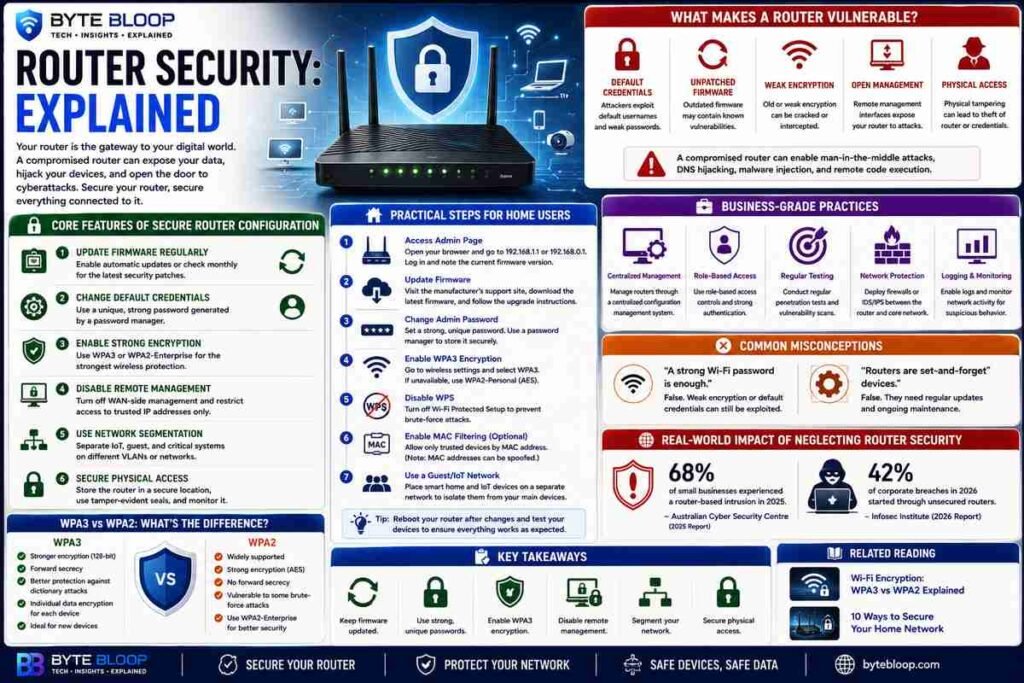
Routers expose a range of attack vectors: default credentials, unpatched firmware, weak encryption, and open management interfaces. Attackers can exploit these weaknesses to perform man‑in‑the‑middle attacks, DNS hijacking, or remote code execution. Physical access to the router can also allow tampering or theft of credentials. Because routers often sit at the perimeter of a network, a breach can give attackers a foothold into more sensitive internal systems.
Core Features of Secure Router Configuration
1. Update Firmware Regularly – Router manufacturers release firmware patches to fix vulnerabilities. Setting automatic updates or checking monthly ensures you stay protected.
2. Change Default Credentials – Default usernames like “admin” and weak passwords are common. Use a unique, strong password generated by a manager.
3. Enable Strong Encryption (WPA3 or WPA2-Enterprise) – WPA3 provides forward secrecy and protects against dictionary attacks. If your router only supports WPA2, enable WPA2-Enterprise with a RADIUS server.
4. Disable Remote Management – Turn off WAN‑side management unless you need it, and restrict access to trusted IPs.
5. Use Network Segmentation – Separate IoT devices, guest Wi‑Fi, and critical systems onto distinct VLANs to limit lateral movement.
6. Secure Physical Access – Place the router in a locked cabinet, use tamper‑evident seals, and monitor for unauthorized changes.
Practical Steps for Home Users
1. Log into your router’s admin page (usually 192.168.1.1 or 192.168.0.1) and note the current firmware version.
2. Visit the manufacturer’s support site to download the latest firmware and follow the upgrade instructions.
3. Change the admin password to a strong, unique value. Use a password manager to store it.
4. Navigate to the wireless settings and switch the encryption to WPA3. If unavailable, select WPA2‑Personal with a 256‑bit passphrase.
5. Disable WPS (Wi‑Fi Protected Setup) as it can be exploited via brute‑force.
6. Enable MAC‑address filtering for critical devices, but remember that MAC addresses can be spoofed.
7. If you have smart home devices, place them on a separate guest network to isolate them from your main devices.
Business‑Grade Practices
Organizations should adopt a layered approach. According to the ITSAP.80.019 guidance, routers should be managed through a centralized configuration management system, with role‑based access controls. Regular penetration testing and vulnerability scanning of the router’s management interface can uncover hidden risks. Additionally, integrating a hardware firewall or IDS/IPS between the router and the core network can detect anomalous traffic patterns.
Common Misconceptions
Many users assume that a strong Wi‑Fi password alone is sufficient. In reality, weak encryption protocols and default credentials can nullify password strength. Another myth is that routers are “set‑and‑forget” devices; they require ongoing maintenance just like any other network component.
Real‑World Impact of Neglecting Router Security
In 2025, a study by the Australian Cyber Security Centre reported that 68% of small businesses had experienced a router‑based intrusion, leading to data breaches and service downtime. Similarly, the Infosec Institute’s 2026 report highlighted that unsecured routers were the most common entry point in 42% of corporate breaches.
Key Takeaways
- Update firmware and change default credentials to block common exploits.
- Enable WPA3 or WPA2‑Enterprise for robust Wi‑Fi encryption.
- Disable remote management and WPS unless absolutely necessary.
- Segment networks to limit lateral movement of attackers.
- Secure physical access to prevent tampering.
- Use a password manager for strong, unique admin passwords.
Frequently Asked Questions
What is router security explained?
Router security refers to the practices and configurations that protect a network router from unauthorized access, exploitation, and compromise, ensuring the integrity and confidentiality of data passing through it.
What are the key features of secure router configuration?
Key features include regular firmware updates, strong unique passwords, WPA3 or WPA2‑Enterprise encryption, disabled remote management, network segmentation, and physical security measures.
What are the best use cases for advanced router security?
Advanced security is essential for small businesses, smart home setups, and any environment where sensitive data or critical devices are connected, especially when using IoT devices that may lack robust security.
What are the pros and cons of enabling WPA3 on home routers?
Pros: stronger encryption, forward secrecy, protection against dictionary attacks. Cons: older devices may not support WPA3, requiring a fallback to WPA2 or a dual‑mode setup.
How often should router firmware be updated?
Ideally, check for updates monthly or enable automatic updates if the router supports it; promptly apply any vendor‑released patches.
Conclusion
Based on the available information and industry analysis, router security provides the foundational shield that protects every device connected to a network. By following best practices—regular firmware updates, strong encryption, secure credentials, and physical safeguards—home users and businesses alike can dramatically reduce the risk of compromise. Consistent vigilance transforms a router from a potential vulnerability into a robust, trusted gateway for all digital activity.
Related Reading
- Wi‑Fi Encryption: WPA3 vs WPA2 Explained