Webflow: Explained
Introduction
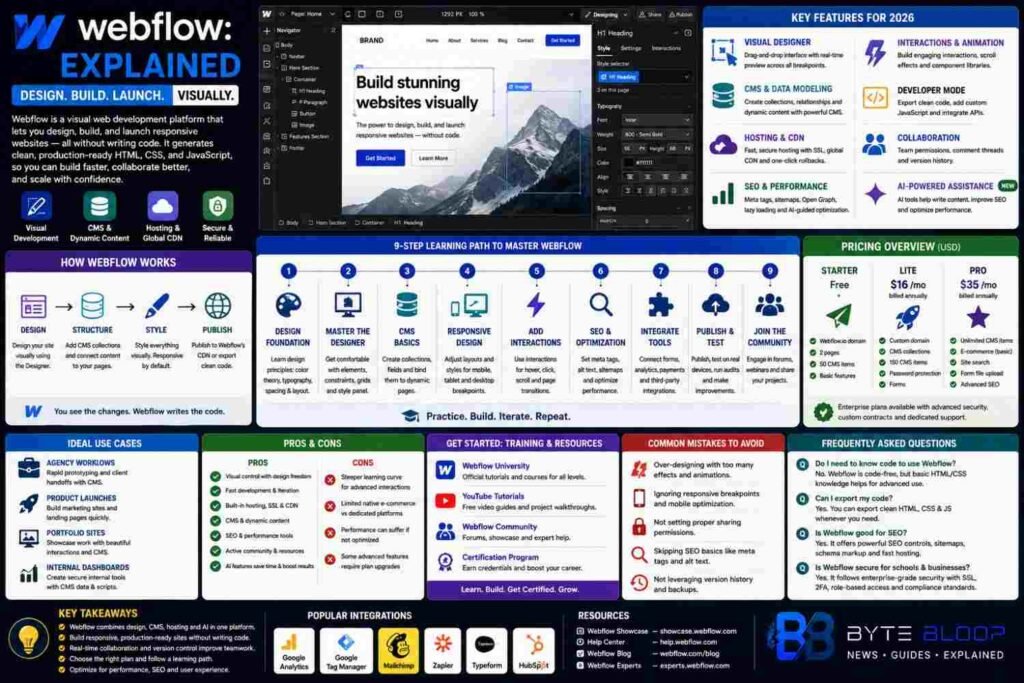
Webflow is a visual web development platform that empowers designers and developers to create fully responsive websites without writing code. The platform automatically generates clean, production‑ready HTML, CSS, and JavaScript from a drag‑and‑drop interface, allowing teams to iterate quickly and maintain design fidelity across devices. In 2026, Webflow has evolved into an all‑in‑one solution that includes CMS, hosting, SEO tools, and AI‑powered design assistance, making it a compelling choice for startups, agencies, and solo creators alike. Its real‑time preview feature lets you see changes instantly, while the built‑in version control and collaboration tools support team workflows. Webflow also offers a robust ecosystem of templates, integrations, and an active community, which helps users jumpstart projects or extend functionality with custom code when needed. Whether you’re building a portfolio, an e‑commerce site, or a complex web application, Webflow’s visual approach can reduce development time and lower the barrier to entry for non‑technical stakeholders. However, mastering its depth requires a learning curve, and some advanced features still demand a basic understanding of HTML and CSS. Understanding these nuances is key to leveraging Webflow effectively in 2026.
How Webflow Works
At its core, Webflow blends design and development in a single canvas. Designers use a visual editor to place elements, set layout properties, and apply styles. Behind the scenes, Webflow translates these actions into semantic HTML and responsive CSS, which can be exported or hosted directly on its CDN. The platform’s CMS lets users create content structures—like blog posts, product listings, or portfolio items—and bind them to dynamic templates. This means content creators can update pages without touching code, while developers can focus on custom interactions or integrations.
Key Features for 2026
- Visual Designer: Drag‑and‑drop interface with real‑time preview across breakpoints.
- CMS & Data Modeling: Create collections, relationships, and dynamic content pages.
- Hosting & CDN: Built‑in hosting with automatic SSL, global CDN, and instant rollbacks.
- SEO & Performance Tools: Meta tags, sitemap generation, lazy loading, and AI‑guided optimization.
- Interactivity & Animation: Triggered animations, scroll effects, and component libraries.
- Developer Mode: Export clean code, add custom JavaScript, and integrate third‑party APIs.
- Collaboration & Version Control: Team permissions, comment threads, and history tracking.
Learning Path: 9 Steps to Master Webflow
1. Foundation in Design Principles: Understand color theory, typography, and layout before diving into the tool.
2. Get Comfortable with the Designer: Practice placing elements, setting constraints, and using the style panel.
3. Explore CMS Basics: Create a collection, add fields, and bind them to a dynamic page.
4. Learn Responsive Breakpoints: Adjust styles for mobile, tablet, and desktop.
5. Add Interactions: Use Webflow’s interaction panel to create hover, click, and scroll effects.
6. Optimize for SEO: Set meta titles, descriptions, and alt tags; generate sitemaps.
7. Integrate Third‑Party Tools: Connect forms, analytics, and e‑commerce platforms.
8. Publish & Test: Deploy to Webflow’s CDN, run performance audits, and iterate.
9. Join the Community: Participate in forums, attend webinars, and share projects.
Pricing Overview
Webflow offers a tiered subscription model. The Starter plan is free for basic sites, while the Lite and Pro plans cater to professionals with CMS and e‑commerce capabilities. Enterprise plans provide advanced security, custom domains, and dedicated support. Pricing is competitive with traditional web development agencies, especially when factoring in the time saved during design and iteration.
Use Cases That Shine
• Agency Workflows: Rapid prototyping and client handoffs.
• Product Launches: Launch landing pages with dynamic content and analytics.
• Portfolio Sites: Showcase creative work with interactive galleries.
• Internal Dashboards: Build internal tools with CMS data and custom scripts.
Pros & Cons
Pros: Visual control, fast deployment, built‑in hosting, strong community, and AI enhancements.
Cons: Steeper learning curve for complex interactions, limited native e‑commerce features compared to dedicated platforms, and potential performance overhead if not optimized.
Key Takeaways
- Visual design meets production‑ready code
- Built‑in CMS and hosting streamline workflows
- AI tools boost SEO and performance
- Collaboration features support team projects
- Learning curve requires practice but pays off
Frequently Asked Questions
What is Webflow?
Webflow is a visual web development platform that lets users design, build, and host responsive websites without writing code, automatically generating clean HTML, CSS, and JavaScript.
What are the key features of Webflow?
Key features include a drag‑and‑drop visual designer, CMS for dynamic content, built‑in hosting and CDN, SEO and performance tools, interactive animations, developer mode for custom code, and collaboration & version control.
What are the best use cases for Webflow?
Ideal for agencies needing rapid prototyping, product teams launching landing pages, creatives building portfolios, and businesses creating internal dashboards with CMS data.
What are the pros and cons of Webflow?
Pros: visual control, fast deployment, integrated hosting, AI SEO, strong community. Cons: learning curve for advanced interactions, limited native e‑commerce compared to dedicated platforms, potential performance overhead if not optimized.
Conclusion
Based on the available information and industry analysis, Webflow provides a powerful, code‑free pathway to build professional, responsive websites while retaining the flexibility of custom code when needed. Its blend of design, CMS, hosting, and AI‑driven tools makes it a versatile choice for creators, agencies, and businesses looking to accelerate digital presence without compromising on quality.
Related Reading
- How to Optimize Webflow Sites for SEO
- Comparing Webflow with Traditional CMS Platforms