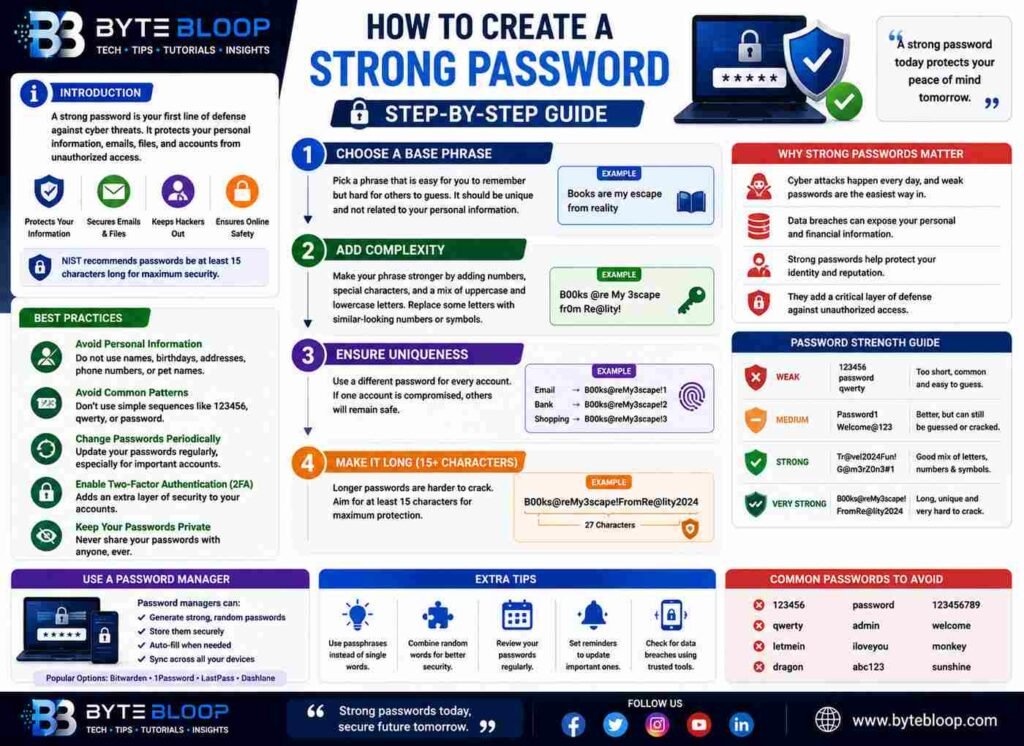
How to Create a Strong Password: Step-by-Step Guide
Introduction
Creating a strong password is one of the most critical steps in protecting your online identity and personal information. A strong password serves as a robust barrier against unauthorized access to your accounts, emails, and sensitive data. According to Google, a strong password helps keep your personal info safe, protects your emails, files, and other content, and prevents someone from accessing your accounts without your permission. The importance of strong passwords cannot be overstated, especially in today’s digital age where cyber threats are increasingly common. A well-crafted password can significantly reduce the risk of your accounts being compromised. Furthermore, using strong passwords is essential for both personal and professional online security. The process of creating a strong password involves several key steps that will be outlined in this guide.
The concept of a strong password has evolved over time, with current recommendations emphasizing the use of long, unique passphrases that include a mix of characters, numbers, and special characters. The National Institute of Standards and Technology (NIST) recommends that passwords should be at least 15 characters long to ensure maximum security. Additionally, it is crucial to avoid using personal information, common patterns, or easily guessable words in your passwords. By understanding the principles behind strong password creation and implementing these guidelines, individuals can significantly enhance their online security. The following sections will delve into the specifics of how to create a strong password, including practical examples and useful tips.
Step 1: Choose a Base Phrase
The first step in creating a strong password is to choose a base phrase that is easy for you to remember but hard for others to guess. This phrase should be unique and not related to your personal information. For example, you could use a quote from your favorite book or a sentence that holds personal significance. The key is to select a phrase that you can easily recall but that would be difficult for someone else to deduce.
Step 2: Add Complexity
Once you have your base phrase, the next step is to add complexity by incorporating numbers, special characters, and a mix of uppercase and lowercase letters. This can be done by replacing certain letters with numbers or special characters that resemble those letters. For instance, you could replace the letter ‘e’ with ‘3’ or the letter ‘a’ with ‘@’. This process helps to create a password that is both unique and resistant to guessing.
Step 3: Ensure Uniqueness
It is essential to use a unique password for each of your online accounts. Reusing passwords across different sites can significantly increase the risk of your accounts being compromised if one of those sites experiences a data breach. By using a password manager, you can generate and store unique, complex passwords for each of your accounts, making it easier to maintain strong password hygiene.
Best Practices for Strong Passwords
In addition to the steps outlined above, there are several best practices to keep in mind when creating and managing your passwords. These include avoiding the use of personal information, not using common patterns or sequences, and changing your passwords periodically. It is also recommended to enable two-factor authentication (2FA) whenever possible, as this adds an additional layer of security to your accounts.
Conclusion Preparation
In conclusion, creating strong passwords is a critical aspect of online security. By following the steps and guidelines outlined in this guide, individuals can protect their personal information and prevent unauthorized access to their accounts. The importance of password security cannot be overstated, and by taking the necessary precautions, you can significantly reduce the risk of falling victim to cyber threats.
Key Takeaways
- Use a base phrase that is easy to remember but hard to guess
- Add complexity with numbers, special characters, and mixed case
- Ensure uniqueness by using a different password for each account
- Avoid using personal information or common patterns
- Consider using a password manager to generate and store complex passwords
Frequently Asked Questions
What makes a password strong?
A strong password is one that is at least 15 characters long, unique, and includes a mix of characters, numbers, and special characters.
Why should I not reuse passwords?
Reusing passwords increases the risk of your accounts being compromised if one of those sites experiences a data breach.
How often should I change my passwords?
It is recommended to change your passwords periodically, but the frequency depends on the sensitivity of the information and the account’s security requirements.
What is two-factor authentication?
Two-factor authentication is a security process in which users are required to provide two different authentication factors to access an account or system.
Can I use a password manager to generate strong passwords?
Yes, password managers can generate and store unique, complex passwords for each of your accounts, making it easier to maintain strong password hygiene.
Conclusion
Based on the available information and industry analysis, creating strong passwords is a crucial step in protecting online identities and personal information. By following the guidelines and best practices outlined, individuals can significantly enhance their online security and reduce the risk of cyber threats.
Related Reading
- The Importance of Cybersecurity