Introduction
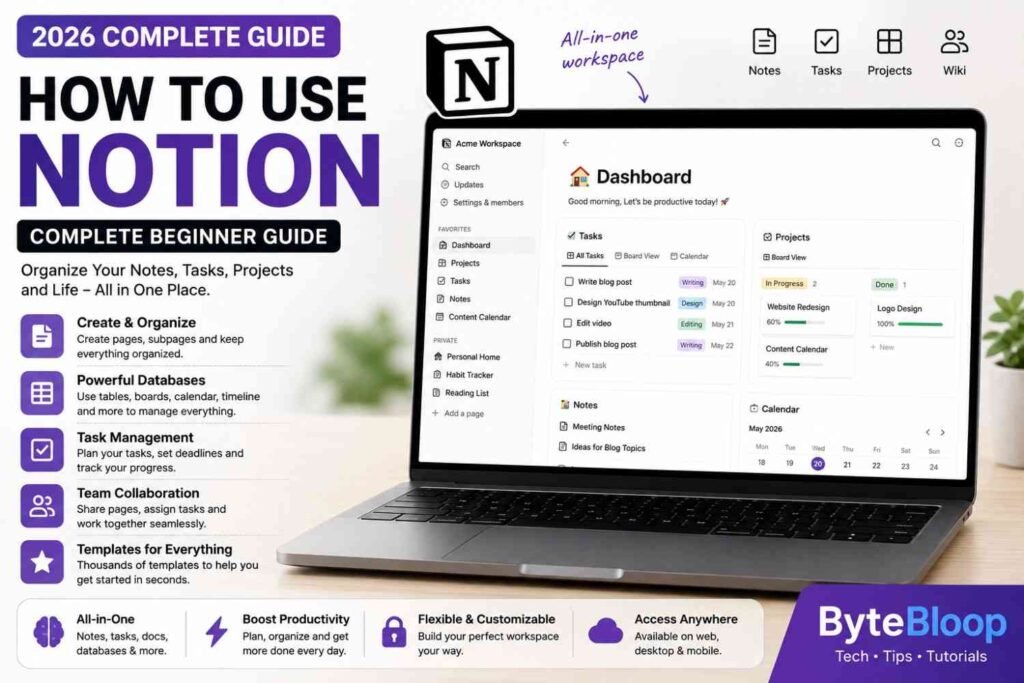
Notion has become one of the most popular productivity platforms for students, professionals, businesses, and content creators. Instead of using separate apps for notes, documents, task management, databases, calendars, and project planning, Notion brings everything together in one powerful workspace.
Whether you’re organizing your personal life, managing a team, planning content for YouTube, tracking business projects, or taking class notes, Notion can help you stay organized and productive.
This beginner-friendly guide explains everything you need to know about Notion, including its features, setup process, workspaces, databases, templates, AI tools, and practical tips to help you get started.
What Is Notion?
Notion is an all-in-one productivity and collaboration platform that combines note-taking, document creation, task management, databases, calendars, and team collaboration into a single application.
Unlike traditional note apps, Notion allows users to build customized workspaces that fit their personal or professional workflow.
Why Use Notion?
Millions of users rely on Notion because it replaces multiple productivity tools with one flexible platform.
You can use Notion for:
- Taking notes
- Managing projects
- Creating to-do lists
- Planning content
- Tracking habits
- Building knowledge bases
- Team collaboration
- Business documentation
- Study planning
- Goal tracking
Whether you’re working alone or with a team, Notion adapts to your needs.
How to Get Started with Notion
Getting started is simple.
Follow these steps:
- Create a Notion account.
- Choose a personal or team workspace.
- Explore the available templates.
- Create your first page.
- Start organizing your content.
Within minutes, you’ll have a personalized workspace ready to use.
Understanding the Notion Interface
The Notion interface is clean and beginner-friendly.
Key sections include:
- Sidebar
- Workspace
- Pages
- Search
- Templates
- Settings
- Favorites
- Shared Pages
Everything is accessible from the left sidebar, making navigation simple.
Creating Your First Page
Pages are the building blocks of Notion.
A page can contain:
- Text
- Images
- Videos
- Checklists
- Tables
- Databases
- Code blocks
- Files
- Links
- Embedded content
You can create unlimited pages and organize them into folders or nested structures.
Using Blocks in Notion
Everything inside Notion is built using blocks.
Common block types include:
- Heading
- Paragraph
- Bullet List
- Numbered List
- Checklist
- Quote
- Table
- Image
- Divider
- Toggle List
- Callout
- Code Block
Blocks can be moved, duplicated, or rearranged with ease.
Organizing Your Workspace
A well-organized workspace makes finding information much easier.
Popular organization methods include:
- Personal dashboard
- Work dashboard
- Study notes
- Content calendar
- Project folders
- Meeting notes
- Knowledge base
Using icons and cover images also helps make pages visually appealing.
Databases in Notion
Databases are one of Notion’s most powerful features.
They allow you to organize information in multiple ways.
Database views include:
- Table View
- Board (Kanban)
- Calendar
- Timeline
- Gallery
- List
These views make it easy to manage projects, tasks, and content.
Task Management
Notion works well as a personal productivity tool.
You can manage:
- Daily tasks
- Weekly goals
- Monthly planning
- Team projects
- Deadlines
- Reminders
- Progress tracking
Everything stays organized in one place.
Using Notion AI
Notion AI adds intelligent writing and productivity features directly inside your workspace.
It can help with:
- Writing articles
- Summarizing documents
- Brainstorming ideas
- Improving grammar
- Translating text
- Creating outlines
- Generating meeting summaries
These features can save time and improve your workflow.
Templates
Notion offers thousands of templates for different purposes.
Popular templates include:
- Student Planner
- Budget Tracker
- Habit Tracker
- Project Manager
- CRM
- Content Calendar
- Reading List
- Travel Planner
- Business Wiki
Templates help you get started without building everything from scratch.
Collaboration Features
Notion makes teamwork simple.
You can:
- Invite team members
- Share pages
- Assign tasks
- Leave comments
- Track updates
- Manage permissions
These collaboration tools make Notion suitable for businesses and remote teams.
Tips for Beginners
To get the most from Notion:
- Start with templates.
- Keep your workspace simple.
- Use headings for better organization.
- Create a dashboard for quick access.
- Use databases for tracking information.
- Learn keyboard shortcuts.
- Back up important data regularly.
Small improvements can make your workspace much more efficient.
Frequently Asked Questions
Is Notion free?
Yes. Notion offers a free plan with many useful features. Paid plans provide additional storage, collaboration tools, and advanced capabilities.
Can I use Notion offline?
Limited offline functionality is available, but some features require an internet connection.
Is Notion good for students?
Yes. Students use Notion for notes, assignments, study schedules, and project planning.
Can businesses use Notion?
Absolutely. Many businesses use Notion for documentation, project management, team collaboration, and knowledge sharing.
Does Notion include AI?
Yes. Notion AI offers writing assistance, summarization, brainstorming, and other productivity features on supported plans.
Final Verdict
Notion is one of the most flexible productivity platforms available today. Whether you’re a student organizing study notes, a content creator planning videos, or a business managing projects, Notion provides the tools to keep everything in one organized workspace.
With pages, databases, templates, collaboration features, and AI-powered assistance, Notion can significantly improve your productivity and simplify everyday work.