LinkedIn Privacy: Explained
Introduction
LinkedIn has become the go‑to platform for professionals worldwide, but the sheer volume of personal and business data it collects raises legitimate privacy concerns. In November 2025, LinkedIn updated its Privacy Policy to clarify how it uses profile information, connections, and third‑party data for advertising, analytics, and content recommendations. The policy also introduces new transparency tools, such as a clearer data access request process and tighter controls on data sharing with partners. For users, the most pressing question is how to balance visibility with privacy—ensuring recruiters can find you while keeping sensitive details out of reach. This guide breaks down the key privacy settings, explains the legal backdrop, and offers actionable steps to safeguard your profile in 2026.
Understanding LinkedIn’s Data Ecosystem
LinkedIn’s data collection spans profile fields, activity logs, and interaction patterns. When you upload a résumé, the platform indexes your education, work history, and skills for search optimization. Every like, comment, or share feeds an algorithm that recommends jobs, content, and connections. LinkedIn also partners with advertisers and data brokers to deliver targeted ads, a practice governed by the platform’s privacy policy and global regulations such as GDPR, UK GDPR, and the U.S. California Consumer Privacy Act.
Core Privacy Settings You Should Know
1. Profile Visibility: Toggle who can view your full profile—public, connections, or specific groups. 2. Connection Privacy: Decide if your connections are visible to others or kept private. 3. Activity Broadcasts: Control whether your network sees updates when you add a job or endorse skills. 4. Data Sharing with Third Parties: Manage permissions for data used in advertising and analytics. 5. Search Engine Indexing: Opt out of allowing search engines to index your profile.
How to Adjust Settings in 2026
Navigate to the Settings & Privacy page via the gear icon. From the “Visibility” tab, adjust profile visibility and who can see your connections. In the “Data Privacy” section, review the list of third‑party partners and toggle data sharing. The “Marketing & Ads” panel lets you opt out of personalized ads. For more granular control, use the “Data Management” tool to request a data export or deletion.
Legal Landscape and Your Rights
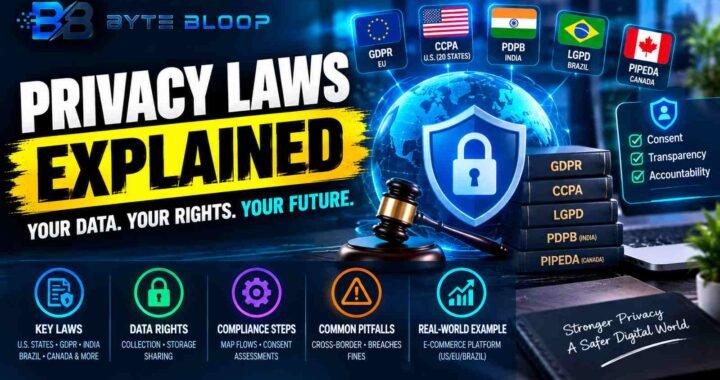
LinkedIn’s policy aligns with GDPR’s right to access, rectify, and erase personal data. In the U.S., state laws such as the California Privacy Rights Act grant similar rights, while the India DPDP Act and Brazil LGPD impose strict data transfer restrictions. Users can submit a data access request through the platform’s portal, and LinkedIn is required to respond within 30 days. Understanding these rights helps you hold the platform accountable and ensures your data is handled responsibly.
Common Privacy Pitfalls and How to Avoid Them
1. Over‑Sharing: Publicly listing sensitive employment details can expose you to unsolicited offers or phishing attempts. 2. Ignoring Data Requests: Failing to review and update data sharing permissions can leave your information exposed to third‑party advertisers. 3. Neglecting Security Settings: Not enabling two‑factor authentication or using weak passwords increases the risk of account hijacking. 4. Unverified Connections: Accepting requests from unknown users can lead to data leaks or credential stuffing attacks.
Practical Tips for Everyday Users
• Keep your headline and summary concise, avoiding personal contact details.
• Use the “Profile Viewing Options” to appear anonymous when researching competitors.
• Regularly audit your connections list to remove outdated or unverified contacts.
• Enable “Open Profile” only for trusted recruiters or industry peers.
• Review the “Ad Preferences” every six months to stay in control of targeted advertising.
Key Takeaways
- LinkedIn’s 2025 policy clarifies data use and introduces new transparency tools
- Profile visibility and connection privacy can be finely tuned through Settings & Privacy
- GDPR, UK GDPR, and other global laws grant users robust rights over their data
- Regular audits of third‑party data sharing prevent unwanted exposure
- Two‑factor authentication and strong passwords are essential defenses against account hijacking
Frequently Asked Questions
What is LinkedIn privacy explained?
LinkedIn privacy explained refers to the platform’s policies, settings, and legal frameworks that govern how personal and professional data is collected, used, and shared.
What are the key features of LinkedIn’s privacy settings?
Key features include profile visibility controls, connection privacy, activity broadcast settings, third‑party data sharing permissions, and search engine indexing options.
What are the best use cases for adjusting privacy on LinkedIn?
Adjusting privacy is ideal for recruiters who want to be discoverable, professionals who wish to protect sensitive job history, and users who want to limit targeted advertising.
What are the pros and cons of tightening LinkedIn privacy?
Pros: increased control over personal data, reduced targeted ads, and better security. Cons: potential decrease in profile visibility, fewer job recommendations, and limited networking opportunities.
Conclusion
Based on the available information and industry analysis, LinkedIn privacy provides a structured framework that balances professional visibility with data protection, allowing users to tailor their exposure while complying with evolving global regulations.
Related Reading
- Mastering LinkedIn Security Settings in 2026