Jenkins: Explained
Introduction
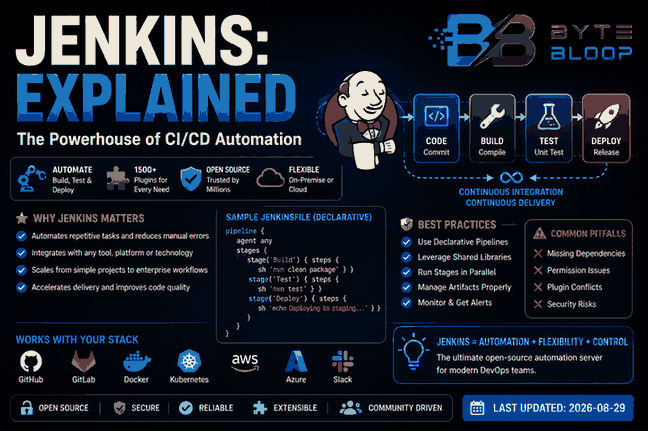
Jenkins is an open‑source automation server that has become the backbone of continuous integration and continuous delivery (CI/CD) pipelines for developers worldwide. Its ability to orchestrate build, test, and deployment tasks across diverse environments makes it indispensable for modern software teams. In 2026, Jenkins continues to evolve with new UI improvements, enhanced security features, and broader plugin support, ensuring it remains a top choice for automation. This guide will walk you through the core concepts of Jenkins, explain why it matters, and show you how to set up a basic pipeline that you can extend to fit any tech stack.
First, Jenkins abstracts the complexity of repetitive tasks by allowing you to define jobs—either freestyle or pipeline—using a simple declarative syntax. These jobs run on agents that can be local or cloud‑based, giving teams flexibility in scaling and resource allocation. Jenkins also integrates seamlessly with version control systems, test frameworks, and container platforms, turning a simple Git push into an automated, end‑to‑end workflow. Whether you’re a solo developer or part of a large enterprise, Jenkins’ extensibility and community support mean you can tailor it to your exact needs.
What Jenkins Is and Why It Matters
At its core, Jenkins is a server that listens for triggers—such as code commits or scheduled cron jobs—and then runs a series of steps defined in a job. These steps can include compiling code, running unit tests, generating artifacts, and deploying to staging or production. The result is a repeatable, auditable process that eliminates manual errors and speeds time‑to‑market.
Because Jenkins is open source, it benefits from a vast ecosystem of plugins. Over 1,500 plugins are available, covering everything from static analysis to Kubernetes integration. The community regularly updates plugins to keep pace with new technologies, ensuring Jenkins stays relevant even as the software landscape shifts.
Installing Jenkins on a Modern Stack
Jenkins can run on Windows, apple.com/macos” target=”_blank” rel=”noopener noreferrer”>macOS, or Linux. For a quick start on Linux, use the official package:
sudo apt update && sudo apt install openjdk-17-jdk
wget https://get.jenkins.io/war-stable/latest/jenkins.war
java -jar jenkins.war
After launching, access the web UI at http://localhost:8080. The first run requires an admin password found in /var/lib/jenkins/secrets/initialAdminPassword. Once logged in, you can install suggested plugins or choose a custom set.
Creating Your First Pipeline
Jenkins pipelines are defined in a Jenkinsfile using either scripted or declarative syntax. Declarative pipelines are more readable and are recommended for beginners.
pipeline {
    agent any
    stages {
        stage('Build') {
            steps {
                sh 'mvn clean package'
            }
        }
        stage('Test') {
            steps {
                sh 'mvn test'
            }
        }
        stage('Deploy') {
            steps {
                sh 'echo Deploying to staging...'
            }
        }
    }
}
Commit this file to your repository. Jenkins will automatically detect the Jenkinsfile when you create a new multibranch pipeline job, triggering the defined stages on every push.
Common Pitfalls and How to Avoid Them
- Missing Dependencies: Ensure the agent environment has all build tools installed. Use Docker agents or pre‑configured images to standardize environments.
- Permission Issues: Jenkins runs under its own user; file permissions on workspace directories can block builds. Set
chmod -R 777on a test machine or adjust ownership. - Plugin Conflicts: Updating plugins can break jobs. Maintain a
plugin‑list.txtand use the Jenkins CLI to install exact versions. - Security Misconfigurations: Disable anonymous read access and enable CSRF protection. Regularly update Jenkins core and plugins.
Best Practices for Scalable Pipelines
1. Use Declarative Syntax: Keeps pipelines maintainable and version‑controlled.
2. Leverage Shared Libraries: Extract common steps into reusable libraries to reduce duplication.
3. Parallel Stages: Run independent tests or deployments in parallel to cut pipeline time.
4. Artifact Management: Store build artifacts in a repository like Nexus or Artifactory for traceability.
5. Monitoring and Alerts: Integrate with Grafana or Prometheus to track pipeline health.
When Jenkins Is the Right Tool
Jenkins excels when you need a flexible, plugin‑rich platform that can integrate with legacy systems or custom tooling. It’s ideal for teams that prefer self‑hosted solutions and have the expertise to manage the underlying infrastructure. For organizations looking for a managed service, cloud‑native alternatives like GitHub Actions or GitLab CI may offer easier setup, but Jenkins still provides unmatched customization.
Key Takeaways
- Jenkins automates CI/CD across any stack with a vast plugin ecosystem.
- Declarative pipelines simplify maintenance and version control.
- Docker agents standardize environments and reduce dependency issues.
- Security hardening is essential—disable anonymous access and keep plugins up‑to‑date.
- Shared libraries and parallel stages boost scalability and speed.
- Jenkins remains the go‑to for self‑hosted, highly customizable automation.”]
- tags
- :
- CI/CD,Jenkins,Automation,DevOps
- faqs
- :
- [object Object],[object Object],[object Object],[object Object]
- conclusion
- :
- Based on the available information and industry analysis
- Jenkins provides a robust
- extensible platform that empowers teams to automate complex build
- test
- and deployment workflows. Its open‑source nature and vibrant plugin ecosystem allow organizations to tailor pipelines to their specific needs
- while recent updates in 2026 have improved security
- UI
- and reliability. By adopting Jenkins
- teams can reduce manual errors
- accelerate delivery cycles
- and maintain full control over their automation infrastructure.
- related_article_suggestions
- :
- [object Object]
- last_updated
- :
- 2026-08-29
Conclusion
Based on the available information, this topic provides essential insights for readers looking to understand the core concepts and practical applications.