Video Conferencing: Explained
Introduction
Video conferencing has become the backbone of modern collaboration, turning distant colleagues into a shared workspace. At its core, it synchronizes audio, video, and content in real time, allowing participants to interact as if they sat in the same room. The technology blends hardware—cameras, microphones, displays—with software that routes data over the internet using codecs and network protocols. Today’s hybrid teams rely on these tools to maintain productivity across continents, reduce travel costs, and foster inclusive meetings. Understanding the mechanics, bandwidth demands, and best‑practice guidelines can transform a chaotic call into a smooth, productive session. This guide breaks down the essential elements of video conferencing, from basic definitions to advanced architectural insights, so you can choose the right solution and run meetings that feel truly collaborative.
First, let’s define the term. Video conferencing is a real‑time communication technology that connects two or more participants in different locations via live video and audio over the internet. It often includes screen sharing, chat, and recording features, enabling teams to collaborate on documents, presentations, and projects without leaving their desks. The experience ranges from simple one‑to‑one calls on smartphones to full‑scale telepresence rooms with high‑definition cameras and immersive displays. As companies increasingly adopt remote or hybrid work models, the demand for reliable, secure, and feature‑rich video conferencing solutions has surged, driving innovation in codecs, AI‑powered noise suppression, and adaptive bandwidth management.
How It Works
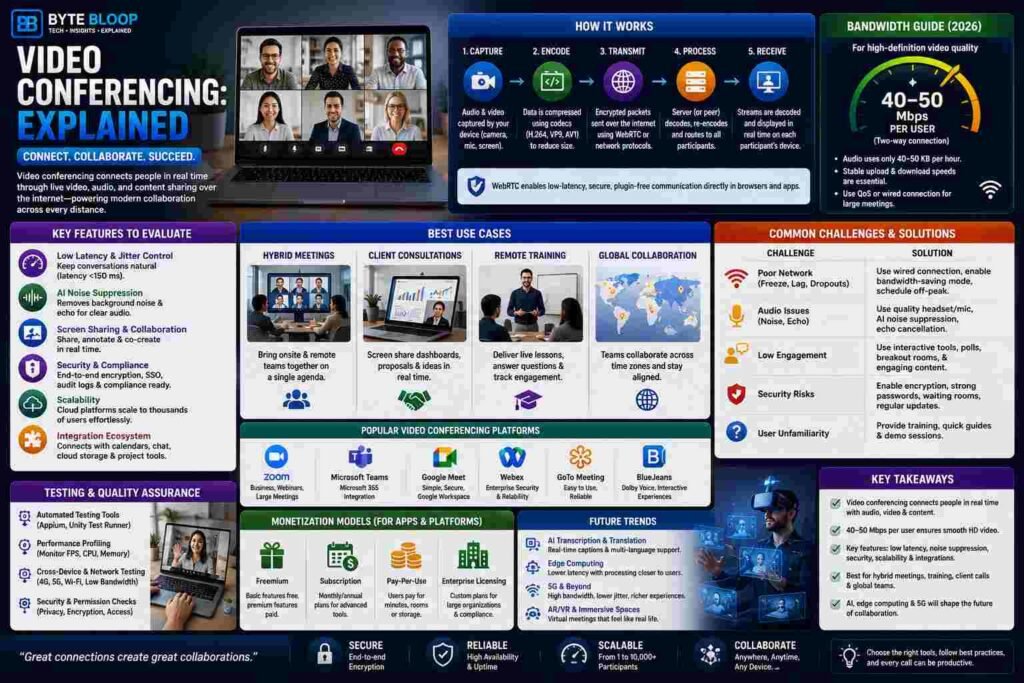
At its simplest, a video conference is a series of packets traveling over the network. Each participant’s device captures audio and video, compresses it with a codec—such as H.264 or VP9—to reduce file size, and sends it to a server or directly to peers via peer‑to‑peer protocols. The server then decodes, re‑encodes, and redistributes the streams to all participants. Modern platforms use WebRTC, a browser‑based technology that supports low‑latency, encrypted communication without plugins. The server infrastructure may be cloud‑based, on‑premises, or hybrid, depending on security and compliance needs.
Bandwidth and Quality Considerations
Quality of Service (QoS) is critical. Typical bandwidth requirements in 2026 are around 40–50 Mbps per user for high‑definition video, with audio consuming only 40–50 KB per hour. These figures assume a stable two‑way connection. If the network is congested, adaptive bitrate algorithms lower the resolution to maintain audio clarity. For large meetings, a dedicated line or a Quality of Service (QoS) configuration can prevent jitter and packet loss. Users should also consider upload speeds; many consumers underestimate the need for symmetric bandwidth.
Key Features to Evaluate
- Latency and Jitter Control: Low latency (<150 ms) keeps conversations natural.
- Noise Suppression and Echo Cancellation: AI‑driven audio processing eliminates background hiss.
- Screen Sharing and Collaboration Tools: Real‑time annotation and shared whiteboards boost productivity.
- Security and Compliance: End‑to‑end encryption, single‑sign‑on, and audit logs are mandatory for regulated industries.
- Scalability: Cloud‑based services can handle thousands of concurrent users without hardware upgrades.
- Integration Ecosystem: Seamless links to calendars, file storage, and project management tools reduce friction.
Best Use Cases
Video conferencing shines in scenarios where visual cues enhance communication:
- Hybrid Meetings: Onsite and remote participants share a single agenda, reducing travel costs.
- Client Consultations: Real‑time screen sharing lets consultants walk clients through dashboards or prototypes.
- Remote Training: Instructors can broadcast live lessons, capture questions, and provide instant feedback.
: Distributed teams collaborate across time zones, ensuring that all voices are heard.
Common Challenges and Mitigation
Despite its benefits, video conferencing can suffer from technical hiccups. Poor network conditions lead to frozen video, audio dropouts, or lag. To mitigate, use a wired Ethernet connection, enable bandwidth‑saving modes, or schedule meetings during off‑peak hours. Hardware issues—like low‑quality microphones—can be resolved by investing in USB‑powered headsets. Finally, user training is essential; many problems arise from unfamiliarity with features such as muting, screen sharing, or breakout rooms.
Future Trends
AI is increasingly shaping the next generation of video conferencing. Real‑time transcription, language translation, and sentiment analysis will make meetings more inclusive and data‑rich. Edge computing will bring processing closer to the user, reducing latency for global participants. Meanwhile, 5G rollout promises higher bandwidth and lower jitter, enabling immersive experiences like holographic telepresence. Companies that adopt these innovations early will gain a competitive edge in remote collaboration.
Key Takeaways
- Video conferencing synchronizes audio, video, and content in real time.
- Bandwidth of 40–50 Mbps per user is typical for HD video in 2026.
- Key features include low latency, noise suppression, and robust security.
- Hybrid meetings, remote training, and global teams are prime use cases.
- Future trends focus on AI, edge computing, and 5G integration.
Frequently Asked Questions
What is video conferencing explained?
Video conferencing is a real‑time communication technology that connects two or more participants in different locations via live audio and video over the internet, often including screen sharing and collaboration tools.
What are the key features of a modern video conferencing platform?
Key features include low latency, adaptive bitrate, AI noise suppression, end‑to‑end encryption, screen sharing, collaboration tools, and seamless integration with calendars and file storage.
What are the best use cases for video conferencing?
Hybrid meetings, client consultations, remote training, and global team collaboration are top use cases where visual and audio cues enhance productivity.
What are the pros and cons of video conferencing?
Pros: real‑time collaboration, cost savings, inclusivity. Cons: bandwidth demands, technical glitches, potential security risks if not properly secured.
Conclusion
Based on the available information and industry analysis, video conferencing provides a scalable, cost‑effective solution that bridges geographic gaps and enhances collaboration across teams. By understanding its architecture, bandwidth requirements, and best‑practice guidelines, organizations can leverage this technology to foster real‑time interaction, improve productivity, and maintain competitive advantage in a hybrid work world.
Related Reading
- Choosing the Right Video Conferencing Platform for Your Business
- How AI Is Transforming Remote Collaboration