Terraform: Explained
Introduction
Infrastructure as Code (IaC) has reshaped how teams provision, manage, and scale resources. At the heart of this shift is Terraform, an open‑source tool that lets you describe entire environments in declarative files and then let the system bring them to life. By treating infrastructure as code, Terraform eliminates manual configuration drift, ensures reproducibility, and enables version control for your cloud assets.
First released by HashiCorp in 2014, Terraform quickly became the industry standard for IaC. Its design philosophy centers on a simple, provider‑agnostic syntax that works across AWS, Azure, Google Cloud, and many other platforms. Whether you’re a developer, a DevOps engineer, or a system administrator, Terraform provides a single language to model everything from a single virtual machine to a multi‑region Kubernetes cluster.
In this guide, we’ll walk through the core concepts that make Terraform powerful, show how to write a basic configuration, and highlight common pitfalls. By the end, you’ll understand why Terraform is a cornerstone of modern cloud operations and how to start using it in your own projects.
Core Concepts
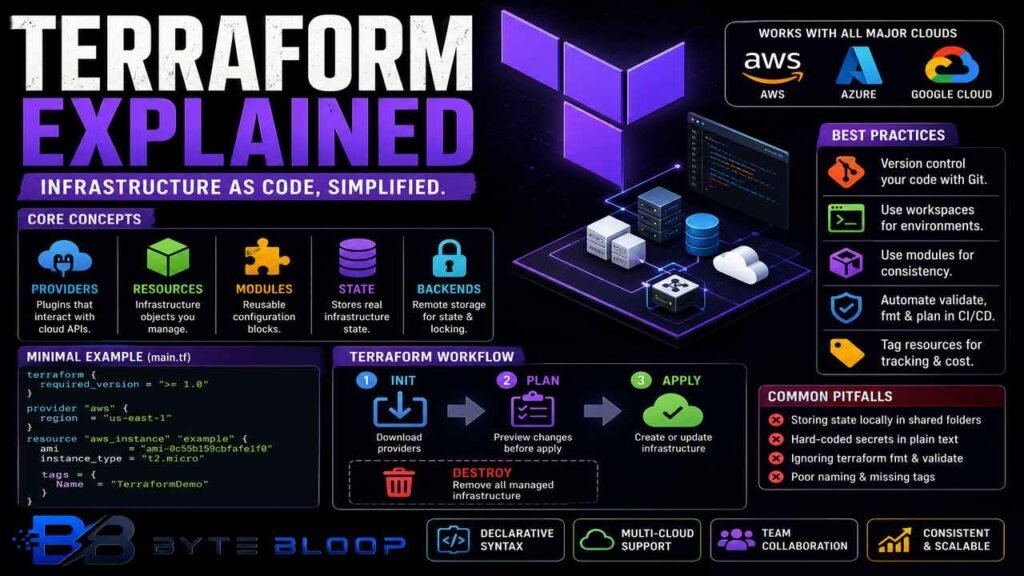
Providers are plugins that Terraform uses to interact with cloud APIs. Each provider (e.g., aws, azurerm, google) exposes resources that you can create, modify, or delete. Providers are declared in a provider block and often require authentication credentials.
Resources represent the infrastructure objects you want to manage. Every resource has a type (e.g., aws_instance) and a set of arguments that define its attributes. Terraform keeps a state file that maps resources to real‑world objects, allowing it to detect changes and plan updates.
Modules are reusable bundles of configuration. A module can encapsulate a VPC, a database, or an entire application stack. By using modules, you promote consistency and reduce duplication across environments.
State is the source of truth for Terraform. It records the current configuration of resources so that future runs can compare desired state against actual state. Remote state backends (e.g., S3, Azure Blob) enable team collaboration and locking.
Getting Started: A Minimal Example
Below is a simple Terraform script that launches an EC2 instance on AWS. Save it as main.tf and run the typical Terraform workflow.
terraform {
  required_version = ">= 1.0"
}

provider "aws" {
  region = "us-east-1"
}

resource "aws_instance" "example" {
  ami           = "ami-0c55b159cbfafe1f0"
  instance_type = "t2.micro"

  tags = {
    Name = "TerraformDemo"
  }
}
Run the following commands in order:
terraform init– Downloads provider plugins.terraform plan– Shows the actions Terraform will perform.terraform apply– Creates the instance.
Once you’re done, you can clean up with terraform destroy.
Common Pitfalls and How to Avoid Them
- State Management – Storing state locally in a shared folder can lead to corruption. Use a remote backend with locking (e.g., Terraform Cloud, S3 + DynamoDB).
- Hard‑coded Secrets – Never embed passwords or API keys in plain text. Leverage environment variables, Vault, or the provider’s credential mechanisms.
- Ignoring
terraform fmt– Consistent formatting makes code easier to read and review. Runterraform fmtbefore committing. - Resource Naming – Use descriptive names and tags. This simplifies cost tracking and auditing.
Best Practices
- Version your Terraform configuration with Git and tag releases.
- Use
terraform workspaceto separate environments (dev, staging, prod). - Apply modules from the Terraform Registry or your own internal registry to enforce standards.
- Automate
terraform validateandterraform fmtin CI pipelines.
Key Takeaways
- Terraform turns infrastructure into reusable code.
- Providers enable multi‑cloud support with a single syntax.
- Modules promote consistency and reduce duplication.
- Remote state backends are essential for team collaboration.
- Automating validation and formatting improves reliability.
Frequently Asked Questions
What is Terraform?
Terraform is an open‑source infrastructure as code tool that lets you build, change, and version infrastructure safely and efficiently.
What are the key features of Terraform?
Terraform offers provider‑agnostic configuration, a declarative language, state management, modules, and remote backends for collaboration.
What are the best use cases for Terraform?
Terraform is ideal for provisioning cloud resources, managing multi‑cloud environments, automating infrastructure updates, and enforcing infrastructure standards across teams.
What are the pros and cons of Terraform?
Pros include consistency, version control, and provider support. Cons can be state management complexity and a learning curve for beginners.
Conclusion
Based on the available information and industry analysis, Terraform provides a unified, declarative approach to managing cloud and on‑prem infrastructure, enabling teams to treat resources as code, reduce drift, and accelerate deployment cycles. Its extensive provider ecosystem and community modules make it adaptable to a wide range of use cases, from simple single‑instance setups to complex, multi‑region architectures. By adopting Terraform, organizations can achieve higher reliability, reproducibility, and operational efficiency in their infrastructure lifecycle.
Related Reading
- Terraform Modules: Reusable Infrastructure Building Blocks
Sources & References