Audio Editing Apps: Explained
Introduction
Audio editing apps have become an essential tool for anyone looking to edit audio files on their mobile devices. With the advancement in technology, these apps have made it possible to edit audio files with ease, regardless of the user’s level of expertise. Audio editing apps offer a wide range of features, including cutting, trimming, and merging audio files, as well as adding effects and filters to enhance the sound quality. Some popular audio editing apps include AudioLab, Audacity, and WavePad, which offer a user-friendly interface and a variety of tools to edit audio files. These apps are not only useful for professionals but also for individuals who want to edit audio files for personal use, such as creating podcasts or voiceovers. The importance of audio editing apps cannot be overstated, as they have made it possible to edit audio files on the go, without the need for a computer or specialized software. Additionally, many audio editing apps are free or offer a free version, making them accessible to a wide range of users.
The core definition of audio editing apps is to provide a platform for users to edit and manipulate audio files. These apps offer a range of features, including audio cutting, trimming, and merging, as well as noise reduction and echo cancellation. Some audio editing apps also offer advanced features, such as multi-track editing and effects processing, which are useful for professionals who need to edit complex audio files. The significance of audio editing apps lies in their ability to provide a convenient and user-friendly way to edit audio files, without the need for specialized software or equipment. With the rise of mobile devices, audio editing apps have become increasingly popular, and are now used by a wide range of individuals, from professionals to hobbyists.
Key Features of Audio Editing Apps
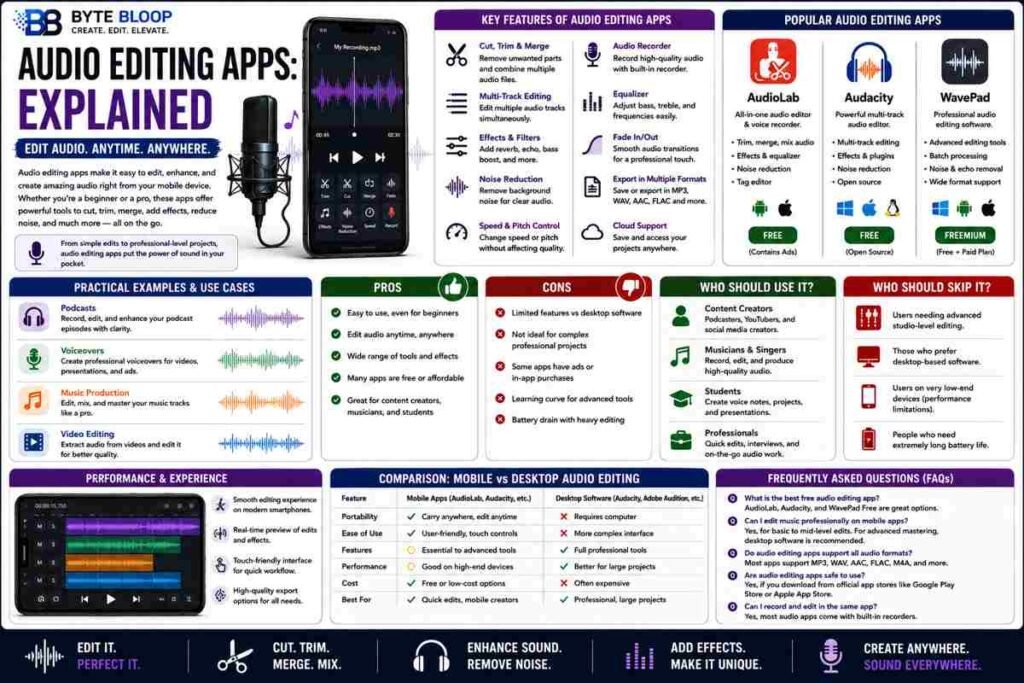
Audio editing apps offer a wide range of features, including audio cutting, trimming, and merging. Some apps also offer advanced features, such as multi-track editing and effects processing. These features are useful for professionals who need to edit complex audio files, as well as for individuals who want to create high-quality audio content. Many audio editing apps also offer a user-friendly interface, which makes it easy for users to navigate and edit audio files. Some apps also offer a free version, which makes them accessible to a wide range of users.
Practical Examples of Audio Editing Apps
There are many practical examples of audio editing apps, including AudioLab, Audacity, and WavePad. These apps offer a wide range of features, including audio cutting, trimming, and merging, as well as effects processing and noise reduction. For example, AudioLab is a powerful audio editor and voice recorder that offers a wide range of features, including audio cutting, trimming, and merging. Audacity is another popular audio editing app that offers a wide range of features, including multi-track editing and effects processing. WavePad is a professional audio editing app that offers a wide range of features, including noise reduction and echo cancellation.
Pros and Cons of Audio Editing Apps
The pros of audio editing apps include their convenience and user-friendly interface. Many audio editing apps are free or offer a free version, which makes them accessible to a wide range of users. Additionally, audio editing apps offer a wide range of features, including audio cutting, trimming, and merging, as well as effects processing and noise reduction. However, there are also some cons to audio editing apps, including their limited functionality compared to professional audio editing software. Some audio editing apps may also have a steep learning curve, which can make it difficult for users to navigate and edit audio files.
Key Takeaways
- Audio editing apps offer a wide range of features, including audio cutting, trimming, and merging
- Many audio editing apps are free or offer a free version, making them accessible to a wide range of users
- Audio editing apps have a user-friendly interface, making it easy for users to navigate and edit audio files
- Some audio editing apps offer advanced features, such as multi-track editing and effects processing
- Audio editing apps are useful for professionals and individuals who want to create high-quality audio content
Frequently Asked Questions
What is an audio editing app?
An audio editing app is a software application that allows users to edit and manipulate audio files on their mobile devices
What are the key features of audio editing apps?
The key features of audio editing apps include audio cutting, trimming, and merging, as well as effects processing and noise reduction
What are the best use cases for audio editing apps?
The best use cases for audio editing apps include creating podcasts, voiceovers, and music tracks, as well as editing audio files for personal use
What are the pros and cons of audio editing apps?
The pros of audio editing apps include their convenience and user-friendly interface, while the cons include their limited functionality compared to professional audio editing software
Are audio editing apps free?
Many audio editing apps are free or offer a free version, making them accessible to a wide range of users
Conclusion
Based on the available information and industry analysis, audio editing apps provide a convenient and user-friendly way to edit audio files on mobile devices, making them a valuable tool for professionals and individuals alike.
Related Reading
- The Best Mobile Video Editing Apps