Introduction
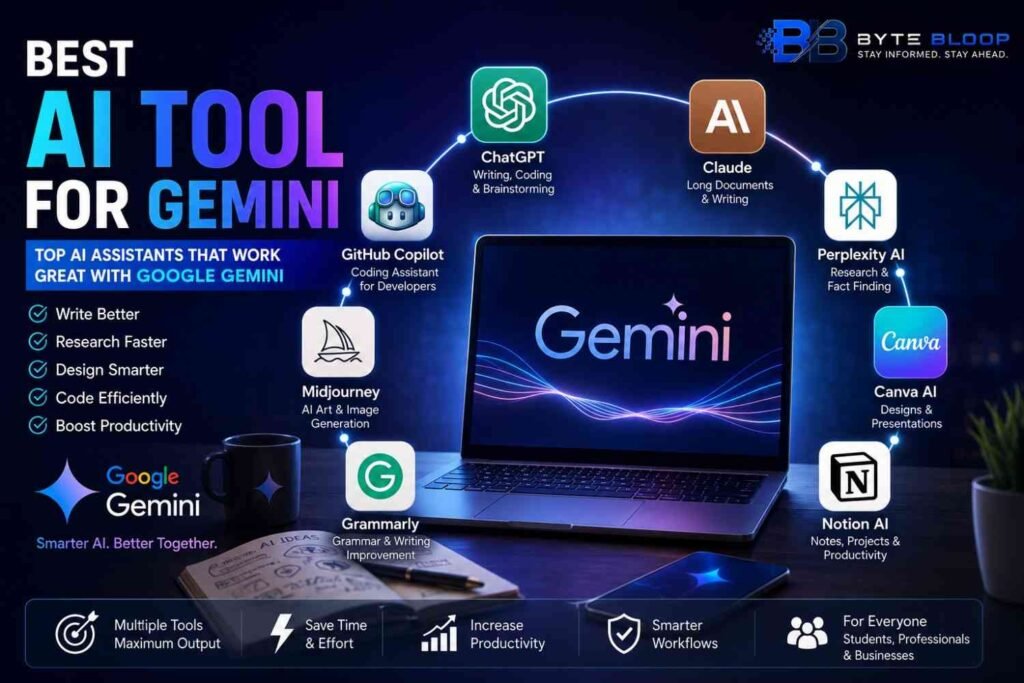
Google Gemini has become one of the most capable AI assistants available today, helping users with writing, coding, research, productivity, and creative work. While Gemini is powerful on its own, pairing it with the right AI tools can significantly improve your workflow.
Whether you’re a student, content creator, software developer, marketer, or business owner, choosing the right companion tools can save time, automate repetitive tasks, and produce better results.
In this guide, we’ll explore the best AI tools that work well alongside Google Gemini and explain where each one shines.
Why Use AI Tools with Gemini?
Gemini is excellent at generating ideas and answering questions, but no single AI tool is perfect for every task.
Using specialized AI tools together with Gemini can help you:
- Create professional content faster.
- Generate and debug code.
- Design graphics.
- Summarize PDFs and documents.
- Automate workflows.
- Improve SEO.
- Edit videos and images.
- Manage projects more efficiently.
Best AI Tools for Gemini
1. ChatGPT
Best For: Writing, coding, brainstorming, and problem-solving.
ChatGPT complements Gemini by offering strong conversational abilities, programming assistance, document analysis, and creative writing support. Many users switch between Gemini and ChatGPT depending on the task.
Key Features
- Natural conversations
- Code generation
- Writing assistance
- Document analysis
- Image understanding (supported platforms)
2. Claude
Best For: Long documents and detailed writing.
Claude is known for handling lengthy documents and producing well-structured responses. It’s useful for research, reports, contracts, and technical documentation.
Key Features
- Long-context support
- High-quality writing
- Research assistance
- Document summarization
3. Perplexity AI
Best For: Research and fact-finding.
Perplexity focuses on providing answers backed by web sources, making it useful for users who need up-to-date information and citations.
Key Features
- Web-powered search
- Source citations
- Research summaries
- Quick fact checking
4. Canva AI
Best For: Graphic design and presentations.
If you use Gemini for content creation, Canva AI can help turn those ideas into social media graphics, presentations, posters, and marketing materials.
Key Features
- AI image generation
- Presentation creation
- Social media templates
- Brand kits
5. GitHub Copilot
Best For: Developers.
GitHub Copilot is designed to assist programmers by suggesting code, completing functions, and speeding up software development.
Key Features
- Code suggestions
- Auto-completion
- Multiple programming languages
- IDE integration
6. Notion AI
Best For: Productivity and note-taking.
Notion AI helps users organize ideas, summarize notes, manage projects, and write documents efficiently.
Key Features
- AI writing
- Meeting summaries
- Task management
- Knowledge organization
7. Midjourney
Best For: AI artwork.
Midjourney specializes in creating high-quality digital artwork and concept images from text prompts, making it popular among designers and creators.
8. Grammarly
Best For: Grammar and writing improvement.
Grammarly checks spelling, grammar, clarity, tone, and readability, making it an excellent companion for Gemini-generated content.
Comparison Table
| AI Tool | Best For | Free Plan | Ideal Users |
|---|---|---|---|
| ChatGPT | Writing & Coding | Yes | Everyone |
| Claude | Long Documents | Yes | Writers, Researchers |
| Perplexity AI | Research | Yes | Students, Professionals |
| Canva AI | Design | Yes | Creators, Marketers |
| GitHub Copilot | Coding | Limited | Developers |
| Notion AI | Productivity | Limited | Teams, Students |
| Midjourney | AI Art | No | Designers |
| Grammarly | Writing | Yes | Students, Professionals |
How to Choose the Right Tool
Choose based on your primary needs:
- Writing: ChatGPT or Claude
- Research: Perplexity AI
- Design: Canva AI
- Programming: GitHub Copilot
- Project Management: Notion AI
- Image Creation: Midjourney
- Grammar: Grammarly
Many professionals combine multiple tools with Gemini to create a more efficient workflow.
Pros & Cons
Pros
- Improves productivity
- Better content creation
- Faster research
- Enhanced coding assistance
- More creative possibilities
- Supports multiple industries
Cons
- Some advanced features require paid subscriptions.
- Switching between different tools can take time.
- AI-generated content should always be reviewed before publishing.
Frequently Asked Questions
Which AI tool works best with Google Gemini?
There isn’t a single best option. ChatGPT, Claude, Perplexity AI, Canva AI, and GitHub Copilot are among the most useful companions depending on your needs.
Is ChatGPT better than Gemini?
Both are capable AI assistants. The better choice depends on your workflow, preferred ecosystem, and the type of tasks you perform.
Can I use multiple AI tools together?
Yes. Many users combine different AI tools for writing, coding, design, research, and productivity.
Which AI tool is best for coding?
GitHub Copilot is widely used for coding assistance, while ChatGPT and Gemini also provide strong programming support.
Which AI tool is best for students?
Students often benefit from combining Gemini with Perplexity AI for research and Grammarly for improving written assignments.
Are these AI tools free?
Most offer a free version, although premium plans typically unlock advanced capabilities and higher usage limits.
Final Verdict
Google Gemini is a powerful AI assistant, but pairing it with specialized tools can significantly improve your productivity. Whether you’re writing articles, designing graphics, researching topics, or developing software, the right combination of AI tools can help you work faster and more effectively.
Instead of relying on a single platform, choose the tools that best match your workflow and use them together to get the best results.