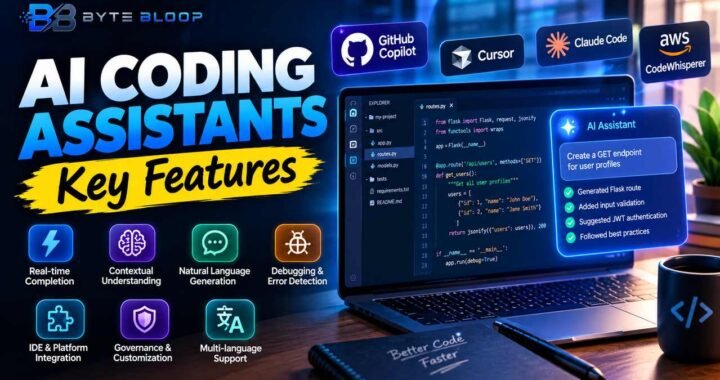
Cursor AI: Explained
Introduction
Cursor AI is an AI‑first integrated development environment that extends the familiar Visual Studio Code experience with powerful coding agents. Instead of typing every line, developers can hand off tasks to the AI, which writes, reviews, and refactors code across multiple files simultaneously. The platform is built on an open‑source codebase, ensuring that developers can customize and extend it with plugins or custom commands. Cursor’s design philosophy centers on productivity: by automating repetitive work, it frees developers to focus on architecture, design, and problem solving. The tool offers two main interaction modes—Composer and Agent—each suited to different stages of the development cycle. Composer is ideal for drafting code snippets or generating boilerplate, while Agent mode handles larger, multi‑step tasks such as feature implementation or bug fixing. With a growing library of tutorials, community resources, and a robust API, Cursor AI is quickly becoming a staple for modern software teams that want to leverage AI to accelerate delivery.
What Is Cursor AI?
Cursor AI is a code editor that integrates advanced language models to assist developers in real time. It functions as a fork of VS Code, so any familiar shortcuts or extensions carry over. The core innovation lies in its “agents,” which can read context from the entire workspace, plan steps, and execute code changes. These agents are powered by models such as GPT‑4o and are fine‑tuned for software development tasks.
Key Features
- Composer Mode – Quickly generate code snippets, comments, or documentation by describing the desired outcome.
- Agent Mode – Hand off multi‑step tasks like adding a new API endpoint, refactoring a module, or fixing a bug.
- Multi‑File Context – The AI can analyze dozens of files at once, understanding module relationships and dependencies.
- Custom Commands & Rules – Define project‑specific guidelines that the AI must follow, such as naming conventions or security checks.
- Cloud Agents – Run agents on the cloud for heavy compute or to offload processing from local machines.
- Open‑Source Extensibility – Build or integrate new plugins, or modify the underlying VS Code base to suit team workflows.
Best Use Cases
- Rapid Prototyping – Generate skeletons for new features or microservices in minutes.
- Code Review Automation – Let agents scan for style violations or security issues before human review.
- Bug Fixing – Provide a description of a bug, and the agent can propose patches across affected files.
– New hires can learn codebases faster by letting the AI explain relationships and suggest improvements.
Practical Example: Adding a REST Endpoint
Suppose a team needs a new user‑registration endpoint. In Composer mode, the developer types: “Create a POST /register endpoint that validates email, hashes password, and stores the user in PostgreSQL.” Cursor AI drafts the route, controller, and database migration. The developer reviews, tweaks validation rules, and then switches to Agent mode to run a full test suite. The agent automatically updates related documentation and pushes changes to the staging branch.
Pros and Cons
- Pros – Significant time savings on boilerplate, consistent coding standards, real‑time assistance, strong community tutorials.
- Cons – Requires internet connectivity for cloud models, occasional hallucinations that need manual verification, learning curve for advanced agent scripting.
Pricing Overview
Cursor AI offers a free tier with basic Composer and Agent capabilities. Paid plans start at $19/month per user, unlocking advanced features such as Cloud Agents, custom command scripting, and priority support. Enterprise options are available for teams needing dedicated infrastructure or on‑prem deployments.
Key Takeaways
- Cursor AI blends VS Code with AI agents to accelerate coding.
- Composer mode handles quick snippets, Agent mode tackles multi‑step tasks.
- Multi‑file context lets the AI understand complex codebases.
- Custom rules and Cloud Agents enhance security and scalability.
- Free tier is sufficient for solo developers; paid plans suit teams.
Frequently Asked Questions
What is Cursor AI?
Cursor AI is an AI‑first code editor built on VS Code that uses advanced language models to write, review, and refactor code across multiple files.
What are the key features of Cursor AI?
Key features include Composer and Agent modes, multi‑file context analysis, custom commands and rules, Cloud Agents, and open‑source extensibility.
What are the best use cases for Cursor AI?
Best use cases are rapid prototyping, automated code reviews, bug fixing, and onboarding new developers with AI‑guided explanations.
What are the pros and cons of Cursor AI?
Pros: time savings, consistency, real‑time help. Cons: requires internet for cloud models, occasional hallucinations, learning curve for advanced scripting.
Conclusion
Based on the available information and industry analysis, Cursor AI provides a compelling blend of familiar VS Code ergonomics with AI‑powered coding agents that can dramatically increase developer productivity, especially for repetitive or multi‑file tasks. By offering both free and paid tiers, it invites solo developers and teams alike to experiment with AI‑assisted workflows, while its open‑source foundation ensures flexibility for customization and integration into existing pipelines.
Related Reading
- AI‑First IDEs: A Comparative Review
- How to Train Custom Coding Agents