Game Launcher Apps: Explained
Introduction
Game launcher apps are specialized tools designed to streamline the way you access, manage, and play games on your mobile device. They consolidate every installed title into a single, searchable hub, often adding features like performance optimization, quick‑launch shortcuts, and in‑app updates. For casual gamers, a launcher can reduce clutter and save battery life by closing background processes. Hardcore players benefit from custom launch profiles, mod support, and real‑time performance metrics. On Samsung devices, the built‑in Game Launcher offers a tailored experience that integrates with the Galaxy Store and hardware optimizations. Meanwhile, third‑party launchers such as Smart Game Launcher & Gaming Hub extend functionality across all Android brands, providing cross‑device compatibility. Understanding the differences between system and third‑party launchers helps you choose the right tool for your gaming habits. In this guide, we break down what game launcher apps are, how they work, and why they matter for both everyday gamers and power users.
What Is a Game Launcher?
A game launcher is an application that serves as a central gateway to all your games. It typically replaces the default app drawer for games, offering a curated interface that highlights new releases, updates, and personalized recommendations. Many launchers also provide background services that monitor system resources, automatically closing non‑essential apps to free RAM and CPU cycles.
Core Features of Popular Launchers
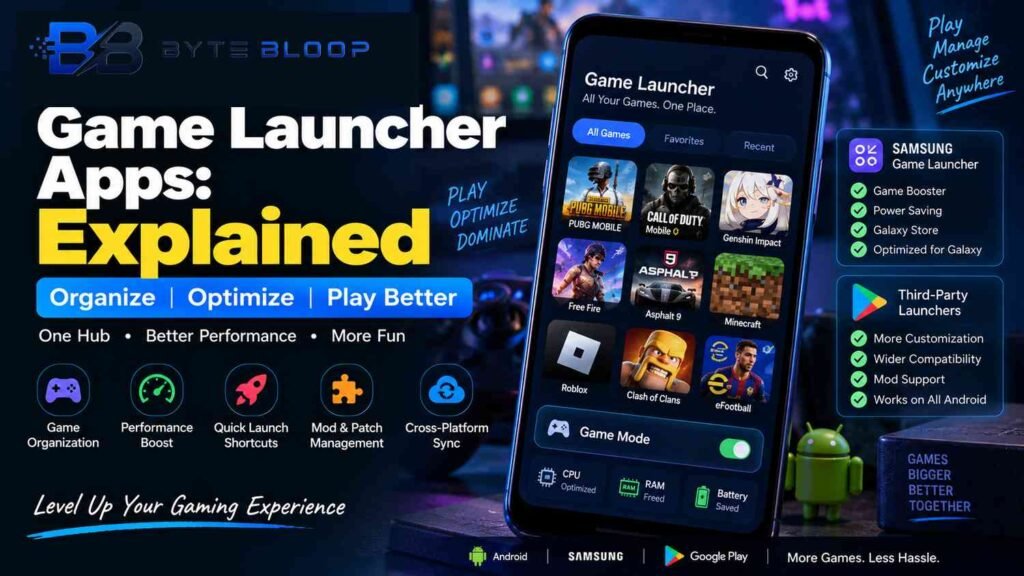
- Game Organization: Group titles by genre, developer, or playtime.
- Performance Boost: Enable “Game Mode” to prioritize GPU and CPU usage.
- Quick‑Launch Shortcuts: Pin favorite games to the home screen or use gesture controls.
- Mod & Patch Management: Install mods or patches directly from the launcher interface.
- Cross‑Platform Sync: Keep progress and settings synced across devices.
System vs. Third‑Party Launchers
Samsung’s native Game Launcher, available on many Galaxy phones, is tightly integrated with the device’s hardware and software stack. It can be updated through the Galaxy Store and offers features like “Game Booster” and “Game Power Saving.” However, it is limited to Samsung devices and may not support all Android games or mods. Third‑party launchers, such as Smart Game Launcher & Gaming Hub, are available on the Google Play Store and work across a wide range of Android phones. They often include additional customization options, broader game compatibility, and community‑driven mod support.
How to Get Started with a Game Launcher
Installing a launcher is straightforward. Search for the desired app in the Play Store, download, and grant the necessary permissions. Once launched, you’ll typically see a prompt to scan your device for installed games. After the scan completes, you can reorder, tag, or create custom folders. Many launchers also provide a “Game Mode” toggle that you can activate before starting a new title.
Optimizing Your Gaming Experience
To get the most out of a launcher, enable the performance‑boosting features it offers. On Samsung devices, turning on Game Power Saving can reduce background network traffic. For third‑party launchers, look for options like “Auto‑Close Apps” or “Battery Saver” that shut down unused processes. Additionally, keep the launcher updated to benefit from new game integrations and security patches.
Security and Privacy Considerations
Because launchers often request extensive permissions—access to installed apps, storage, and sometimes location—review the privacy policy before installation. Reputable launchers from well‑known developers maintain transparent data practices. If you’re concerned about data sharing, opt for open‑source alternatives or those that allow you to disable non‑essential permissions.
Key Takeaways
- Game launchers consolidate all titles into a single hub, saving time and space.
- Performance‑boosting modes can improve battery life and reduce lag.
- Third‑party launchers offer broader compatibility and mod support beyond OEM solutions.
- System launchers like Samsung’s integrate deeply with device hardware for optimal gaming.”]
- faqs
- :
- [object Object],[object Object],[object Object],[object Object]
- conclusion
- :
- Based on the available information and industry analysis
- game launcher apps significantly streamline mobile gaming by centralizing game access
- enhancing performance
- and offering advanced management tools. Whether you rely on Samsung
- s native launcher or opt for a versatile third‑party solution, the right launcher can reduce clutter, extend battery life, and improve overall gaming satisfaction. Future developments in AI‑driven recommendations and cross‑device sync promise to make these tools even more indispensable for gamers worldwide.”,”related_article_suggestions”:[{“title”:”Top 5 Android Game Optimizers for 2026″,”slug”:”top-android-game-optimizers-2026″}],”last_updated”:”2026-09-07″
Conclusion
Based on the available information, this topic provides essential insights for readers looking to understand the core concepts and practical applications.