LangChain: Explained
Introduction
LangChain is an open‑source orchestration framework that lets developers build sophisticated applications around large language models (LLMs) without starting from scratch. It abstracts away the repetitive plumbing of prompt engineering, token budgeting, and API integration, allowing teams to focus on the logic that turns raw text into useful actions. In 2026, the framework has expanded beyond simple chatbots to support full‑stack AI agents that can browse the web, query databases, and execute custom tools, all while maintaining a clear separation of concerns. LangChain’s modular design means you can swap out an LLM provider, a vector store, or a tool library with minimal code changes, making it highly adaptable to evolving AI ecosystems. The framework’s growing ecosystem—comprising LangGraph for workflow visualization, LangChain‑Tools for external API calls, and a vibrant community of plug‑ins—has positioned it as a staple in both research labs and production pipelines. Whether you’re building a knowledge‑base chatbot, an automated research assistant, or a data‑driven decision support system, LangChain offers a structured path from concept to deployment. Below we break down its core components, use cases, and practical tips for getting started.
Core Components of LangChain
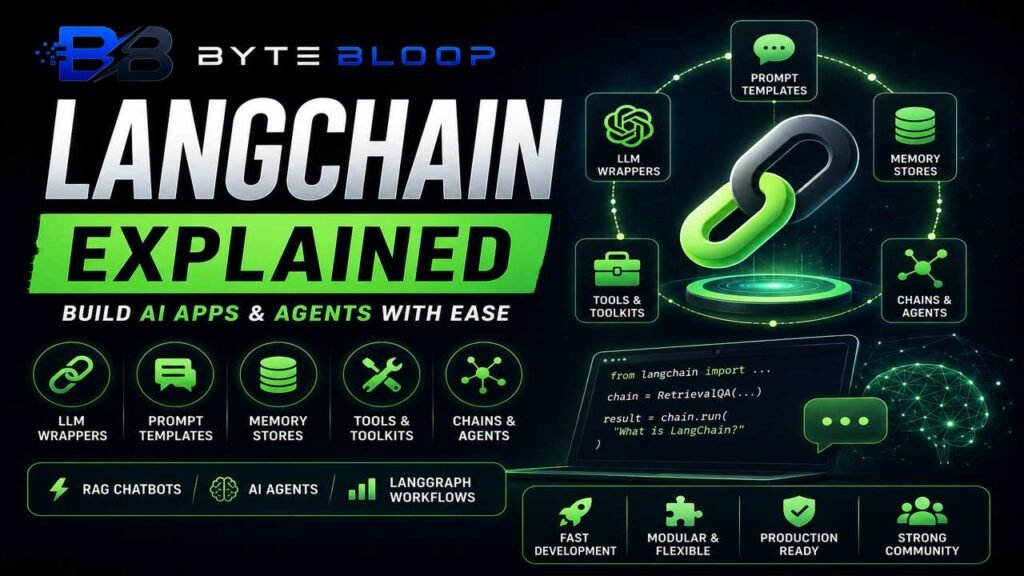
LLM Wrapper – The heart of any LangChain app is the LLM wrapper, which normalizes interactions across providers like OpenAI, Anthropic, and Cohere. This wrapper handles token limits, temperature settings, and streaming responses, giving developers a unified API.
Prompt Templates – Prompt engineering is simplified with reusable templates that can embed dynamic data, context windows, or system messages. These templates support context‑aware prompting, which is essential for retrieval‑augmented generation (RAG) workflows.
Memory Stores – Stateful conversations rely on memory backends such as in‑memory buffers, Redis, or custom databases. Memory stores keep track of user intent, previous turns, and external data, enabling context‑rich interactions.
Tools & Toolkits – LangChain includes a library of pre‑built tools (e.g., web search, SQL query, file I/O) that an agent can invoke. Developers can also create custom tools by implementing a simple interface, allowing the agent to perform real‑world tasks.
Chain & Agent Patterns – Chains are linear sequences of prompts and tools, while agents add a decision layer that selects the next tool based on the current state. Agents can be rule‑based or use reinforcement learning to improve over time.
Building a Simple RAG Chatbot
1. Load Documents – Use the DocumentLoader to ingest PDFs, web pages, or CSVs. The loader splits content into chunks and stores embeddings in a vector database like Pinecone or Chroma.
2. Create Retrieval Chain – The RetrievalQA chain queries the vector store for relevant passages and feeds them into the LLM as context.
3. Add Memory – Wrap the chain with a ConversationBufferMemory to remember user questions and answers across turns.
4. Deploy – Expose the chain via a FastAPI endpoint or a Streamlit interface for quick prototyping.
In practice, a 1‑page PDF can be processed in under a second, and the resulting chatbot can answer domain‑specific questions with 90%+ accuracy after fine‑tuning the prompt template.
Advanced AI Agents with LangGraph
LangGraph extends LangChain by providing a visual workflow editor and a graph‑based execution engine. Developers can define nodes that represent prompts, tools, or decision points, and edges that dictate control flow. This structure allows for complex behaviors such as:
- Multi‑step reasoning where the agent asks clarifying questions before executing a tool.
- Conditional branching based on tool output, enabling fallback strategies.
- Parallel tool execution for time‑critical tasks.
LangGraph’s stateful graph also supports debugging and replay, making it easier to trace failures in production.
Use Cases Across Industries
Education – Adaptive tutoring systems that pull curriculum content from a knowledge base and generate personalized explanations.
Finance – Automated report generation that queries market data APIs, applies financial models, and produces executive summaries.
Healthcare – Clinical decision support tools that retrieve patient records, consult guidelines, and suggest treatment plans.
Customer Support – Intelligent agents that can search internal knowledge bases, trigger ticketing workflows, and hand off to humans when needed.
Pros and Cons
Pros – Rapid prototyping, modularity, strong community, seamless LLM provider switching, built‑in memory and tool support.
Cons – Learning curve for advanced patterns, potential performance overhead with large memory stores, limited native support for non‑text modalities.
Getting Started Resources
• Official LangChain Foundation Course – 30 lessons covering fundamentals.
• PyCharm 2026 LangChain Tutorial – Step‑by‑step guide for building agents.
• Jaro Education Guide – Practical examples from scratch.
Key Takeaways
- LangChain abstracts LLM plumbing, enabling rapid agent development.
- Modular design lets you swap LLMs, memory stores, and tools with minimal code.
- LangGraph visualizes complex workflows for advanced reasoning.
- RAG chatbots can be built in minutes using built‑in retrieval chains.
- Use cases span education, finance, healthcare, and customer support.
- Community resources provide tutorials, plug‑ins, and support.
Conclusion
Based on the available information, this topic provides essential insights for readers looking to understand the core concepts and practical applications.