Security Apps: Explained
Introduction
Mobile phones are the primary gateway to personal data, banking, and corporate networks, making them prime targets for cybercriminals. Security apps act as a shield, offering features such as malware detection, secure browsing, and device lockout to counter these threats. They range from lightweight antivirus tools to comprehensive suites that manage permissions, encrypt data, and provide remote wipe capabilities. As mobile usage continues to grow, understanding how these apps work and what to expect from them becomes essential for both casual users and enterprises. This guide dives into the core functions of security apps, highlights industry best practices, and offers real‑world examples of how they safeguard your digital life. By the end, you’ll know which features matter most, how to choose the right solution, and how to keep your device resilient against evolving attacks.
What Security Apps Do
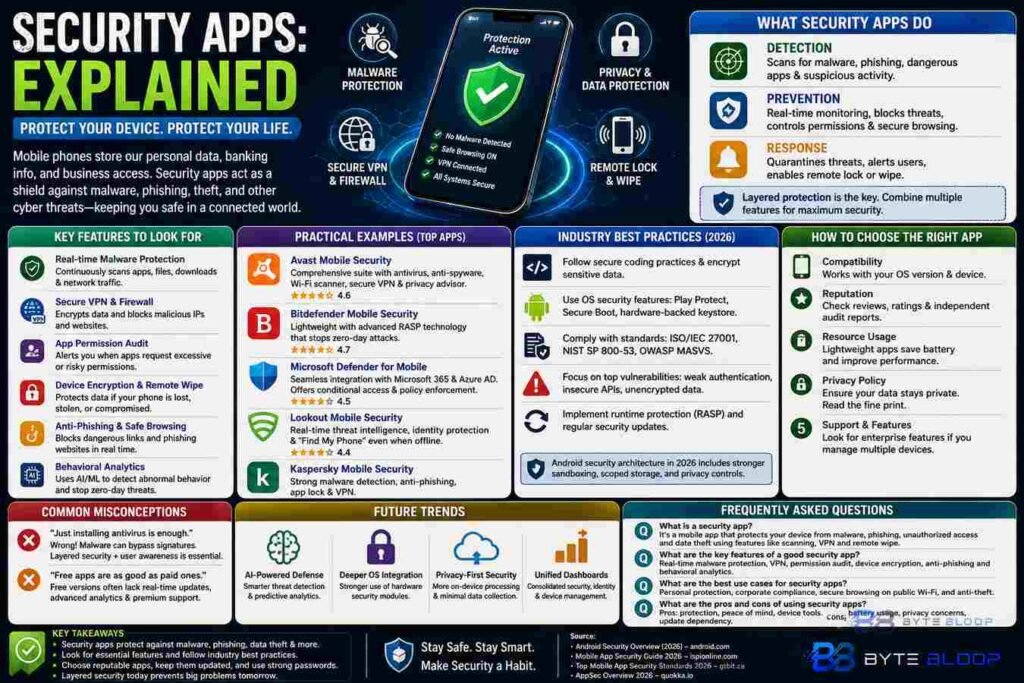
At their core, security apps perform three primary tasks: detection, prevention, and response. Detection involves scanning the device for malware, phishing sites, and suspicious apps. Prevention includes real‑time monitoring of network traffic, blocking malicious URLs, and enforcing strong authentication. Response covers actions such as quarantining threats, alerting the user, and enabling remote lock or wipe to protect data if a device is lost or stolen. These functions are layered, with many apps integrating multiple services into a single dashboard.
Key Features to Look For
While the market is saturated, certain features consistently differentiate effective security solutions:
- Real‑time malware protection – Continuous scanning of apps, downloads, and network traffic.
- Secure VPN & firewall – Encrypts data and blocks malicious IPs.
- App permission audit – Alerts you when an app requests excessive access.
- Device encryption & remote wipe – Protects data on loss or theft.
- Anti‑phishing & safe browsing – Flags suspicious URLs and email links.
- Behavioral analytics – Uses machine learning to spot abnormal activity.
Industry Best Practices (2026)
According to the 2026 Mobile App Security Guide, developers should adopt secure coding practices, encrypt sensitive data, and integrate runtime protection. Android’s security architecture now includes Play Protect, secure boot, and hardware‑backed keystores, which reputable security apps leverage to enhance device integrity. For enterprises, following the top mobile app security standards of 2026—such as ISO/IEC 27001 and NIST SP 800‑53—ensures compliance and reduces risk. The Quokka.io 2026 report highlights that the most common vulnerabilities are weak authentication, insecure APIs, and unencrypted data, underscoring the need for robust security apps that address these gaps.
Practical Examples
1. Avast Mobile Security – Offers a comprehensive suite with anti‑virus, anti‑spyware, and a secure VPN, plus a feature that blocks location‑based tracking.
2. Bitdefender Mobile Security – Known for its lightweight footprint and advanced RASP (Runtime Application Self-Protection) that stops zero‑day attacks.
3. Microsoft Defender for Mobile – Integrates with Azure AD, providing conditional access and policy enforcement for corporate devices.
4. Lookout Mobile Security – Focuses on real‑time threat intelligence and a “Find My Phone” feature that works even when the device is offline.
Choosing the Right App
When selecting a security app, consider the following criteria:
- Compatibility with your OS version and device model.
- Reputation and independent security audits.
- Resource usage—heavy apps can drain battery and slow performance.
- Privacy policy—ensure the app does not become a data collector.
- Support for enterprise features if you manage multiple devices.
Common Misconceptions
Many users believe installing an antivirus alone guarantees protection. In reality, malware can bypass traditional signatures, so layered security—combining antivirus, firewall, and user education—is essential. Another myth is that free apps are as secure as paid ones; free versions often lack real‑time updates or advanced analytics, leaving gaps in defense.
Future Trends
2026 trends point toward AI‑driven threat detection, deeper integration with OS security modules, and increased focus on privacy‑preserving analytics. Expect security apps to evolve from reactive scanners to proactive guardians that learn user behavior and preempt attacks before they materialize.
Key Takeaways
- Security apps combine detection, prevention, and response to protect devices.
- Core features include real‑time malware protection, VPN, permission audit, and remote wipe.
- Industry standards and OS security modules now provide a stronger foundation for app security.
- Choosing an app requires evaluating compatibility, reputation, and privacy policies.
- Future security tools will leverage AI and deeper OS integration for proactive defense.
Frequently Asked Questions
What is a security app?
A security app is a mobile application that protects your device from malware, phishing, unauthorized access, and data theft by providing features such as real‑time scanning, VPN, and remote wipe.
What are the key features of a good security app?
Strong real‑time malware detection, secure VPN, permission audit, device encryption, anti‑phishing, and behavioral analytics are essential features that differentiate top security apps.
What are the best use cases for security apps?
Use them on personal devices to guard against malware and phishing, on corporate devices for compliance and data protection, and on shared or public devices to maintain privacy and secure access.
What are the pros and cons of using security apps?
Pros include comprehensive protection, peace of mind, and device management tools. Cons may be increased battery usage, potential privacy concerns, and the need to keep the app updated for effectiveness.
Conclusion
Based on the available information and industry analysis, security apps provide a multi‑layered defense that mitigates the most common mobile threats, from malware to data breaches. By selecting a solution that aligns with best practices and evolving standards, users can maintain robust protection while preserving device performance and privacy.
Related Reading
- Top 5 VPN Apps for Mobile Security