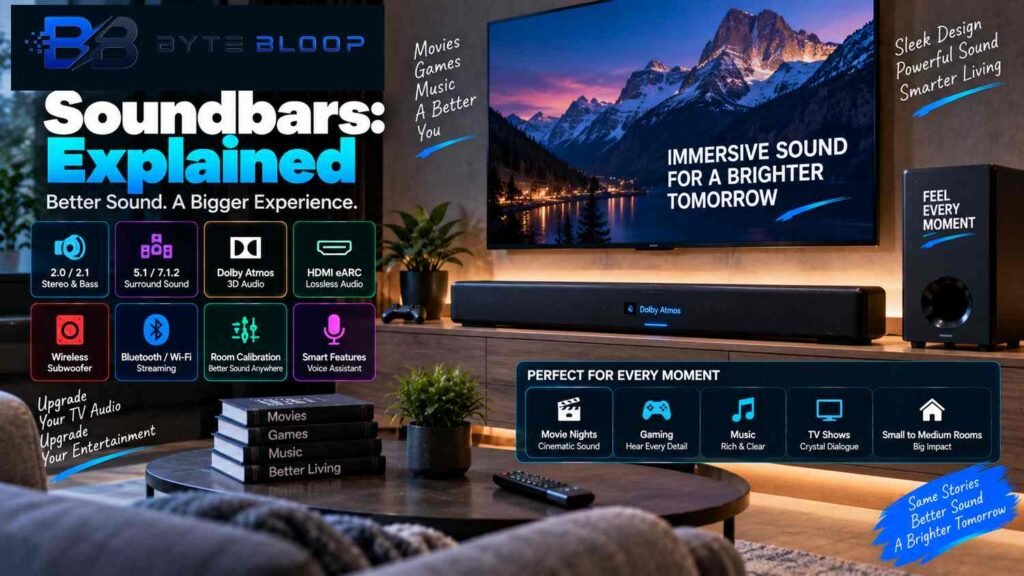
Soundbars Explained: Types, Features & Buying Guide for 2026
Introduction
Soundbars have become a popular way to improve TV audio without filling a room with a traditional collection of separate speakers. Instead of placing multiple front speakers, a center speaker and other components around the room, a soundbar combines several speaker drivers into a single elongated enclosure that can sit below or near a television.
Modern soundbars are available in many configurations. Some provide basic stereo sound, while others add a subwoofer, rear speakers, virtual surround processing or Dolby Atmos height effects. The right setup depends on the size of your room, the type of content you watch, your connectivity requirements and how much physical equipment you want around the TV.
Dolby notes that soundbars can provide Dolby Atmos through different approaches, including upward-firing speakers, additional surround speakers and virtualization. Physical speakers and ceiling-mounted systems can still provide a different experience from a compact soundbar, particularly for rear and overhead positioning.
Connectivity has also become more important. HDMI ARC and eARC allow compatible TVs to send audio to a soundbar over HDMI, while Bluetooth and Wi-Fi can support music and other wireless uses. HDMI eARC supports high-bitrate and uncompressed audio formats beyond the capabilities of regular ARC.
In this guide, we will explain what soundbars are, how channel configurations work, Dolby Atmos and DTS:X, HDMI ARC vs eARC, subwoofers, connectivity, room calibration, gaming, setup, common mistakes and how to choose a soundbar for your home.
What Is a Soundbar?
A soundbar is a long, narrow speaker system that contains multiple speaker drivers inside one enclosure.
It is normally placed:
- Below a TV
- In front of a TV
- On a TV stand
- On a wall below a wall-mounted TV
Depending on the model, a soundbar may also be sold with:
- A wireless subwoofer
- Wireless rear speakers
- A separate center channel
- Upward-firing height drivers
- External control boxes
The main advantage is simplicity.
A traditional home-theater setup may require multiple speakers, speaker cables, an AV receiver and careful placement. A soundbar can combine many of these functions into a much smaller system.
That does not mean every soundbar sounds the same. Driver quality, enclosure design, processing, room acoustics and speaker placement all have a major effect on the final result.
How Does a Soundbar Work?
Inside a soundbar are multiple speaker drivers designed to reproduce different portions of the audio spectrum.
A basic soundbar might use left and right channels to create stereo sound.
More advanced models can include dedicated drivers for:
- Left audio
- Center dialogue
- Right audio
- Surround effects
- Height effects
A subwoofer handles deep bass frequencies.
Some soundbars also use digital signal processing to create a larger soundstage from a relatively compact enclosure.
The result can make TV dialogue clearer and make movies or games sound larger than they do through typical built-in TV speakers.
Soundbar Channel Configurations Explained
One of the first specifications you will see when comparing soundbars is the channel configuration.
Examples include:
2.0
2.1
3.1
5.1
5.1.2
7.1.4
These numbers tell you how the speaker system is structured.
What Does 2.0 Mean?
A 2.0 system has:
- 2 main audio channels
- No dedicated subwoofer channel
It is essentially a stereo setup.
A 2.0 soundbar can be a simple upgrade over TV speakers for users who mainly want clearer and wider stereo sound.
What Does 2.1 Mean?
A 2.1 system has:
- 2 main channels
- 1 subwoofer
The subwoofer is designed to reproduce low-frequency sound such as:
- Bass in music
- Explosions
- Engine sounds
- Impact effects
A 2.1 setup can therefore provide a stronger low-end response than a basic 2.0 system.
What Does 3.1 Mean?
A 3.1 system generally contains:
- Left channel
- Center channel
- Right channel
- 1 subwoofer
The dedicated center channel is particularly useful for dialogue.
This configuration can be helpful for people who watch a lot of movies and TV shows where clear speech is important.
What Does 5.1 Mean?
A traditional 5.1 surround configuration consists of:
- Front left
- Center
- Front right
- Surround left
- Surround right
- Subwoofer
In a soundbar, however, those channels may be reproduced through different combinations of built-in drivers, signal processing and optional rear speakers.
Dolby explains that all-in-one soundbars can reproduce 5.1 and 7.1 formats through multiple built-in drivers, virtualization or additional discrete surround speakers depending on the design.
What Does 5.1.2 Mean?
A 5.1.2 Dolby Atmos setup generally represents:
- 5 main channels
- 1 subwoofer channel
- 2 height channels
The final .2 refers to the two height elements.
On a soundbar, those height effects may come from upward-firing drivers or virtualized processing rather than physical speakers installed in the ceiling.
What Does 7.1.4 Mean?
A 7.1.4 configuration indicates:
- 7 main channels
- 1 subwoofer
- 4 height channels
This is a more complex immersive-audio configuration and is commonly associated with systems containing additional surround and height speakers.
A compact soundbar may advertise similar channel processing, but the physical speaker arrangement can differ significantly between products.
Dolby Atmos Explained
Dolby Atmos is an object-based immersive audio format designed to position sounds within a three-dimensional listening space.
Instead of thinking only about fixed left and right channels, Atmos can represent individual sound elements as objects that can be positioned around and above the listener.
With a compatible soundbar, Atmos effects can be created in several ways.
Upward-Firing Speakers
Some soundbars contain speakers that fire sound toward the ceiling.
The reflected sound can create the perception of audio arriving from above.
Dolby explains that upward-firing Atmos-enabled speakers use ceiling reflections to reproduce overhead effects.
Virtualized Atmos
Some soundbars use digital processing rather than physical height speakers.
The soundbar attempts to create the perception of height and surround effects using its existing drivers and signal processing.
This can be useful where additional speakers are impractical.
Rear Speaker Systems
More advanced soundbar packages can include separate rear speakers.
This provides actual speakers behind or beside the listener rather than relying entirely on virtual processing.
Dolby notes that soundbars may be combined with wireless rear speakers to create a more immersive setup.
DTS:X Explained
DTS:X is another immersive audio technology designed to place sound in a three-dimensional environment.
According to DTS, DTS:X is an object-based audio technology that can work with TVs, soundbars, game consoles and AV receivers. DTS also provides Virtual:X processing for systems using fewer physical speakers.
When a soundbar supports DTS:X, the actual experience still depends on:
- The soundbar’s speaker arrangement
- Supported content
- The connected TV or source
- Audio settings
- The room
Therefore, simply seeing a “DTS:X” logo on a box does not tell you exactly how immersive the final result will be.
Official: DTS:X
HDMI ARC vs HDMI eARC
HDMI connectivity is one of the most important factors when choosing a modern soundbar.
HDMI ARC
ARC stands for Audio Return Channel.
It allows a compatible TV to send audio back to a connected soundbar through the HDMI connection.
This reduces the need for a separate audio cable.
HDMI eARC
eARC stands for Enhanced Audio Return Channel.
It provides significantly more audio bandwidth than standard ARC and supports formats such as:
- Dolby TrueHD
- Dolby Atmos
- DTS:X
- DTS-HD Master Audio
- Uncompressed 5.1
- Uncompressed 7.1
HDMI’s official documentation states that eARC supports high-bitrate audio formats and uncompressed multichannel audio.
Samsung’s current support documentation similarly explains that eARC can transmit higher-quality audio from compatible TVs to soundbars and AV receivers.
Important Point
eARC does not automatically make every audio source lossless.
The TV, soundbar, source device and actual content all need to support the relevant audio format.
For example, if the source only provides compressed audio, eARC cannot turn that source into lossless audio.
Optical vs HDMI for a Soundbar
Optical audio connections remain useful, especially with older TVs.
However, HDMI eARC generally provides greater bandwidth and broader support for modern high-bitrate formats.
Samsung’s current connection table shows that HDMI eARC can carry formats such as Dolby TrueHD and other high-quality audio formats that are not available through optical connections.
A simple comparison:
| Connection | Typical Use |
|---|---|
| HDMI ARC | Basic TV audio return |
| HDMI eARC | High-bandwidth modern audio |
| Optical | Older or simpler setups |
| Bluetooth | Wireless audio |
| Wi-Fi | Streaming and connected audio features |
For a new TV and soundbar combination, HDMI eARC is often worth prioritizing when both devices support it.
Wireless Subwoofer Explained
A subwoofer is designed to reproduce deep bass.
Many soundbar packages include a wireless subwoofer so you can place the subwoofer separately from the main bar without running a long audio cable across the room.
A subwoofer can add impact to:
- Action movies
- Games
- Music
- Sports broadcasts
- Cinematic sound effects
However, a subwoofer does not automatically mean better sound.
Its integration with the soundbar matters.
A poorly balanced subwoofer can sound:
- Boomy
- Overpowering
- Loose
- Disconnected
A properly integrated subwoofer should complement the main speakers rather than dominate them.
Dialogue Clarity
One of the biggest reasons people upgrade TV audio is poor dialogue clarity.
A soundbar with a dedicated center channel can potentially improve speech reproduction.
Some models also provide dialogue enhancement modes.
These features can be useful for:
- Movies
- TV series
- News
- Sports
- Podcasts
- YouTube
However, dialogue problems can also come from the source mix, room acoustics and television placement.
A soundbar is not a guarantee that every program will suddenly have perfect speech clarity.
Smart Connectivity Features
Modern soundbars may support several wireless technologies.
Bluetooth
Bluetooth allows compatible devices to send audio wirelessly to the soundbar.
It can be useful for:
- Smartphones
- Tablets
- Laptops
The quality and supported codecs depend on the devices involved.
Wi-Fi
Wi-Fi-enabled soundbars can provide more advanced network-based functionality.
Depending on the model, this can include:
- Music streaming
- Multi-room audio
- App control
- Firmware updates
- Voice assistant integration
AirPlay 2
Some compatible soundbars support Apple AirPlay 2.
This can allow supported Apple devices to send audio over a home network.
AirPlay 2 support is not universal, so always check the exact model before buying.
Room Calibration
Room acoustics have a major effect on sound.
Walls, furniture, ceiling height and room shape can influence:
- Bass
- Reflections
- Dialogue
- Stereo width
- Surround effects
Some soundbars use room-calibration technology to measure the listening environment and adjust audio processing.
A calibration system may attempt to compensate for:
- Speaker distance
- Volume differences
- Room reflections
- Bass response
- Spatial positioning
Room calibration can help, but it cannot completely eliminate the physical characteristics of a room.
Soundbar Placement
Placement affects performance.
Below the TV
The most common location is directly below the television.
This can help keep dialogue visually aligned with the screen.
Wall Mounting
Some soundbars can be mounted directly beneath a wall-mounted TV.
Follow the manufacturer’s installation instructions and keep the speaker orientation correct.
Avoid Blocking the TV
The soundbar should not obstruct:
- The TV screen
- Infrared sensors
- Remote-control receivers
- Important ports
Upward-Firing Atmos Soundbars
If your soundbar has upward-firing speakers, avoid placing objects directly above those drivers.
The sound needs a suitable path toward the ceiling for the intended reflection effect.
Dolby specifically describes ceiling reflection as part of how upward-firing Atmos speakers produce overhead effects.
Do Room Size and Ceiling Height Matter?
Yes.
Room characteristics can influence how a soundbar performs.
A compact soundbar may be perfectly suitable for:
- Bedrooms
- Small living rooms
- Apartments
- Smaller entertainment spaces
Larger rooms may benefit from:
- Larger soundbars
- Separate subwoofers
- Rear speakers
- More powerful systems
For Atmos soundbars using ceiling reflections, ceiling shape and height can also influence the effectiveness of the height effect.
Dolby recommends considering the room, budget and type of setup when choosing an immersive home audio system.
Soundbars for Movies
Movies are one of the main use cases for soundbars.
A good soundbar can improve:
- Dialogue
- Bass
- Soundstage
- Action effects
- Background ambience
Dolby Atmos-compatible soundbars can add a sense of height and spatial movement when the content and hardware support it.
For the most convincing surround experience, soundbars paired with physical rear speakers generally have more physical speaker placement around the listener than single-bar systems.
Soundbars for Gaming
Soundbars can also be useful for gaming.
Important features include:
- Clear directional effects
- Low audio latency
- HDMI connectivity
- Surround or immersive audio
- Compatibility with the gaming console
- Clear dialogue
Gamers should also check whether the entire HDMI chain supports the video features they need.
For example, if a console requires high refresh-rate video, the TV and soundbar’s HDMI pass-through capabilities can become important depending on how the devices are connected.
Soundbars for Music
A soundbar is not limited to TV audio.
Many models can also act as wireless music speakers.
Possible sources include:
- Smartphones
- Streaming services
- Bluetooth devices
- Wi-Fi music platforms
- TV music applications
If music is a major priority, pay attention to stereo performance and music-tuning features rather than focusing only on surround formats.
Voice Assistants and Smart Features
Some soundbars include or support voice assistants.
Depending on the manufacturer, you may be able to:
- Control playback
- Adjust volume
- Start music
- Control connected devices
Availability varies significantly by product and region.
Smart functionality should therefore be treated as a feature to verify rather than something every soundbar automatically includes.
Pros and Cons of Soundbars
Advantages
Compact Design
A soundbar takes much less physical space than a conventional multi-speaker system.
Easier Setup
There are usually fewer components and fewer cables.
Better TV Audio
A dedicated soundbar can provide a larger and clearer soundstage than many built-in TV speakers.
Flexible Features
Higher-end systems may include:
- Dolby Atmos
- DTS:X
- Wireless subwoofers
- Rear speakers
- Wi-Fi
- Voice controls
Disadvantages
Limited Physical Surround
A single soundbar cannot physically place speakers behind you in the same way as dedicated rear speakers.
Virtual Surround Depends on Room
Virtualized effects can vary based on room layout and listening position.
High-End Cost
Premium soundbar systems with subwoofers and rear speakers can become expensive.
Brand Ecosystem Dependence
Some advanced features may work best when products from the same ecosystem are used together.
Who Should Buy a Soundbar?
Soundbars can be a practical choice for:
Small to Medium Rooms
They take up relatively little space and can simplify installation.
TV Viewers
People looking for clearer dialogue and stronger audio than the TV’s built-in speakers provide may benefit.
Movie Fans
Atmos-equipped systems can add spatial and height effects.
Gamers
A soundbar can provide stronger game audio without requiring a complete speaker setup.
Apartment Owners
A compact system can be easier to install where running speaker cables is difficult.
Who Might Prefer a Traditional Home-Theater System?
A separate speaker system may be more appropriate for users who prioritize:
- Physical rear speakers
- Precise speaker placement
- Large-room performance
- Maximum upgrade flexibility
- Dedicated AV equipment
- Audiophile-oriented setups
Dolby notes that a multichannel speaker setup with dedicated overhead speakers can provide the full physical Atmos speaker arrangement, while soundbars offer a more compact alternative.
How to Choose the Right Soundbar
Before buying, consider the following factors.
1. Check Your TV’s Connections
Look for:
- HDMI ARC
- HDMI eARC
- Optical
- Bluetooth
- Wi-Fi
Ideally, match the soundbar’s capabilities with your TV’s available connections.
2. Decide Whether You Need a Subwoofer
If you watch a lot of action movies or listen to bass-heavy music, a dedicated subwoofer can make a noticeable difference.
For casual TV viewing, you may prefer the simplicity of a soundbar without a separate subwoofer.
3. Decide Whether You Need Dolby Atmos
Atmos is useful when you want spatial and height effects.
But do not buy the feature purely because it appears on the box.
Check:
- Whether your TV supports the necessary audio path
- Whether your content has Atmos
- Whether the soundbar uses upward-firing drivers or virtualization
- Whether you can add rear speakers
4. Think About Room Size
Choose a system appropriate for your space.
A large soundbar system may be unnecessary in a small bedroom, while a tiny bar may struggle to provide the scale you want in a large living room.
5. Consider Rear Speakers
If surround immersion is important, check whether the soundbar supports separate rear speakers.
This can provide actual sound sources behind the listening position rather than relying entirely on virtual processing.
6. Check Gaming Requirements
Console gamers should look at:
- HDMI version
- eARC support
- Pass-through capabilities
- VRR compatibility
- ALLM compatibility
- Supported audio formats
Do not assume that every HDMI-equipped soundbar supports every modern gaming feature.
How to Set Up a Soundbar
A basic setup is usually straightforward.
Step 1: Position the Soundbar
Place it below the TV or mount it according to the manufacturer’s instructions.
Step 2: Connect HDMI
If your TV supports ARC or eARC, connect the HDMI cable to the corresponding HDMI port.
Step 3: Connect the Subwoofer
For wireless models, follow the manufacturer’s pairing process.
Step 4: Configure TV Audio
Select the soundbar as the TV’s audio output.
If using eARC, verify that eARC is enabled.
Samsung’s current setup instructions, for example, include enabling HDMI eARC mode and appropriate audio-output settings on supported TVs.
Step 5: Configure Audio Format
If your TV provides options such as:
- Auto
- Pass Through
- Bitstream
- PCM
choose the setting recommended by the TV and soundbar manufacturer for your specific setup.
Step 6: Run Calibration
If your soundbar includes room calibration, run the calibration process after positioning all components.
Step 7: Test Different Content
Try:
- Dialogue-heavy content
- Action movies
- Music
- Games
- Atmos-compatible content
This helps you determine whether the setup actually performs as expected.
Common Soundbar Buying Mistakes
Buying Only Based on Channel Numbers
More channels do not automatically mean better sound.
Speaker quality, placement, processing and room conditions also matter.
Assuming Atmos Means True Ceiling Sound
Atmos can be reproduced through different speaker configurations and virtualization techniques.
A single compact soundbar with virtualized Atmos is physically different from a system with dedicated rear and ceiling speakers.
Ignoring the TV Connection
Buying an advanced soundbar while using an incompatible connection can prevent access to some of its supported formats.
Choosing Too Much Power for a Small Room
A very large system may be unnecessary for a small bedroom or compact apartment.
Ignoring Dialogue Performance
Bass and surround effects attract attention, but dialogue clarity is equally important for movies and television.
Putting Objects in Front of Upward-Firing Drivers
Objects placed on top of an Atmos soundbar can interfere with the intended upward audio path.
Soundbar vs TV Speakers
| Feature | TV Speakers | Soundbar |
|---|---|---|
| Physical Size | Built into TV | Separate bar |
| Bass | Usually limited | Often stronger |
| Dialogue | Varies | Can be clearer |
| Stereo Width | Usually limited | Generally wider |
| Surround | Limited | Can support virtual or physical surround |
| Dolby Atmos | Model-dependent | Available on compatible models |
| Subwoofer | Rare | Optional/common |
| Setup | Simplest | Still relatively simple |
A soundbar is generally intended as an upgrade rather than a replacement for a full dedicated home-theater system.
Soundbar vs Home-Theater System
| Feature | Soundbar | Traditional Home Theater |
|---|---|---|
| Setup Complexity | Low to moderate | Higher |
| Cable Requirements | Usually fewer | More |
| Physical Space | Low | Higher |
| Rear Speakers | Optional or virtual | Usually physical |
| Upgrade Flexibility | Varies | Generally high |
| Immersion | Good to very good depending on system | Can be very high |
| Room Impact | Moderate to high | High |
| Convenience | High | Lower |
The Future of Soundbars in 2026
Soundbars continue to become more sophisticated.
Better Spatial Audio
Dolby Atmos and DTS:X support continue to expand the role of compact audio systems beyond conventional stereo.
More Wireless Connectivity
Wi-Fi-based streaming and multi-room functionality can make soundbars useful as general home audio devices rather than TV-only speakers.
Smarter Audio Processing
Digital signal processing can increasingly be used to improve:
- Dialogue
- Virtual surround
- Bass management
- Room adaptation
- Content-specific sound modes
Better Gaming Integration
As televisions and gaming consoles continue to support higher refresh rates, low-latency technologies and advanced HDR formats, soundbar connectivity is becoming increasingly relevant to gaming setups.
HDMI 2.2, released in 2026, also continues the evolution of HDMI connectivity, with eARC retained as part of its advanced audio capabilities.
Frequently Asked Questions
What is a soundbar?
A soundbar is a long, compact speaker system containing multiple drivers in one enclosure, typically designed to improve TV and home-entertainment audio.
Are soundbars better than TV speakers?
A soundbar can provide a wider soundstage, stronger bass and more advanced audio features than many TV speakers, although performance varies between models.
What does 2.1 mean on a soundbar?
2.1 usually means two main audio channels plus one subwoofer.
What does 5.1 mean on a soundbar?
5.1 generally represents five main channels plus one subwoofer channel. On a soundbar, those channels can be reproduced through built-in drivers, virtualization or additional speakers depending on the system.
What does 5.1.2 mean?
5.1.2 generally means five main channels, one subwoofer and two height channels.
Is Dolby Atmos worth it on a soundbar?
It can be useful for people who want immersive height and spatial effects, but the result depends on the soundbar design, room, content and listening position.
Does every Dolby Atmos soundbar have upward-firing speakers?
No. Some soundbars use upward-firing drivers, while others use virtualization or different speaker configurations to create an immersive effect.
Is HDMI eARC better than HDMI ARC?
eARC provides higher bandwidth and supports additional high-bitrate and uncompressed audio formats.
Does HDMI eARC automatically provide lossless audio?
No. The TV, soundbar, source device, connection and content all need to support the appropriate format.
Do I need a subwoofer with a soundbar?
Not necessarily. A subwoofer is useful if you want stronger deep bass, but compact soundbars can work without one.
Are wireless subwoofers actually wireless?
Usually the audio connection between the soundbar and subwoofer is wireless, but the subwoofer itself normally still needs electrical power.
Can I use a soundbar for gaming?
Yes. Soundbars can work well for gaming, especially when they support compatible HDMI connections and immersive audio formats.
Can a soundbar replace a complete home-theater system?
A soundbar can provide a simpler alternative, but a system with separate front, rear and height speakers can offer more physically discrete sound placement.
Can I connect my phone to a soundbar?
Many soundbars support Bluetooth, while some also provide Wi-Fi-based streaming or AirPlay 2. Always verify the exact model’s supported connectivity.
Does room size matter for a soundbar?
Yes. Room dimensions, ceiling characteristics, furniture and listening position can affect sound and immersive effects.
Key Takeaways
- A soundbar combines multiple speaker drivers into a compact enclosure.
- Channel configurations such as 2.0, 2.1, 5.1 and 5.1.2 describe different audio layouts.
- Dolby Atmos can be reproduced through upward-firing speakers, additional surround speakers or virtualization.
- DTS:X is another immersive audio technology designed to position sound in a three-dimensional space.
- HDMI eARC provides much greater audio bandwidth than standard ARC and supports formats such as Dolby TrueHD, Dolby Atmos and DTS:X.
- A dedicated subwoofer can provide deeper and more powerful bass.
- Room size, ceiling characteristics and speaker placement can affect immersive audio performance.
- A controller or TV remote is not the only consideration; connectivity and supported formats matter when choosing a soundbar for gaming.
- A single soundbar can simplify installation, but separate rear and height speakers can provide more physically discrete surround effects.
- The best soundbar for a particular setup depends on the room, TV, content, budget and desired level of immersion.
Conclusion
Soundbars provide a practical way to improve TV and home-entertainment audio without the complexity and space requirements of a traditional multi-speaker system.
The category now covers a wide range of products. Basic 2.0 and 2.1 soundbars focus on simple stereo and improved bass, while more advanced systems can add center channels, wireless subwoofers, rear speakers and immersive formats such as Dolby Atmos and DTS:X.
Connectivity is equally important. HDMI ARC can simplify TV audio connections, while eARC provides the bandwidth required for more advanced high-bitrate and uncompressed audio formats on compatible equipment.
Dolby Atmos can also be implemented in different ways. A soundbar with upward-firing drivers can use ceiling reflections for height effects, while other models rely on virtualization or optional rear speakers.
That means specifications should not be viewed in isolation.
Instead of choosing a soundbar only because it has a large channel number or an Atmos logo, consider the entire system: your TV’s connections, room size, ceiling, listening position, content, gaming requirements and whether you want physical rear speakers or a simpler all-in-one design.
For users who want better TV audio with relatively little installation work, a soundbar can be a convenient solution. For those seeking maximum physical surround coverage and upgrade flexibility, a traditional home-theater system may still make more sense.
Understanding these differences makes it easier to choose a soundbar that fits the way you actually watch, listen and play.
Related Reading