Digital Textbooks Explained: Features, Benefits & Future of Digital Learning in 2026
Introduction
Digital textbooks are electronic learning resources designed to deliver educational content through computers, tablets, smartphones and other digital devices. They can range from straightforward electronic versions of traditional books to richer learning experiences that include searchable text, hyperlinks, multimedia, annotations, assessments and other interactive features.
Unlike a scanned PDF, a well-designed digital textbook can support more flexible ways of reading and studying. Students may be able to search for concepts instantly, highlight important passages, add notes, change display settings and access supplementary resources without switching to a separate physical book.
Digital textbooks can also make it easier to distribute updated content. Open educational resources provide another model: platforms such as OpenStax offer free digital textbooks, downloadable PDFs and openly licensed educational materials, while the Open Textbook Library provides textbooks that can be freely used and adapted under their respective open licenses.
At the same time, moving from print to digital does not automatically improve learning. Students and educators still need reliable access to devices and connectivity, accessible content, appropriate teaching practices and clear privacy protections.
In this guide, we will explain what digital textbooks are, how they work, their key features, benefits, challenges, accessibility requirements, implementation best practices and the role of AI in digital learning.
What Is a Digital Textbook?
A digital textbook is an electronic version of educational material designed to be read or used on a digital device.
It may be delivered through:
- A web browser
- A dedicated educational platform
- An e-reader application
- A downloadable PDF
- An EPUB or other digital format
- A learning management system
- A school or university portal
Digital textbooks can contain ordinary text and images, but many modern educational platforms go further by integrating multimedia and interactive elements.
For example, a biology textbook may include an interactive diagram, while a mathematics textbook may link to exercises or explanatory videos.
The exact feature set depends on the publisher, platform and textbook.
Digital Textbook vs PDF: What Is the Difference?
A common misconception is that every PDF is a digital textbook.
A PDF is simply one digital document format. It can be used to distribute a textbook, but its capabilities may be more limited than a purpose-built digital textbook platform.
A traditional PDF might allow you to:
- Read text
- Search
- Zoom
- Add basic annotations
- Print pages
A more advanced digital textbook may additionally provide:
- Interactive elements
- Embedded media
- Quizzes
- Progress tracking
- Teacher dashboards
- Searchable learning activities
- Accessibility controls
- Synchronization across devices
This distinction matters because digital textbook describes the educational resource and experience, while PDF describes one possible file format.
OpenStax, for example, provides its textbooks online and as downloadable PDFs, demonstrating that a digital textbook can exist in multiple formats.
How Digital Textbooks Work
Digital textbooks generally combine content delivery with software features.
A simplified workflow looks like this:
Digital Content
      ↓
Educational Platform
      ↓
Student Device
      ↓
Reading + Interaction
      ↓
Notes / Quizzes / Activities
      ↓
Progress or Learning Data
Depending on the platform, some information may remain entirely on the device while other features may require a connected online service.
For this reason, schools and institutions should understand whether the chosen platform supports offline access and what information it collects.
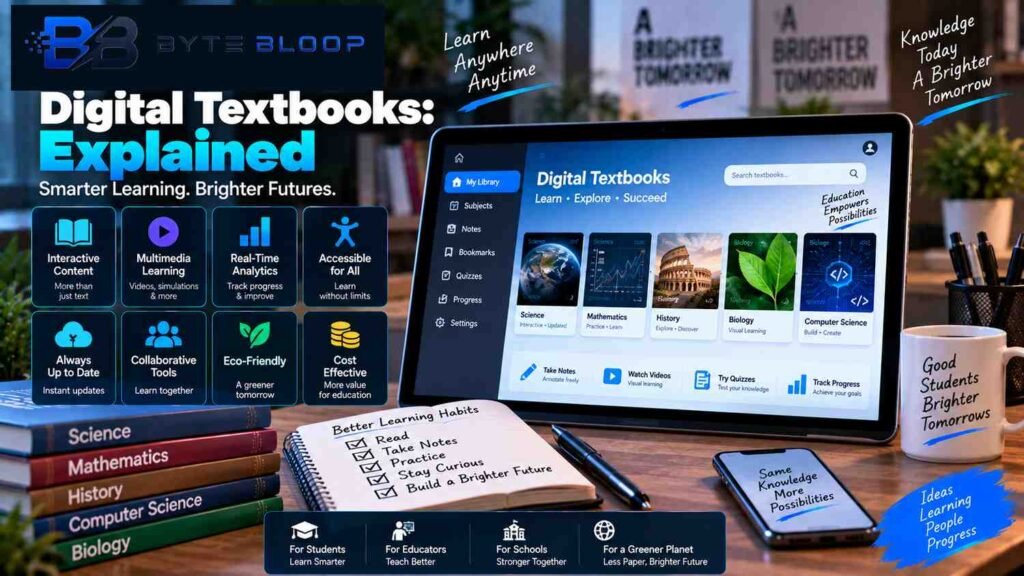
Key Features of Digital Textbooks
1. Searchable Content
Search is one of the simplest advantages of digital text.
Instead of manually scanning hundreds of pages, a student can search for a term and quickly locate relevant passages.
This is particularly helpful with:
- Technical subjects
- Reference material
- Large textbooks
- Exam preparation
- Research
2. Highlighting and Annotations
Many digital textbook platforms allow students to highlight passages and add notes.
Students may use annotations to:
- Mark important concepts
- Write questions
- Add explanations
- Create study notes
- Identify topics for revision
OpenStax currently provides digital reading tools such as highlighting and note-taking within supported experiences.
3. Multimedia Integration
Digital textbooks can incorporate content beyond static text.
Examples include:
- Videos
- Audio
- Animations
- Interactive diagrams
- Simulations
- External resources
This can be useful when a concept is difficult to explain through text alone.
However, multimedia should support the learning objective rather than simply being added for visual appeal.
4. Interactive Exercises
Some digital textbooks include exercises directly within the learning experience.
Students may be able to:
- Answer questions
- Receive feedback
- Retry an exercise
- View explanations
- Track progress
This can reduce the separation between reading material and practice.
5. Accessibility Features
Accessibility is an important part of digital textbook design.
Depending on the platform and format, features can include:
- Adjustable text size
- Reflowable text
- Keyboard navigation
- Screen-reader compatibility
- Alternative text for images
- Captions
- High-contrast options
- Accessible mathematical content
W3C’s WCAG 2.2 provides a current international framework for making web content more accessible to people with disabilities, including users with visual, auditory, physical, cognitive and other accessibility needs.
For non-web digital documents and software, W3C also provides WCAG2ICT guidance describing how WCAG principles can be applied beyond traditional web content.
6. Cross-Device Access
Digital textbooks can potentially be accessed from different devices.
A student might read the same material on:
- Laptop
- Desktop
- Tablet
- Smartphone
Some platforms can synchronize notes, bookmarks or progress between devices, although this depends on the specific service.
7. Content Updates
Digital delivery can make updating content easier than replacing a printed edition.
For example, an online textbook platform may update:
- Corrections
- Links
- References
- Examples
- Supplementary resources
However, not every digital format updates automatically. A downloaded PDF, for example, may remain unchanged until a newer version is downloaded.
Benefits of Digital Textbooks
1. Portability
A single tablet or laptop can contain a large library of textbooks.
Students do not need to carry multiple heavy physical books every day.
2. Fast Search
Searchable text makes it easier to locate specific concepts, terms or chapters.
This can be especially useful during revision.
3. Interactive Learning
Multimedia and interactive elements can supplement traditional reading.
For certain subjects, simulations and visual explanations may help demonstrate concepts more clearly than static illustrations.
4. Flexible Access
Students can access digital textbooks from different locations and, depending on the platform, through multiple devices.
OpenStax currently provides its textbooks online and as downloadable PDFs, making its materials available in multiple formats.
5. Open Educational Resources
Open textbooks can reduce barriers to accessing educational material.
OpenStax describes its textbooks as openly licensed educational resources and offers free online access to its digital books.
The Open Textbook Library similarly focuses on openly licensed textbooks that can be used and, subject to their licenses, adapted.
6. Reduced Physical Storage
Schools and students can store many digital resources without requiring physical shelves or storage rooms.
This does not mean digital resources have no infrastructure requirements. Devices, servers, connectivity and maintenance still have costs.
7. Easier Accessibility Adjustments
Digital materials can provide accessibility options that are difficult to replicate in a standard printed book.
For example, users may benefit from:
- Larger text
- Screen readers
- Reflowable layouts
- Keyboard navigation
- Captions
- Alternative text
The effectiveness of these features depends on whether the content itself has been designed accessibly.
Limitations of Digital Textbooks
Digital textbooks also have drawbacks.
1. Device Dependency
Students need a compatible device to access the material.
A damaged device, unavailable charger or hardware limitation can interrupt study.
2. Internet Connectivity
Some digital platforms require an internet connection for certain features.
Cloud-based assessments, synchronization and online multimedia may not work fully offline.
Institutions should therefore verify whether their chosen solution provides an offline option.
3. Digital Fatigue
Long periods of screen use can be uncomfortable for some learners.
The solution is not necessarily to avoid digital textbooks completely. Instead, institutions can encourage balanced study practices, breaks and different learning activities.
4. Teacher Training
Technology can introduce additional complexity for teachers.
Educators may need training in:
- Platform navigation
- Digital assessments
- Accessibility
- Content creation
- Privacy settings
- Troubleshooting
- Learning analytics
Without adequate support, even a technically capable platform can be difficult to implement effectively.
5. Privacy and Data Protection
Some digital learning platforms collect information related to student activity.
This can potentially include identifiers, usage information, assessment results or other educational data.
Privacy requirements vary by country and situation. In the United States, FERPA protects personally identifiable information contained in education records, and U.S. Department of Education guidance addresses privacy considerations around online educational services.
Organizations should review:
- What data is collected
- Why it is collected
- Where it is stored
- Who can access it
- How long it is retained
- How it is deleted
- Which laws and institutional policies apply
Digital Textbooks and Accessibility
Accessibility should be considered from the beginning rather than treated as a final checklist.
Text Accessibility
Text should be readable and properly structured.
Useful practices include:
- Clear headings
- Logical reading order
- Sufficient contrast
- Resizable text
- Proper semantic structure
Image Accessibility
Important images should have meaningful alternative text when appropriate.
Decorative images should be handled differently so they do not unnecessarily interrupt assistive technologies.
Video Accessibility
Video-based learning content should consider:
- Captions
- Transcripts
- Accessible controls
- Audio clarity
Interactive Content
Interactive elements should be usable with different input methods and should not depend entirely on one type of interaction.
WCAG 2.2 provides testable accessibility criteria designed to support accessible web content across desktop and mobile devices.
Digital Textbooks for Students
Students can use digital textbooks in many ways.
Reading
The most basic use is simply reading course material.
Revision
Students can highlight important sections, search concepts and create notes.
Practice
Interactive exercises can allow students to test their understanding immediately.
Research
Search and hyperlinks can make it easier to explore related material.
Students should still evaluate external sources carefully rather than assuming every linked resource is accurate.
Digital Textbooks for Teachers
Digital textbooks can also provide benefits for educators.
Teachers may be able to:
- Assign specific chapters
- Add notes
- Share resources
- Create assessments
- Monitor progress
- Recommend additional material
- Customize content
The exact capabilities vary between platforms.
OpenStax, for example, offers educator resources and LMS-integrated tools alongside its digital textbooks.
Open Textbooks and Open Educational Resources
Open educational resources, commonly called OER, are educational materials made available under licenses that permit specific forms of free use and reuse.
Open textbooks are one category of OER.
The important distinction is that free to access and openly licensed are not necessarily the same thing.
A textbook can be free to read while still restricting copying or modification.
For example, OpenStax currently uses the Creative Commons BY-NC-SA license for its textbook content, which allows sharing and adaptation under stated conditions and restricts commercial use.
Always check the license before copying, modifying or commercially redistributing educational content.
Best Practices for Implementing Digital Textbooks
1. Start With a Pilot Program
Do not immediately deploy a platform across every class.
Begin with:
- One subject
- One grade
- One department
- Or a small group of teachers
Measure the experience before expanding.
2. Train Teachers
Training should include more than basic platform navigation.
Teachers should understand:
- Accessibility
- Content management
- Assessments
- Analytics
- Privacy
- Troubleshooting
3. Check Accessibility Before Deployment
Review the textbook and platform against applicable accessibility requirements.
WCAG 2.2 is a useful reference for web-based learning experiences, while WCAG2ICT provides additional guidance for non-web documents and software.
4. Provide Offline Options
Students should not lose access to essential learning material simply because their internet connection temporarily fails.
Where practical, provide downloadable or offline-compatible material.
OpenStax, for example, offers textbooks in downloadable PDF form in addition to online access.
5. Protect Student Data
Before adopting a platform, review its privacy documentation and institutional requirements.
Pay attention to:
- Data collection
- Third-party integrations
- Analytics
- Account permissions
- Retention policies
- Security
- Data deletion
6. Give Students Multiple Learning Formats
A digital textbook should ideally work alongside other instructional methods.
For example:
Textbook → Video → Practice → Discussion → Assessment
This creates a broader learning experience rather than making the textbook the only source of instruction.
7. Collect Feedback
Ask teachers and students:
- What works?
- What is confusing?
- What is slow?
- What accessibility problems exist?
- Which features are actually useful?
- What needs improvement?
Use this information to improve the implementation.
Digital Textbooks and AI in 2026
Artificial intelligence is becoming an important part of digital education.
The OECD’s Digital Education Outlook 2026 examines generative AI in education and highlights potential roles for AI as a tutor, partner and assistant. At the same time, it emphasizes that successfully completing tasks with GenAI does not automatically mean students have learned, and that AI use should be guided by sound teaching principles.
This distinction is particularly important for AI-enhanced textbooks.
AI-Powered Explanations
An AI system could potentially explain a difficult paragraph in simpler language.
For example:
Original:
A complex academic explanation.
AI-assisted:
A shorter explanation using simpler terminology.
This can support understanding, but students should still be encouraged to verify important information.
AI Tutoring
An integrated AI assistant can potentially answer questions while students study.
It might:
- Explain terminology
- Generate practice questions
- Provide hints
- Summarize a section
- Help identify weak areas
However, the quality and reliability of these answers depends on the system and the educational context.
Adaptive Learning
Adaptive learning systems can modify activities based on student performance.
For example:
Student answers question
        ↓
System evaluates response
        ↓
Identifies difficulty
        ↓
Provides additional practice
        ↓
Moves to next concept
The goal is to provide practice appropriate to the student’s current understanding.
AI-Generated Educational Content
Generative AI can also assist educators with content creation.
Possible uses include:
- Drafting quiz questions
- Creating study prompts
- Generating examples
- Producing summaries
- Creating differentiated exercises
However, AI-generated educational material should be reviewed by qualified educators for accuracy, relevance, bias, copyright and age appropriateness.
The OECD’s 2026 guidance emphasizes human-centred education and careful use of GenAI rather than simply outsourcing cognitive work to AI systems.
For more AI-related content on BYTE BLOOP, see our AI Automation Software Explained article.
Digital Textbooks and Learning Analytics
Some digital learning platforms collect information about how students interact with educational content.
Analytics may include:
- Pages or sections viewed
- Quiz performance
- Completion rates
- Assignment activity
- Time spent in a learning environment
- Areas where students frequently struggle
These metrics can potentially help educators identify areas requiring additional teaching.
However, analytics should support teaching rather than become a substitute for teacher judgment.
A low score does not automatically explain why a student struggled.
Security Considerations for Digital Textbooks
Digital learning systems can contain valuable educational data and therefore require appropriate security controls.
Potential risks include:
- Unauthorized account access
- Phishing
- Weak passwords
- Excessive permissions
- Unprotected data
- Unsafe third-party integrations
- Malicious links
Schools and educational organizations should apply appropriate security practices such as:
- Strong authentication
- Least-privilege access
- Regular software updates
- Secure connections
- Account monitoring
- Data minimization
- Staff security training
For a broader look at protecting online systems, read the BYTE BLOOP guide to Web Application Security.
Digital Textbooks vs Traditional Textbooks
| Feature | Digital Textbooks | Traditional Textbooks |
|---|---|---|
| Portability | High | Limited by physical weight |
| Search | Fast | Manual |
| Multimedia | Can be integrated | Usually limited |
| Updates | Can be easier to distribute | Requires new editions |
| Annotation | Digital tools | Physical notes |
| Accessibility | Can offer advanced options | Often requires alternative formats |
| Device Requirement | Yes | No |
| Internet Requirement | Depends on platform | No |
| Interactive Assessments | Possible | Usually separate |
| Physical Storage | Minimal | Significant |
The comparison is not about one format universally replacing the other.
Different students and institutions may benefit from different combinations of resources.
Digital Textbooks for Different Education Levels
K-12 Education
Digital textbooks can support classroom instruction, homework and supplementary learning.
Key considerations include:
- Age-appropriate design
- Accessibility
- Device availability
- Parent involvement
- Privacy
- Teacher support
Higher Education
Universities can use digital textbooks for:
- Lectures
- Independent study
- Assignments
- Research
- Exam preparation
- Open educational programs
OpenStax currently provides free digital textbooks for higher education and K-12 subjects.
Professional Learning
Digital textbooks can also support professional education and training.
Examples include:
- Coding
- Cybersecurity
- Business
- Healthcare
- Engineering
- Certifications
The ability to update digital content can be particularly useful in fields where information changes frequently.
Common Challenges and Solutions
| Challenge | Possible Solution |
|---|---|
| Poor connectivity | Offline downloads and alternative access |
| Device shortages | Shared devices or institution-supported programs |
| Teacher learning curve | Structured training |
| Accessibility problems | Accessibility testing and remediation |
| Privacy risks | Data-minimization and privacy review |
| Digital fatigue | Breaks and varied learning activities |
| Low engagement | Interactive but purposeful activities |
| Outdated content | Regular content review |
| Platform dependency | Export and continuity planning |
Future of Digital Textbooks
Digital textbooks are likely to continue moving beyond simple electronic copies of printed books.
More AI Assistance
AI may increasingly help students understand difficult concepts, generate practice material and navigate large collections of learning resources.
More Personalization
Digital learning systems can potentially adapt activities and recommendations to individual learning needs.
Greater Accessibility
Accessibility standards and better assistive technologies can make educational resources usable by a wider range of learners.
More Open Educational Content
Open educational resources can provide alternatives to expensive proprietary textbooks.
Platforms such as OpenStax demonstrate how openly licensed digital textbooks can be distributed at scale, while the Open Textbook Library provides another catalog of openly licensed materials.
Stronger Focus on Privacy
As digital learning platforms collect more information, institutions will need to pay greater attention to responsible data practices, security and transparency.
Frequently Asked Questions
What is a digital textbook?
A digital textbook is an electronic educational resource that students can access through computers, tablets, smartphones or other compatible devices.
Is a digital textbook the same as a PDF?
No. A PDF is a file format that can be used to distribute a digital textbook, but a digital textbook can also include interactive features, multimedia, assessments and other learning tools.
What are the main features of digital textbooks?
Common features include searchable content, digital annotations, multimedia, interactive exercises, accessibility features and, on some platforms, progress tracking and analytics.
What are the benefits of digital textbooks?
They can improve portability, searchability and accessibility while supporting multimedia, interactive learning and flexible distribution.
What are the disadvantages of digital textbooks?
Potential disadvantages include device requirements, connectivity issues, screen fatigue, teacher training requirements and privacy concerns.
Are digital textbooks cheaper than printed textbooks?
Not always. Some digital textbooks are free or openly licensed, while others are sold through commercial platforms. OpenStax is one example of an organization offering free digital access to openly licensed textbooks.
What are open textbooks?
Open textbooks are textbooks released under licenses that permit specified forms of free use and reuse. The exact permissions depend on the license.
What is OER?
OER stands for Open Educational Resources. These are teaching, learning and research materials made available under licenses that allow certain forms of reuse.
Can digital textbooks work offline?
Some can. The availability of offline reading depends on the platform and format. Downloadable PDFs are one common way of providing offline access.
How does AI affect digital textbooks?
AI can potentially provide personalized explanations, tutoring, summaries, practice questions and adaptive learning support. However, the OECD emphasizes that AI should be used with clear pedagogical guidance rather than simply replacing students’ cognitive work.
Are digital textbooks accessible?
They can be, but accessibility depends on how the textbook and platform are designed. WCAG 2.2 provides accessibility guidance for web content, and WCAG2ICT extends related guidance to non-web documents and software.
Key Takeaways
- Digital textbooks are more than electronic copies of printed books.
- They can include search, annotations, multimedia, interactive exercises and accessibility features.
- A PDF is one possible digital textbook format, but it does not automatically provide advanced interactive functionality.
- Open educational resources can provide free or adaptable learning materials depending on their licenses.
- Accessibility should be considered from the beginning using appropriate standards and testing.
- Reliable device access and connectivity are important for digital learning programs.
- Student data privacy and security should be reviewed before adopting educational platforms.
- AI can assist with tutoring, explanations and adaptive learning, but effective learning still depends on appropriate educational design and human guidance.
- OpenStax currently provides free digital textbooks and downloadable PDFs, making it a useful example of an open digital textbook model.
Conclusion
Digital textbooks have changed what an electronic learning resource can be.
Instead of simply reproducing a printed book on a screen, modern digital textbooks can combine text with search, annotations, multimedia, interactive activities, accessibility features and, in some cases, learning analytics.
They can make educational content more portable and flexible while opening opportunities for openly licensed resources. OpenStax and the Open Textbook Library demonstrate different approaches to open educational content and digital textbook distribution.
However, technology by itself does not guarantee better educational outcomes.
Successful adoption requires reliable infrastructure, appropriate teacher training, accessible design, thoughtful instructional practices and careful handling of student data.
AI is adding another layer to this transformation. The OECD’s 2026 Digital Education Outlook highlights genuine opportunities for generative AI in education while emphasizing that AI should support learning rather than simply automate cognitive work.
The future of digital textbooks will therefore depend not only on how advanced the technology becomes, but on how effectively educators use that technology to support learning.
The strongest digital textbook experience is not necessarily the one with the most features. It is the one that makes educational content accessible, useful, understandable, secure and relevant to the learner.
Related Reading
AI Automation Software Explained
Web Application Security Explained
Useful External Resources
OECD Digital Education Outlook 2026