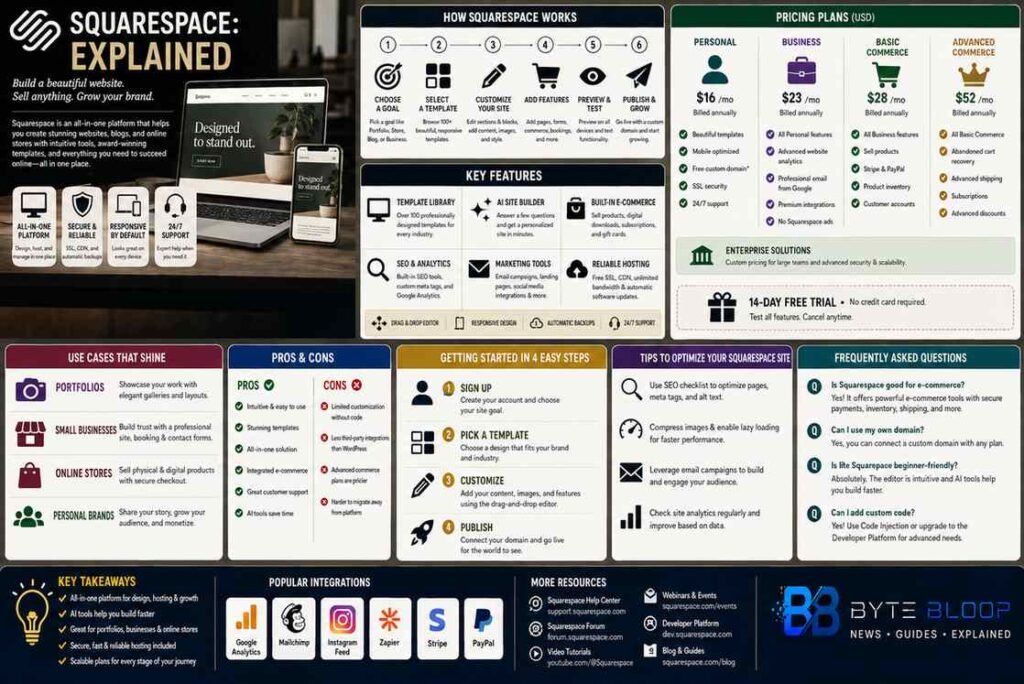
Squarespace: Explained
Introduction
Squarespace has become a go‑to platform for anyone looking to launch a polished online presence without diving into code. Since its 2004 debut, the company has evolved from a simple drag‑and‑drop builder into a full‑stack solution that supports blogs, portfolios, e‑commerce stores, and even custom domains. Its appeal lies in a unified interface that lets users design, publish, and manage content from a single dashboard, while the underlying architecture handles hosting, security, and performance. For creatives, entrepreneurs, and small businesses, Squarespace offers a suite of professionally designed templates that adapt to any device, making responsive design a default rather than a chore. The platform’s AI‑powered tools—such as the Site Builder and Image Editor—further lower the barrier to entry, allowing novices to create visually compelling sites in minutes. However, this convenience comes with trade‑offs: limited customization for advanced developers and a pricing model that scales with added features. Understanding these nuances is key to deciding whether Squarespace is the right fit for your project.
How Squarespace Works
At its core, Squarespace is a hosted website builder. Users select a template, customize it through a visual editor, and publish directly to a subdomain or a custom domain. The platform manages SSL certificates, CDN delivery, and automatic backups, freeing creators from server maintenance. The editor is divided into sections and blocks; sections define page layout while blocks hold content such as text, images, or commerce widgets. This modular approach lets users rearrange content with drag‑and‑drop, ensuring a clean, responsive design across devices.
Key Features
- Template Library – Over 100 professionally designed themes, many tailored for specific industries like photography, food, or retail.
- AI Site Builder – Guides users through design choices, automatically generating layouts and color schemes based on content.
- Built‑in E‑Commerce – Supports product listings, inventory tracking, shipping options, and payment gateways such as Stripe and PayPal.
- SEO & Analytics – Built‑in SEO tools, customizable meta tags, and integration with Google Analytics.
- Marketing Tools – Email campaigns, landing pages, and social media integrations help drive traffic and conversions.
Pricing Structure
Squarespace offers tiered plans: Personal, Business, Basic Commerce, Advanced Commerce, and a custom Enterprise option. The Personal plan covers static sites and basic blogging, while the Business plan unlocks e‑commerce and marketing features. Commerce plans add advanced inventory, subscription products, and tax calculation. Pricing is subscription‑based, with annual plans cheaper than monthly. A 14‑day free trial lets users test the platform before committing.
Use Cases
Squarespace shines for:
- Portfolio Sites – Photographers, designers, and artists can showcase work with minimal code.
- Small Business Websites – Local shops, consultants, and service providers benefit from integrated booking and contact forms.
- Online Stores – From niche merch to digital downloads, the commerce engine handles payments, shipping, and inventory.
- Personal Brands – Bloggers and influencers can publish content, sell merch, and manage email lists in one place.
Pros and Cons
Pros: Intuitive editor, responsive templates, robust hosting, strong e‑commerce support, and a unified admin panel.
Cons: Limited theme customization without code, higher cost for advanced commerce features, and fewer integrations compared to WordPress or Shopify.
Getting Started
Launching a site involves selecting a goal, choosing a template, customizing content, and publishing. The AI Site Builder can auto‑generate a layout if you input key details, while the manual editor allows granular control. Once live, the dashboard offers analytics, marketing, and e‑commerce management tools. For more advanced needs, developers can use Squarespace’s Developer Platform to build custom templates with HTML, CSS, and JavaScript, though this requires a separate subscription.
Key Takeaways
- Squarespace is a hosted, all‑in‑one website builder with responsive templates and built‑in e‑commerce.
- Its AI tools reduce design time, making it ideal for non‑technical creators.
- Pricing scales with features, offering a free trial and tiered plans for businesses of all sizes.
- Customization is limited without code; advanced developers may need the Developer Platform.
- It excels for portfolios, small businesses, and personal brands that value design and ease of use.
Frequently Asked Questions
What is Squarespace?
Squarespace is a hosted website builder that lets users create, publish, and manage websites using drag‑and‑drop templates and an intuitive editor.
What are the key features of Squarespace?
Key features include a vast template library, AI Site Builder, built‑in e‑commerce, SEO tools, marketing integrations, and automatic hosting and security.
What are the best use cases for Squarespace?
Squarespace works best for portfolios, small business sites, online stores, and personal brands that need a polished, responsive design without coding.
What are the pros and cons of Squarespace?
Pros: user‑friendly, responsive templates, integrated e‑commerce, and strong hosting. Cons: limited theme customization, higher cost for advanced commerce, and fewer third‑party integrations.
Conclusion
Based on the available information and industry analysis, Squarespace provides a streamlined, all‑in‑one solution that empowers creators to build visually stunning, responsive websites with minimal technical effort. Its AI‑driven design tools and robust e‑commerce features make it especially attractive to small businesses and personal brands seeking a quick, professional online launch. While the platform’s limited customization options and pricing structure may deter developers and larger enterprises, for most users the trade‑offs are outweighed by the convenience, design quality, and integrated services that Squarespace offers.
Related Reading
- Building a Portfolio Website with Squarespace
- E‑Commerce Best Practices on Squarespace