Video Editing Education: Explained
Introduction
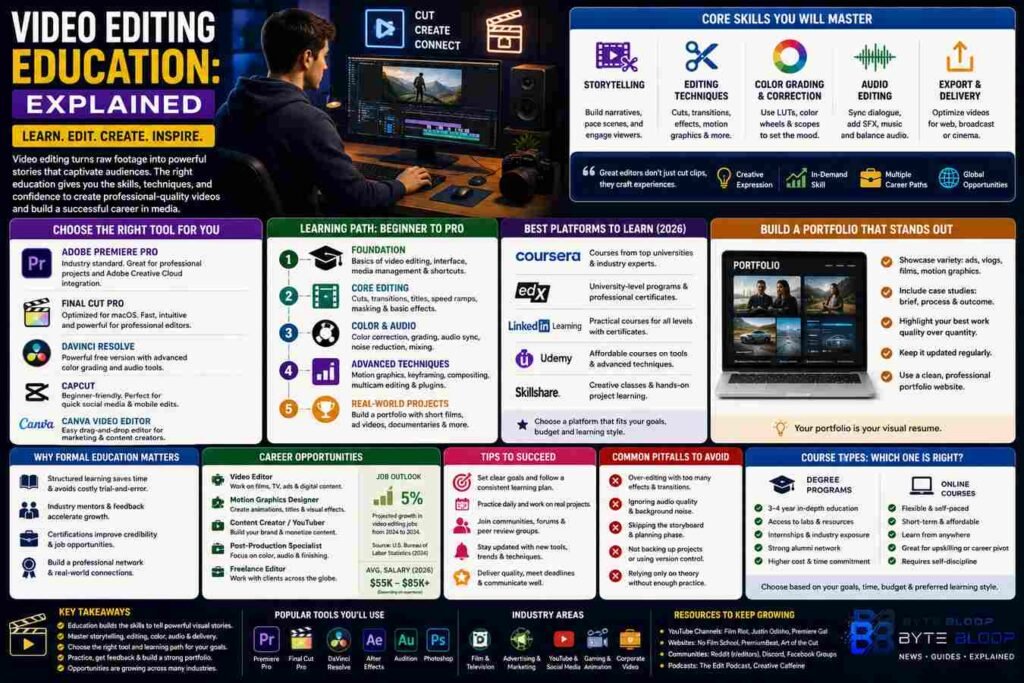
Video editing is more than cutting clips; it’s the art of turning raw footage into compelling narratives that resonate with audiences. In today’s digital landscape, a polished edit can elevate a brand, launch a viral campaign, or secure a film festival spot. Yet many aspiring editors feel overwhelmed by the sheer number of tools, techniques, and industry expectations. Video editing education bridges that gap, offering structured learning paths that cover everything from basic cuts to advanced color grading and audio synchronization.
Modern courses are designed for diverse learners: from hobbyists wanting to improve YouTube videos to professionals aiming for a career in film or media. They combine theory with hands‑on projects, ensuring students not only understand concepts but can apply them immediately. Whether you prefer self‑paced online modules or instructor‑led bootcamps, the right course can help you master industry staples like Adobe Premiere Pro, Final Cut Pro, DaVinci Resolve, and even emerging tools like CapCut and Canva’s video editor.
Why Formal Video Editing Education Matters
Structured learning reduces trial‑and‑error, saving time and money. According to Coursera’s 2026 catalog, courses cover cutting techniques, color correction, audio synchronization, and visual storytelling—skills that are hard to acquire through random tutorials. EdX also offers university‑level programs that delve into the technical nuances of editing software, providing credentials that employers recognize. A formal education equips you with a portfolio of projects, a network of peers, and a clear roadmap for career progression.
Choosing the Right Tool for Your Learning Path
Each editing platform has its strengths. Premiere Pro excels in cross‑platform workflow and integration with Adobe Creative Cloud. Final Cut Pro offers a streamlined experience for macOS users, while DaVinci Resolve is renowned for its free version and powerful color grading suite. CapCut and Canva provide beginner‑friendly interfaces that are ideal for social‑media creators. When selecting a course, consider the tool you’ll use most often and the level of depth the curriculum offers.
Core Skills Taught in Video Editing Courses
1. Storytelling & Narrative Structure: Learning how to pace scenes and build emotional arcs.
2. Editing Techniques: Mastering cuts, transitions, and motion graphics to keep viewers engaged.
3. Color Grading & Correction: Using LUTs and color wheels to create mood and consistency.
4. Audio Editing: Syncing dialogue, adding sound effects, and balancing music tracks.
5. Export & Delivery: Optimizing files for web, broadcast, or theatrical release.
How to Maximize Your Learning Experience
• Set Clear Goals: Decide whether you want a hobby skill or a professional credential.
• Practice Consistently: Apply lessons to real projects—short films, vlogs, or client work.
• Seek Feedback: Join editing communities or peer review groups to refine your style.
• Stay Updated: Video editing software evolves rapidly; keep up with new features and plugins.
Career Opportunities and Industry Demand
Proficiency in video editing opens doors across media, advertising, gaming, and education. According to industry reports, demand for skilled editors is projected to grow 5% annually through 2030. Freelance platforms, production houses, and corporate marketing teams all seek editors who can deliver high‑quality content on tight deadlines.
Common Pitfalls and How to Avoid Them
Many beginners fall into the trap of over‑editing, using too many flashy transitions that distract from the story. Others neglect audio quality, assuming visuals alone will carry the piece. Structured courses emphasize balance—editing for clarity, pacing, and emotional impact—helping students avoid these mistakes.
Key Takeaways
- Structured courses cover storytelling, color grading, and audio synchronization.
- Choosing the right software aligns learning with career goals.
- Consistent practice and community feedback accelerate skill growth.
- Video editing skills are in high demand across multiple industries.
- Free and paid courses offer flexible options for every budget.
Frequently Asked Questions
What is video editing education explained?
It refers to structured learning programs that teach the technical and creative aspects of turning raw footage into polished, narrative-driven videos.
What are the key features of top video editing courses?
They include hands‑on projects, software tutorials for tools like Premiere Pro and DaVinci Resolve, mentorship, and industry‑recognized certificates.
What are the best use cases for video editing education?
From creating marketing content and YouTube videos to pursuing a career in film, television, or corporate communications.
What are the pros and cons of online video editing courses?
Pros: flexible scheduling, access to global instructors, and often lower cost. Cons: less hands‑on interaction and potential lack of immediate feedback compared to in‑person bootcamps.
Conclusion
Based on the available information and industry analysis, video editing education provides a structured pathway to acquire essential storytelling, technical, and professional skills that are increasingly valuable across media, marketing, and entertainment sectors. By selecting the right course and consistently applying learned techniques, learners can transform raw footage into compelling narratives that resonate with audiences and open doors to diverse career opportunities.
Related Reading
- Top 5 Video Editing Software for Beginners
- How to Build a Video Editing Portfolio That Gets Noticed