USB Technology: Explained
Introduction
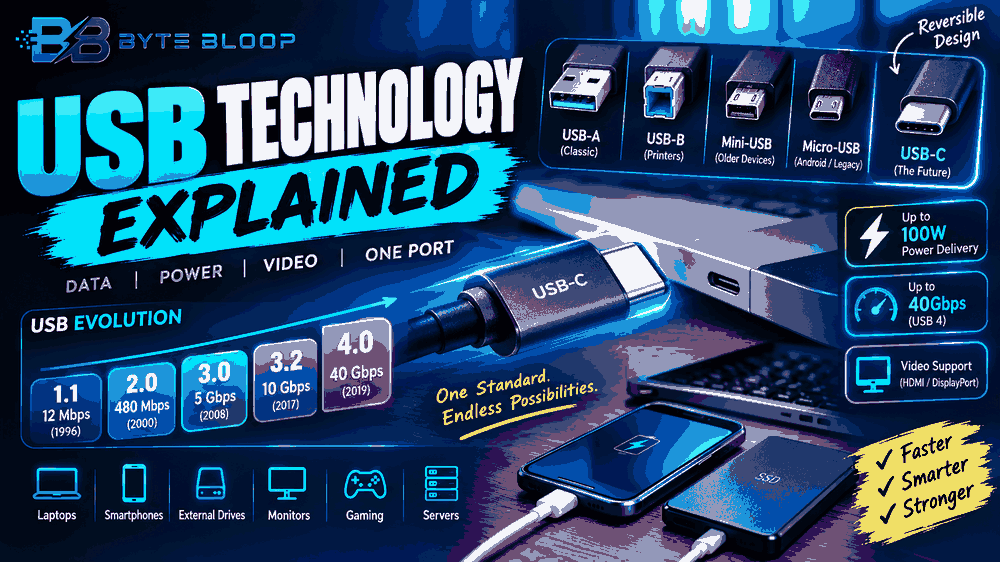
Universal Serial Bus, or USB, has become the backbone of modern connectivity, powering everything from smartphones to servers. First introduced in 1996, USB was designed to replace a patchwork of legacy ports with a single, standardized interface that could handle data, power, and even video in a unified manner. Over the past two decades, the standard has evolved from USB 1.1’s modest 12 Mbps to the lightning‑fast speeds of USB 4, which can reach up to 40 Gbps and support Thunderbolt integration. The latest generation also features a reversible USB‑C connector, making cable orientation a thing of the past. This guide breaks down the core concepts of USB technology, explains the differences between connector types and standards, and offers practical advice for selecting the right cables for everyday use.
What USB Actually Does
At its heart, USB is a serial communication protocol that transfers data between a host (like a computer) and a peripheral (such as a keyboard or external drive). The protocol defines both the electrical signaling and the mechanical interface, ensuring that devices from different manufacturers can talk to each other seamlessly. USB also supplies power, allowing devices to draw up to 5 V at 500 mA in the original spec, and up to 100 W in the latest USB‑C Power Delivery (PD) specification. According to the Wikipedia entry on USB, the standard’s dual role of data and power delivery has made it ubiquitous in consumer electronics.
Evolution of USB Standards
The USB family is organized by generation, each offering higher bandwidth, improved power delivery, and new connector designs. A concise guide from Plugable outlines the progression: USB 1.0/1.1 (12 Mbps), USB 2.0 (480 Mbps), USB 3.0/3.1 Gen 1 (5 Gbps), USB 3.2 Gen 2 (10 Gbps), and USB 4 (40 Gbps). Thunderbolt integration, first introduced in 2011, is now a common feature of USB 4 devices, enabling daisy‑chain displays and external GPUs.
USB‑C: The Reversible Connector
USB‑C is the latest connector type, replacing older USB‑A and USB‑B designs. Its 24‑pin layout supports higher data rates, bidirectional power flow, and reversible insertion. The new standard also allows for alternate modes such as DisplayPort, HDMI, and MHL, turning a single port into a versatile hub. As noted by the Newnex guide, the USB‑C form factor has become the default on laptops, tablets, and even some smartphones.
Power Delivery and Charging
USB Power Delivery (PD) extends the voltage range from 5 V up to 20 V, enabling fast charging of laptops and other high‑power devices. According to the same Newnex source, PD can deliver up to 100 W, making it a viable alternative to proprietary charging solutions. This feature is especially useful for users who prefer a single cable for both data and power.
Connector Types and Their Use Cases
While USB‑C is now the most common connector, several others remain in use:
- USB‑A – The classic rectangular plug still dominates on desktops and older peripherals.
- USB‑B – Found on printers, scanners, and other larger devices.
- Mini‑USB – Once standard on cameras and MP3 players, now largely obsolete.
- Micro‑USB – Widely used on older Android phones and small accessories before being replaced by USB‑C.
Each type has distinct pinouts and power capabilities, so choosing the correct cable for your device is essential. The Anker guide clarifies that misidentifying a cable can lead to insufficient power or data transfer issues.
Practical Tips for Selecting USB Cables
- Check the label: Look for “USB 3.0”, “USB 3.1”, or “USB 4” to ensure you’re getting the desired speed.
- Verify power delivery ratings: For laptops, a cable rated for 100 W is recommended.
- Opt for reversible connectors if you need frequent plug‑in/out; USB‑C offers this convenience.
- Consider durability: Braided cables often last longer than standard plastic ones.
When in doubt, consult the manufacturer’s specifications or use the guides from Scosche and Newnex to match the right cable to your device.
Future of USB
USB 4’s integration with Thunderbolt and its support for multi‑lane data paths position it as the future of high‑speed connectivity. The industry is also exploring 10‑Gbps USB‑C for mobile devices, which could eliminate the need for separate HDMI or DisplayPort cables. As the standard matures, we can expect even tighter integration of power, data, and video in a single port.
Key Takeaways
- USB evolved from 12 Mbps to 40 Gbps, now dominated by USB‑C
- USB‑C offers reversible design, higher power delivery, and alternate modes
- USB Power Delivery can supply up to 100 W, replacing many proprietary chargers
- Choosing the right cable requires checking speed, power, and connector type
Frequently Asked Questions
What is USB and why is it important?
USB is a universal serial bus standard that enables data transfer and power delivery between devices, making it essential for everyday electronics.
What are the key features of USB‑C?
USB‑C offers reversible insertion, 100 W power delivery, 10‑Gbps data rates, and alternate modes like DisplayPort and HDMI.
What are the best use cases for USB 4?
USB 4 is ideal for high‑speed external storage, multi‑display setups, and devices requiring Thunderbolt integration.
What are the pros and cons of USB 2.0?
Pros: widespread compatibility and low cost. Cons: limited speed (480 Mbps) and power (up to 2.5 W).
Conclusion
Based on the available information and industry analysis, USB technology has evolved from a simple data transfer protocol into a versatile, high‑speed, and power‑dense interface that powers modern devices. Its continued development, especially with USB‑C and USB 4, ensures that consumers and professionals alike can rely on a single, standardized connection for data, video, and power needs.
Related Reading
- Thunderbolt 4 vs. USB 4: Which to Choose?
Sources & References
- USB — Universal Serial Bus (USB) is an industry standard, for digital data transmission and power delivery. In the latest standard, the USB-C connector replaces many …
- Decoding USB Standards – 2026 Edition — A clear guide to USB naming and standards from USB 2.0 to USB4 and Thunderbolt, explaining speeds, connectors, power, and labels, …
- How to Identify Different USB Types: A Brief Guide — USB (Universal Serial Bus) is a standard for connecting devices and transferring data. It enables communication, charging, and data exchange …
- USB Types Explained: A Comprehensive Guide — In this comprehensive guide, we will walk you through the basics of USB, the standards, and help you choose the right USB cable for your …
- USB Connector Type Guide — Learn about different USB connector types and generations with Newnex’s comprehensive guide. Compare USB-A, USB-C, Mini USB, and more for smarter …