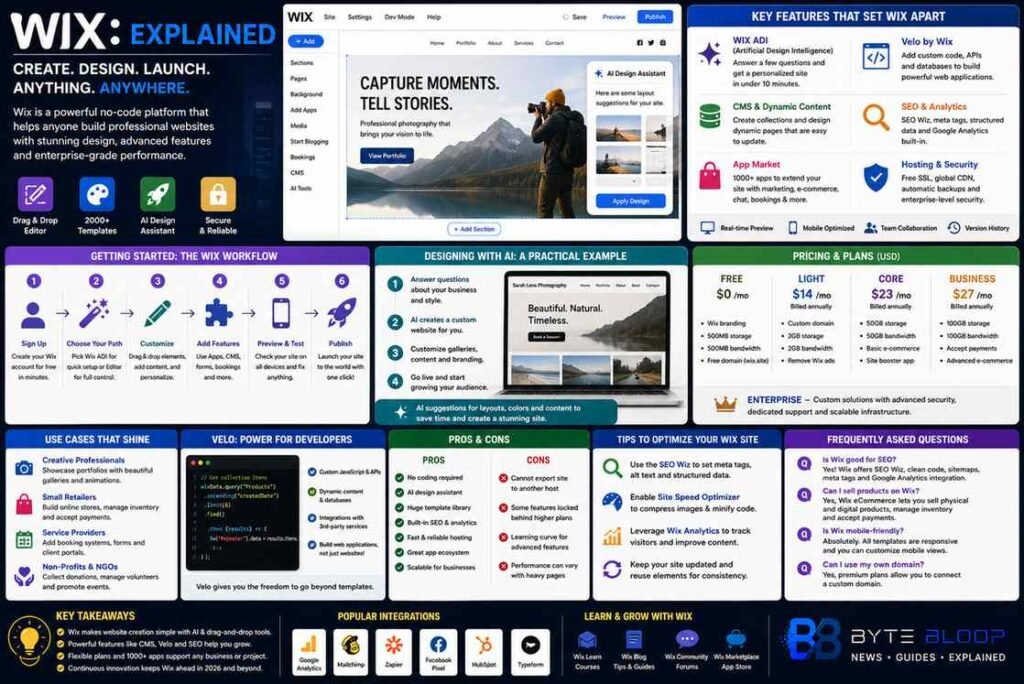
Wix: Explained
Introduction
Wix has evolved from a simple drag‑and‑drop builder into a full‑stack platform that powers millions of websites worldwide. Its promise is clear: anyone can create a polished, functional site without writing a single line of code. This is achieved through an intuitive visual editor, a vast library of over 2,000 templates, and AI‑driven design assistants that suggest layouts, color palettes, and content blocks. For entrepreneurs, artists, and small businesses, Wix offers a low‑cost entry point with free hosting and optional premium plans that unlock custom domains, advanced SEO tools, and e‑commerce capabilities. The platform also supports more advanced users through Wix Code (now Velo), allowing custom JavaScript, APIs, and database integration. In 2026, Wix’s focus on enterprise‑grade experiences—such as dynamic content rendering, performance optimization, and AI‑powered personalization—has broadened its appeal beyond hobbyists to mid‑market brands seeking scalable digital solutions.
Whether you’re building a portfolio, launching an online store, or creating a community hub, Wix’s ecosystem provides the tools to design, launch, and grow a site from a single dashboard. Below, we walk through the core features, practical steps, and real‑world use cases that make Wix a compelling choice for modern web creators.
Getting Started: The Wix Workflow
Wix’s onboarding process is designed to get you live in minutes. After signing up, you choose between the AI‑powered Wix ADI or the classic editor. The ADI asks a few questions about your goals and automatically generates a tailored site, while the classic editor gives you full control over layout and content.
Once your site is created, you can switch between the editor and the mobile view to ensure responsiveness. Wix’s built‑in editor uses a simple drag‑and‑drop interface, but you can also add advanced elements such as forms, galleries, and video backgrounds with a single click.
Key Features That Set Wix Apart
- Template Library: Over 2,000 professionally designed templates across categories like photography, food, and business.
- Wix ADI (Artificial Design Intelligence): Generates a personalized site in under 10 minutes based on your answers.
- Velo by Wix: A developer platform that adds custom code, APIs, and database functionality.
- SEO & Analytics: Built‑in SEO wizard, Google Analytics integration, and performance monitoring.
- App Market: More than 1,000 third‑party apps for marketing, e‑commerce, and social media.
Designing With AI: A Practical Example
Imagine you’re a freelance photographer looking to showcase your portfolio. You start with the ADI, answer questions about your style and target audience, and receive a ready‑made site. From there, you customize the gallery layout, add a booking form, and integrate a payment gateway for prints. Wix’s AI also suggests color palettes that match your brand, ensuring a cohesive visual identity without manual tweaking.
Advanced Development: Velo for Custom Functionality
For users who need more than a template, Velo allows you to write JavaScript, create dynamic pages, and connect to external APIs. A local coffee shop could build a reservation system that pulls real‑time inventory data, or an event organizer could create a ticketing platform that updates seat availability on the fly. Velo’s backend services are managed by Wix, so you don’t need a separate server.
Pricing and Plans
Wix offers a free tier with Wix branding and limited storage. Premium plans start at $14 per month (annual billing) and include a custom domain, increased bandwidth, and advanced marketing tools. The Business & e‑commerce plans add payment processing, inventory management, and the ability to sell digital products. For enterprise users, Wix Enterprise provides dedicated support, advanced security, and custom integrations.
Use Cases Across Industries
Wix’s versatility is evident in its adoption across diverse sectors:
- Creative Professionals: Photographers, designers, and artists use Wix to showcase portfolios with high‑resolution galleries.
- Small Retailers: Boutique shops launch e‑commerce sites with inventory management and integrated payment gateways.
- Service Providers: Consultants, coaches, and freelancers create booking pages and client portals.
Pros and Cons
Pros include a generous free tier, AI assistance, and an extensive app market. Cons are the limited export options (you can’t move a site to another host) and occasional performance hiccups on heavily trafficked pages. However, Wix’s continuous updates and focus on enterprise features mitigate many of these drawbacks.
Tips for Optimizing Your Wix Site
- Use the SEO Wiz to set meta tags, alt text, and structured data.
- Enable Site Speed Optimizer to compress images and minify code.
- Leverage Wix Analytics to track user behavior and adjust content accordingly.
- Regularly update templates to keep the design fresh and secure.
Key Takeaways
- Wix offers a no‑code, AI‑powered design path for instant sites.
- Over 2,000 templates cover every niche, from portfolios to e‑commerce.
- Velo unlocks custom code and APIs for advanced functionality.
- Free tier provides a solid starting point; premium plans scale with business needs.
Frequently Asked Questions
What is Wix?
Wix is a cloud‑based website builder that lets users create, publish, and manage sites without coding, using drag‑and‑drop tools, AI design assistants, and a vast template library.
What are the key features of Wix?
Key features include a free editor, AI‑driven Wix ADI, Velo for custom development, built‑in SEO tools, an extensive app market, and scalable pricing plans.
What are the best use cases for Wix?
Wix excels for creatives, small retailers, service providers, and non‑profits who need quick, visually appealing sites with optional e‑commerce or booking functionalities.
What are the pros and cons of using Wix?
Pros: no coding required, AI design, large template library, flexible pricing. Cons: limited site export, occasional performance issues on high‑traffic pages, and some advanced features locked behind higher tiers.
Conclusion
Based on the available information and industry analysis, Wix provides a versatile, no‑code platform that democratizes web design while offering enterprise‑grade features for growth. Its AI‑powered design tools, extensive template library, and Velo development environment make it suitable for both novices and advanced users, positioning Wix as a leading choice for individuals and businesses seeking rapid, scalable online presence.
Related Reading
- How Wix ADI Transforms Portfolio Sites
- Velo by Wix: Building Custom Web Apps