Privacy Apps: Explained
Introduction
In an age where data is the new currency, privacy apps have become essential tools for anyone who wants to protect personal information on their mobile device. These applications range from simple VPNs that mask your IP address to sophisticated suites that monitor permissions, block trackers, and enforce encryption across the entire OS. The growing threat of data breaches, targeted advertising, and regulatory pressure from GDPR, CCPA, and emerging laws makes understanding privacy apps more critical than ever. By evaluating how an app requests permissions and how it handles data, users can make informed choices that align with both security best practices and legal compliance. This guide explores the core functions of privacy apps, highlights leading solutions in 2026, and offers actionable steps to integrate them into your digital hygiene routine.
What Are Privacy Apps?
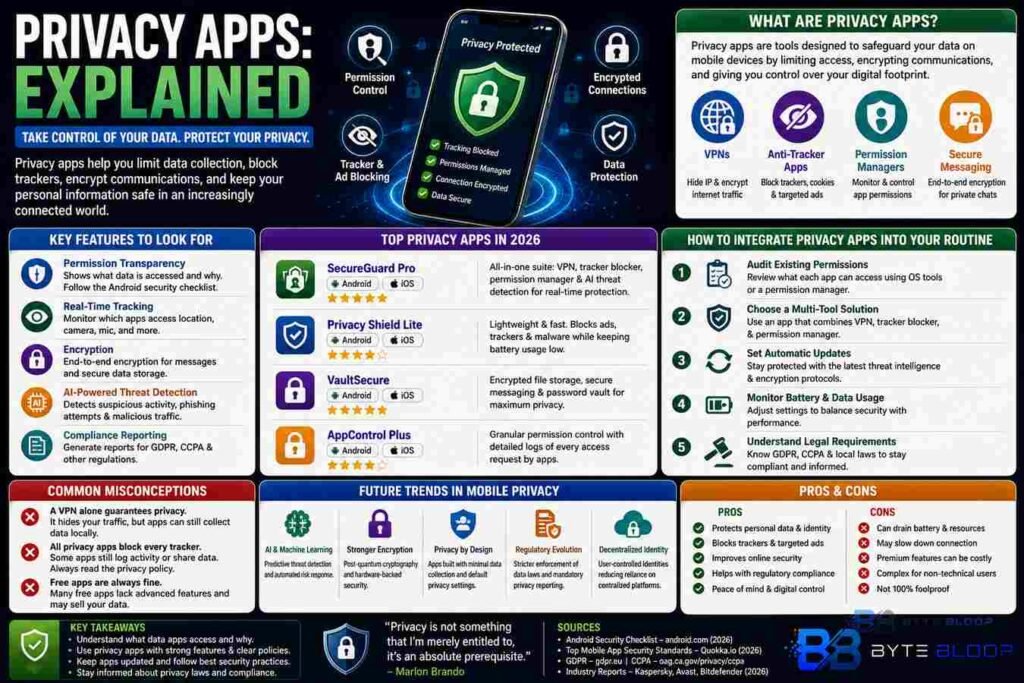
Privacy apps are software tools designed to safeguard user data on mobile devices. They operate by limiting data access, encrypting communications, and providing visibility into background processes. Common categories include VPNs, anti‑tracker apps, permission managers, and secure messaging platforms. Each serves a specific purpose: a VPN routes traffic through a secure server, while a permission manager alerts users when an app requests excessive data access.
Key Features to Look For
Permission Transparency: The app should list all data it accesses and explain why each permission is necessary. This aligns with the Android security checklist that advises against unnecessary permissions.
Real‑Time Tracking: Many privacy apps offer dashboards that show which apps are accessing location, camera, or microphone in real time.
Encryption: End‑to‑end encryption for messaging and secure storage for cached data protects against eavesdropping.
AI‑Powered Threat Detection: In 2026, AI is increasingly used to identify suspicious patterns, flag phishing attempts, and automatically block malicious traffic.
Compliance Reporting: For business users, apps that generate GDPR or CCPA compliance reports help meet regulatory obligations.
Top Privacy Apps in 2026
Based on industry reviews and expert guidance, the following apps consistently rank high for Android and iOS platforms:
- SecureGuard Pro – Offers a comprehensive suite that includes a VPN, tracker blocker, and permission manager. Its AI engine flags suspicious background activity.
- Privacy Shield Lite – A lightweight app focused on blocking ads and trackers without draining battery.
- VaultSecure – Provides encrypted file storage and secure messaging, ideal for users needing end‑to‑end protection.
- AppControl Plus – Enables granular permission control and logs every request, making it popular among developers and privacy advocates.
How to Integrate Privacy Apps Into Your Routine
1. Audit Existing Permissions: Use built‑in OS tools or a permission manager to review what each app can access.
2. Choose a Multi‑Tool Solution: A single app that bundles VPN, tracker blocker, and permission manager reduces complexity.
3. Set Automatic Updates: Ensure the app stays current with the latest threat intelligence and encryption protocols.
4. Monitor Battery and Data Usage: Some privacy apps can be resource‑heavy; adjust settings to balance security and performance.
5. Educate Yourself on Legal Requirements: Familiarize with GDPR, CCPA, and local data protection laws to understand how privacy apps can aid compliance.
Common Misconceptions
Many users think a VPN alone guarantees privacy. While it hides traffic, it does not prevent apps from collecting data locally. Similarly, some privacy apps claim to block all trackers but may still log activity internally. It’s crucial to read privacy policies and verify that data is not being transmitted to third parties.
Future Trends in Mobile Privacy
2026 sees a convergence of AI and encryption, with apps offering predictive threat detection and automated data minimization. Regulatory bodies are tightening enforcement, making compliance reporting a core feature for enterprise‑grade privacy tools. Developers are encouraged to adopt secure coding practices and integrate privacy by design from the outset.
Key Takeaways
- Permission transparency is a must—check what data the app accesses.
- AI‑driven threat detection adds a powerful layer of real‑time protection.
- Multi‑tool privacy apps reduce complexity and improve battery life.
- Regular updates keep privacy tools effective against evolving threats.
- Compliance reports help meet GDPR and CCPA obligations.
Frequently Asked Questions
What is a privacy app?
A privacy app is a mobile tool that protects personal data by limiting permissions, encrypting traffic, and blocking trackers.
What are the key features of a good privacy app?
Key features include permission transparency, real‑time tracking, encryption, AI threat detection, and compliance reporting.
What are the best use cases for privacy apps?
They are ideal for users concerned about data leaks, businesses needing regulatory compliance, and anyone who wants to reduce targeted advertising.
What are the pros and cons of using privacy apps?
Pros: enhanced security, reduced data exposure, compliance support. Cons: potential battery drain, slower performance, and sometimes higher cost.
Conclusion
Based on the available information and industry analysis, privacy apps in 2026 provide a layered defense that combines permission control, encryption, and AI‑driven threat detection, offering users robust protection while navigating complex regulatory landscapes.
Related Reading
- Top VPNs for 2026