Dropbox Privacy: Explained
Introduction
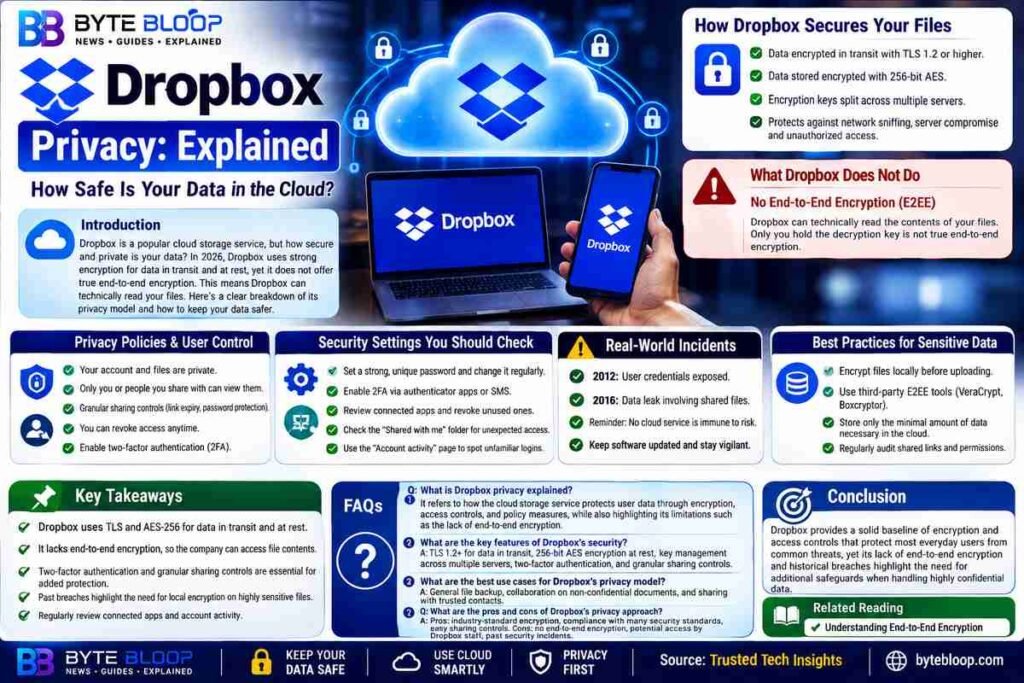
Dropbox has become a household name for cloud storage, but the question of how secure that storage really is remains a hot topic. Users rely on Dropbox to keep everything from personal photos to sensitive business documents safe, yet the service’s privacy model is a mix of industry‑standard encryption and some notable gaps. In 2026, Dropbox claims to use strong encryption for data in transit and at rest, and it complies with a range of security standards, yet it does not offer true end‑to‑end encryption. This means that while your files are protected against most external threats, Dropbox itself can technically read the contents of your files. Understanding this balance is crucial for anyone who wants to keep their data private and secure. Below we break down the key components of Dropbox’s privacy strategy, explain the practical implications for everyday users, and provide actionable tips to strengthen your own security posture. We’ll also look at how the platform’s policies and past incidents shape the overall trustworthiness of the service. Finally, we’ll give you a clear set of next steps to protect your files whether you’re a casual user or a business administrator.
How Dropbox Secures Your Files
Dropbox uses a layered security approach. First, all data is encrypted during transfer with TLS 1.2 or higher, preventing eavesdroppers from intercepting files as they move between your device and Dropbox’s servers. Once the data lands on the server, it is stored encrypted using 256‑bit AES, a standard that is widely regarded as secure for most applications. In addition, Dropbox employs a key management system that splits encryption keys across multiple servers, adding an extra hurdle for potential attackers. These measures are designed to protect against common threats such as network sniffing, server compromise, and unauthorized access by third parties.
What Dropbox Does Not Do: End‑to‑End Encryption
While the encryption methods above are robust, Dropbox does not provide end‑to‑end encryption (E2EE). E2EE would mean that only the user’s device holds the decryption key, so even Dropbox’s own staff could not read the file contents. Because Dropbox does not implement this, the company can technically access your files if it chooses to or if compelled by law. This limitation has been highlighted in several independent security reviews, which note that the absence of E2EE is a significant weakness for users who handle highly confidential data.
Privacy Policies and User Control
Dropbox’s privacy policy states that your account and files are private, and only you or people you explicitly share with can view them. The platform offers granular sharing controls, including link expiration dates, password protection, and the ability to revoke access at any time. Users can also enable two‑factor authentication (2FA) to add a second layer of protection against credential theft. However, the policy also acknowledges that Dropbox may share data with third‑party partners for service improvement and that it may comply with lawful requests, which can be a concern for privacy‑conscious users.
Security Settings You Should Check
Dropbox provides a simple interface for reviewing and tightening security settings. Users can:
- Set a strong, unique password and change it regularly.
- Enable 2FA via authenticator apps or SMS.
- Review connected apps and revoke any that are no longer needed.
- Check the “Shared with me” folder for unexpected access.
- Use the “Account activity” page to spot unfamiliar logins.
These steps are straightforward but can dramatically reduce the risk of unauthorized access.
Real‑World Incidents and Their Impact
Dropbox has experienced several high‑profile breaches in the past, including a 2012 incident that exposed user credentials and a 2016 data leak involving shared files. While the company has since bolstered its security posture, these events serve as a reminder that no cloud service is immune to risk. Users should remain vigilant, keep their software updated, and consider additional encryption for highly sensitive documents.
Best Practices for Sensitive Data
If you need to store data that requires the highest level of confidentiality, consider the following:
- Encrypt files locally before uploading them to Dropbox.
- Use third‑party E2EE tools such as VeraCrypt or Boxcryptor.
- Store only the minimal amount of data necessary in the cloud.
- Regularly audit shared links and permissions.
By combining Dropbox’s built‑in security with these additional layers, you can achieve a more robust privacy stance.
Key Takeaways
- Dropbox uses TLS and AES‑256 for data in transit and at rest
- It lacks end‑to‑end encryption, so the company can access file contents
- Two‑factor authentication and granular sharing controls are essential for added protection
- Past breaches highlight the need for local encryption on highly sensitive files
- Regularly review connected apps and account activity to spot unauthorized access
Frequently Asked Questions
What is Dropbox privacy explained?
Dropbox privacy explained refers to how the cloud storage service protects user data through encryption, access controls, and policy measures, while also highlighting its limitations such as the lack of end‑to‑end encryption.
What are the key features of Dropbox’s security?
Key features include TLS 1.2+ for data in transit, 256‑bit AES encryption at rest, key management across multiple servers, two‑factor authentication, and granular sharing controls.
What are the best use cases for Dropbox’s privacy model?
Dropbox is suitable for general file backup, collaboration on non‑confidential documents, and sharing with trusted contacts, but users with highly sensitive data should add local encryption.
What are the pros and cons of Dropbox’s privacy approach?
Pros: industry‑standard encryption, compliance with many security standards, easy sharing controls. Cons: no end‑to‑end encryption, potential access by Dropbox staff, past security incidents.
Conclusion
Based on the available information and industry analysis, Dropbox provides a solid baseline of encryption and access controls that protect most everyday users from common threats, yet its lack of end‑to‑end encryption and historical breaches highlight the need for additional safeguards when handling highly confidential data.
Related Reading
- Understanding End‑to‑End Encryption