Classroom Technology: Explained
Introduction
Classroom technology has moved from simple overhead projectors to sophisticated AI‑driven ecosystems that personalize learning, enhance engagement, and streamline administrative tasks. In 2026, educators are leveraging tools that blend artificial intelligence, extended reality, and real‑time data analytics to create immersive, adaptive learning environments. These advancements are not merely gadgets; they represent a paradigm shift toward student‑centered instruction that adapts to individual learning styles and paces. The integration of smart displays, cloud‑based platforms, and quantum‑inspired data processing is reshaping how teachers plan lessons and how students collaborate across borders. Yet, the rapid pace of innovation also introduces challenges—budget constraints, data privacy concerns, and the need for professional development. Understanding the core components, benefits, and pitfalls of classroom technology is essential for schools aiming to stay competitive and equitable. This guide demystifies the latest trends, offers practical selection tips, and outlines how educators can responsibly adopt new tools to enhance learning outcomes.
What Makes Modern Classroom Tech Different?
Traditional classroom tech focused on hardware—projectors, whiteboards, and basic computers. Today’s solutions are software‑centric, cloud‑based, and AI‑driven. They can analyze student performance in real time, recommend personalized resources, and even simulate complex scientific phenomena through virtual or augmented reality. The shift from “technology in the classroom” to “technology that transforms learning” is driven by data‑rich environments and the demand for scalable, adaptable instruction.
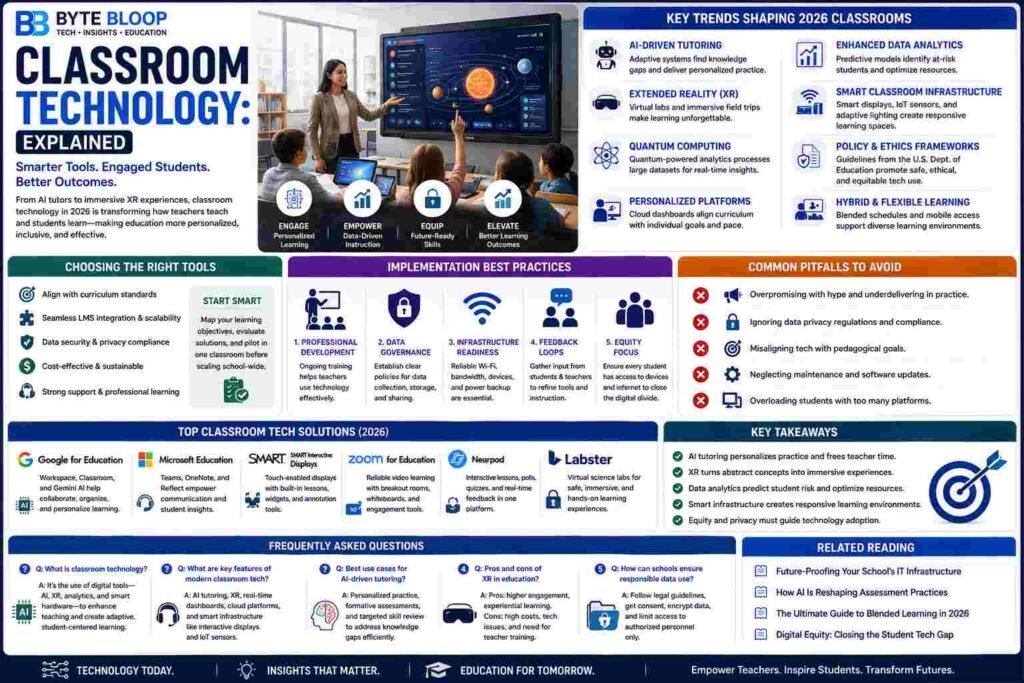
Key Trends Shaping 2026 Classrooms
1. AI‑Driven Tutoring Systems – Adaptive algorithms identify knowledge gaps and deliver tailored practice, freeing teachers to focus on higher‑order thinking.
2. Extended Reality (XR) – Virtual labs and immersive field trips bring abstract concepts to life, increasing retention.
3. Quantum Computing Applications – While still nascent, quantum‑enabled analytics promise faster processing of large educational datasets, enabling real‑time insights.
4. Personalized Learning Platforms – Cloud‑based dashboards align curriculum with individual goals, supporting differentiated instruction.
5. Enhanced Data Analytics – Predictive models help identify at‑risk students and optimize resource allocation.
6. Smart Classroom Infrastructure – Integrated displays, IoT sensors, and adaptive lighting create responsive learning spaces.
7. Policy & Ethics Frameworks – New guidance from the U.S. Department of Education emphasizes responsible data use and equity.
8. Hybrid & Flexible Learning Models – Blended schedules and mobile access support diverse learning environments.
Choosing the Right Tools for Your School
With over 247 options reviewed in a 2026 selection guide, schools face a daunting task. Key criteria include:
- Alignment with curriculum standards
- Scalability and integration with existing LMS
- Data security and compliance with FERPA or GDPR
- Cost‑effectiveness and total cost of ownership
- User support and professional development resources
Start by mapping out learning objectives, then evaluate tools against those goals. Pilot programs in a single classroom can reveal real‑world usability before campus‑wide rollouts.
Implementation Best Practices
1. Professional Development – Continuous training ensures teachers can leverage new features and troubleshoot issues.
2. Student Data Governance – Establish clear policies for data collection, storage, and sharing.
3. Infrastructure Readiness – Reliable Wi‑Fi, sufficient bandwidth, and power backups are non‑negotiable.
4. Iterative Feedback Loops – Collect student and teacher input to refine tool usage and curriculum alignment.
5. Equity Focus – Provide equal access to devices and internet connectivity to avoid widening the digital divide.
Common Pitfalls to Avoid
• Overpromising with hype and underdelivering in practice.
• Ignoring data privacy regulations, leading to compliance risks.
• Failing to align technology with pedagogical goals, resulting in superficial gadget use.
• Neglecting ongoing maintenance and software updates, causing security vulnerabilities.
• Overloading students with too many platforms, creating cognitive fatigue.
Key Takeaways
- AI tutoring personalizes practice and frees teacher time
- XR turns abstract concepts into immersive experiences
- Data analytics predict student risk and optimize resources
- Smart infrastructure creates responsive learning environments
- Equity and privacy must guide technology adoption
Frequently Asked Questions
What is classroom technology explained?
It refers to the integrated use of digital tools—AI, XR, data analytics, and smart hardware—that transform traditional teaching methods into adaptive, student‑centered learning experiences.
What are the key features of modern classroom tech?
Adaptive AI tutoring, immersive XR environments, real‑time data dashboards, cloud‑based learning platforms, and smart classroom infrastructure like interactive displays and IoT sensors.
What are the best use cases for AI‑driven tutoring?
Individualized review sessions, formative assessment, and supplemental practice where teachers need to target specific skill gaps without spending extra class time.
What are the pros and cons of XR in education?
Pros include higher engagement and experiential learning; cons involve high setup costs, potential technical glitches, and the need for teacher training to integrate XR meaningfully.
How can schools ensure responsible data use?
By following federal guidance, establishing clear consent protocols, encrypting student data, and limiting access to authorized personnel only.
Conclusion
Based on the available information and industry analysis, classroom technology provides a powerful framework for personalized, engaging, and data‑driven learning environments. By aligning tools with pedagogical goals, prioritizing equity and privacy, and investing in ongoing professional development, educators can harness AI, XR, and smart infrastructure to elevate student outcomes and prepare learners for a rapidly evolving digital world.
Related Reading
- Future-Proofing Your School’s IT Infrastructure
- How AI Is Reshaping Assessment Practices