Virtual Classrooms: Explained
Introduction
Virtual classrooms have moved from a niche solution to a mainstream cornerstone of modern education, corporate training, and even government onboarding. In 2026, the term refers to a fully integrated online space where teachers and students interact in real time, sharing video, audio, screen content, and collaborative tools. The shift began during the pandemic, but recent advances in AI, low‑latency streaming, and immersive technologies have made these environments more engaging than ever. They now support not only live lectures but also breakout groups, instant polling, and adaptive learning pathways. This guide explains what a virtual classroom is, why it matters, and how institutions can implement it effectively.
At its core, a virtual classroom is a digital replica of a physical classroom that preserves the immediacy of face‑to‑face instruction while adding flexibility and reach. Unlike simple video conferencing, it integrates learning management systems, content libraries, and analytics dashboards into a single interface. The result is an ecosystem that mirrors the flow of a traditional lesson—announcement, instruction, practice, assessment—yet is accessible from any device. Understanding this ecosystem is key to unlocking its full potential.
What Makes a Virtual Classroom Different from a Webinar?
Webinars are one‑way broadcasts, often with limited interaction. Virtual classrooms, by contrast, are designed for two‑way communication. They allow students to raise hands, submit questions, and collaborate on shared documents in real time. The platform also tracks engagement metrics—attendance, chat activity, and quiz scores—providing instructors with data to personalize instruction. This interactivity is what transforms a passive viewing experience into an active learning environment.
Core Components of a Modern Virtual Classroom
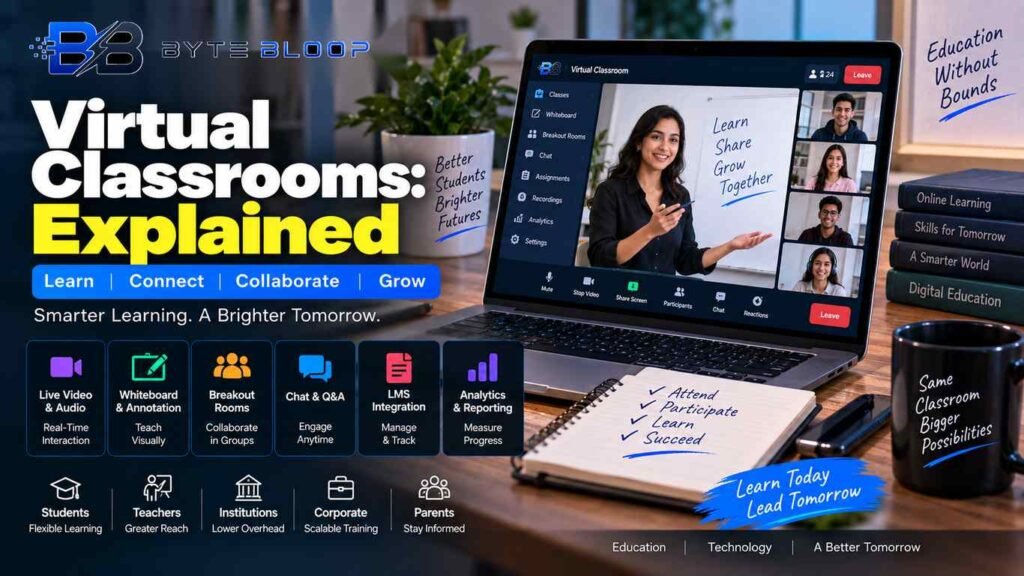
- Live Video & Audio – High‑definition streams with low latency so that lag does not break the flow of conversation.
- Whiteboard & Annotation – Digital whiteboards that let teachers draw, highlight, and annotate on the fly, with the ability to save sessions.
- Breakout Rooms – Small group spaces for discussion, group projects, or peer tutoring.
- Chat & Q&A – Persistent chat windows and structured Q&A panels keep dialogue organized.
- Learning Management Integration – Seamless connection to LMSs for grading, resource sharing, and progress tracking.
- Analytics & Reporting – Dashboards that show real‑time engagement and post‑class performance.
Benefits for Different Stakeholders
Students gain flexibility and access to diverse resources. Teachers can reach larger audiences and use data to tailor instruction. Administrators benefit from reduced overhead and the ability to monitor compliance. Parents and guardians appreciate the transparency and real‑time updates. Corporate trainers enjoy scalable onboarding and continuous skill development without travel costs.
Common Implementation Mistakes
- Choosing a platform that focuses only on video and neglects collaboration tools.
- Ignoring bandwidth requirements—students in rural areas may experience lag.
- Not training staff on best practices for digital engagement.
- Failing to integrate with existing LMS or grading systems.
Practical Tips for Setting Up a Virtual Classroom
- Define learning objectives and map them to platform features.
- Test connectivity with a pilot group before full rollout.
- Set clear behavioral guidelines—hand‑raising etiquette, chat usage, and breakout room conduct.
- Use pre‑recorded modules to supplement live sessions and reduce bandwidth strain.
- Leverage analytics to adjust pacing and content in real time.
Future Trends in Virtual Classrooms
AI‑driven tutoring, adaptive pacing, and immersive VR labs are poised to make virtual classrooms indistinguishable from physical ones. Real‑time language translation will break down language barriers, while predictive analytics will flag students at risk before they fall behind. As hardware becomes more affordable, high‑definition, low‑latency streaming will become the norm, making the experience seamless for all participants.
Key Takeaways
- Virtual classrooms combine live video, collaboration tools, and analytics into a single learning ecosystem.
- They offer flexibility and scalability for students, teachers, and institutions alike.
- Common pitfalls include neglecting collaboration features and bandwidth planning.
- Future trends point to AI, VR, and real‑time translation enhancing the experience.
Frequently Asked Questions
What is a virtual classroom?
A virtual classroom is an online, real‑time learning environment that replicates the interactive elements of a physical classroom, including video, audio, whiteboards, breakout rooms, and analytics.
What are the key features of a virtual classroom?
Live video & audio, digital whiteboards, breakout rooms, persistent chat, LMS integration, and real‑time analytics.
What are the best use cases for virtual classrooms?
Remote education, corporate training, onboarding, government workshops, and any scenario where live interaction and immediate feedback are essential.
What are the pros and cons of virtual classrooms?
Pros: flexibility, scalability, data‑driven insights, and reduced overhead. Cons: bandwidth demands, potential engagement drop, and the need for digital literacy.
Conclusion
Based on the available information and industry analysis, virtual classrooms provide a dynamic, data‑rich platform that extends learning beyond physical boundaries, enhances engagement through real‑time interaction, and offers scalable solutions for educators and organizations alike.
Related Reading
- AI in the Classroom: How Machine Learning Shapes Learning