Remote Work Privacy: Explained
Introduction
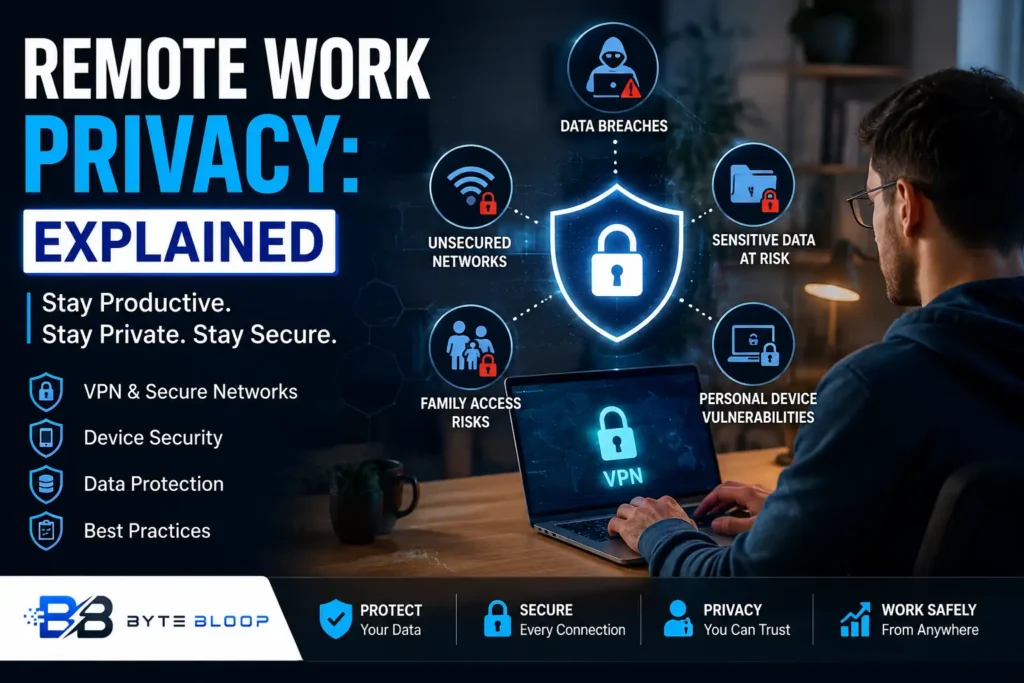
Remote work has become a staple of modern business, offering flexibility and cost savings for both employers and employees. Yet, this shift has also opened new doors for privacy breaches, from family members inadvertently accessing confidential files to sensitive financial data leaking over unsecured home networks. The stakes are high: a single misstep can expose personal information, compromise corporate secrets, and erode trust. Understanding the nuances of remote work privacy is essential for safeguarding both individual and organizational assets. This guide breaks down the core concepts, highlights common pitfalls, and provides actionable strategies to keep data secure while working from home.
At its heart, remote work privacy involves protecting personal and professional information across multiple touchpoints—devices, networks, and communication tools. Employees often juggle personal and work tasks on the same laptop, share screens with family members, and rely on public Wi‑Fi for connectivity. Each scenario introduces vulnerabilities that can be mitigated with proper policies, technology, and training. By adopting a layered approach—combining secure infrastructure, clear guidelines, and continuous awareness—organizations can transform remote work from a privacy risk into a resilient model.
Common Privacy Pitfalls in Remote Work
1. Unsecured Home Networks – Many workers use routers without strong encryption or outdated firmware, making it easy for attackers to intercept traffic. According to the Cybersecurity and Data Protection Considerations for Remote Workers guide, a VPN encrypts the connection to corporate servers, reducing this risk.
2. Personal Device Usage – When employees use personal smartphones or tablets for business, they expose corporate data to personal apps that may lack enterprise security controls. The Remote-work privacy failures and how to prevent them report shows family members can access chats and finances in seconds if devices are not properly segmented.
3. Inadequate Access Controls – Without role‑based permissions, anyone with a login can view sensitive documents. The 10 Data Privacy Best Practices in the Era of Remote Work recommends clear data privacy policies and secure communication tools to mitigate this.
4. Insufficient Employee Training – Even the best technology fails if users are unaware of phishing tactics or how to secure their environment. Regular training, as highlighted in the same best‑practice list, is essential.
Building a Robust Remote Work Privacy Framework
1. Secure the Network
Implement a corporate VPN or zero‑trust network access (ZTNA) solution to encrypt all traffic. According to the Cybersecurity and Data Protection Considerations for Remote Workers, a VPN is a foundational layer that protects data in transit.
2. Enforce Device Security
Mandate that employees use company‑managed devices or enroll personal devices in a mobile device management (MDM) system. This ensures up‑to‑date patches, anti‑malware, and remote wipe capabilities. The Work from Home and Privacy Challenges study notes that unsecured devices are a primary vector for data exfiltration.
3. Apply Least‑Privilege Access
Use role‑based access control (RBAC) and enforce the principle of least privilege. Regularly audit permissions to prevent over‑exposure. The 10 Data Privacy Best Practices list stresses the importance of clear data privacy policies to guide this process.
4. Adopt Secure Collaboration Tools
Replace unsecured chat apps with enterprise‑grade solutions that offer end‑to‑end encryption and compliance features. The Remote-work privacy failures guide recommends secure communication tools as a frontline defense.
5. Provide Continuous Training and Awareness
Run quarterly phishing simulations, share best‑practice newsletters, and create a culture where employees feel comfortable reporting suspicious activity. The Harvard Best Practices for Remote Work article emphasizes regular employee training as a critical control.
6. Monitor and Respond
Deploy endpoint detection and response (EDR) tools, monitor for unusual data transfers, and have an incident response plan tailored to remote scenarios. The BlackFog Remote Work Privacy and Cybersecurity Essentials article highlights the risk of data exfiltration on remote devices.
Practical Tips for Employees
- Always log out of work accounts when switching to personal use.
- Keep work and personal files on separate partitions or cloud services.
- Use a dedicated, strong password manager and enable two‑factor authentication.
- When in a public space, avoid accessing sensitive documents unless on a VPN.
- Regularly back up critical data to an encrypted external drive or secure cloud.
Real‑World Example: The 2026 Remote‑Work Privacy Leak
In early 2026, a mid‑size firm experienced a breach when an employee’s home router was compromised, exposing confidential client data and personal financial records. The incident, covered in the Remote-work privacy failures guide, was traced back to a default router password and lack of VPN usage. The fallout included regulatory fines and a loss of client trust, underscoring the need for robust network security.
Key Takeaways
- Use VPNs or ZTNA to encrypt traffic
- Enforce device security via MDM or company‑managed hardware
- Apply least‑privilege access and audit permissions
- Choose secure, encrypted collaboration tools
- Provide regular training and phishing simulations
- Monitor endpoints and have a remote‑specific incident plan
Frequently Asked Questions
What is remote work privacy explained?
Remote work privacy refers to the measures and practices that protect personal and corporate data when employees work outside traditional office environments.
What are the key features of a robust remote work privacy framework?
A strong framework includes VPN or ZTNA, device management, least‑privilege access, secure collaboration tools, ongoing training, and proactive monitoring.
What are the best use cases for VPNs in remote work?
VPNs are ideal for encrypting all traffic to corporate resources, protecting data in transit, and ensuring compliance with data‑protection regulations.
What are the pros and cons of using personal devices for work?
Pros include cost savings and employee comfort; cons involve higher security risks, potential data leakage, and challenges in enforcing policies.
Conclusion
Based on the available information and industry analysis, remote work privacy provides a framework that protects both personal and corporate data through layered security measures, clear policies, and continuous education. By integrating VPNs, device management, least‑privilege access, and secure collaboration tools, organizations can mitigate the heightened risks of working outside the office while maintaining productivity and compliance.
Related Reading
- How to Choose the Right VPN for Remote Teams
Sources & References