Wi‑Fi 6 vs Wi‑Fi 7: Key Differences
Introduction
Wi‑Fi 6, standardized as 802.11ax in 2019, brought a suite of efficiency improvements that helped networks handle more devices without sacrificing performance. It introduced technologies like OFDMA, MU‑MIMO, and target‑wake time to reduce contention and improve battery life. In 2024, Wi‑Fi 7 (802.11be) arrived, promising a quantum leap in speed, bandwidth, and latency. While Wi‑Fi 6 remains the workhorse for most households, Wi‑Fi 7’s advances target the next generation of high‑bandwidth applications such as 8K streaming, AR/VR, and real‑time cloud gaming. Understanding the technical distinctions between these two standards is essential for IT managers, homeowners, and tech enthusiasts who want to future‑proof their networks.
Wi‑Fi 6
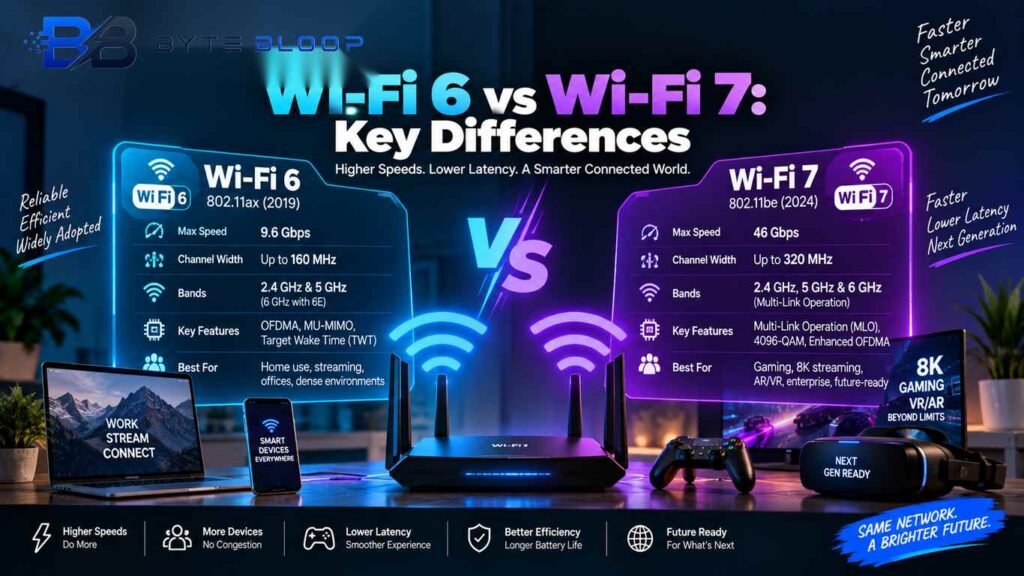
Wi‑Fi 6’s maximum theoretical throughput tops out at 9.6 Gbps, achieved through 160‑MHz channels and 1024‑QAM modulation. It operates primarily in the 2.4 GHz and 5 GHz bands, with the 6 GHz band available only through the Wi‑Fi 6E extension. Key features include:
- OFDMA – slices a channel into sub‑carriers, allowing multiple devices to share bandwidth simultaneously.
- MU‑MIMO – supports up to eight simultaneous downlink streams, improving multi‑device performance.
- Target Wake Time (TWT) – schedules device wake times, reducing power drain for IoT and mobile devices.
Wi‑Fi 6 excels in dense environments such as apartment complexes, offices, and stadiums, where many devices compete for airtime. Its backward compatibility with Wi‑Fi 5 and 4 ensures a smooth transition for legacy devices.
Wi‑Fi 7
Wi‑Fi 7 pushes the envelope with a theoretical maximum throughput of 46 Gbps, roughly four times Wi‑Fi 6’s peak. It achieves this by expanding channel width to 320 MHz, doubling the available spectrum, and introducing 4096‑QAM modulation. Other innovations include:
- Multi‑Link Operation (MLO) – enables devices to transmit across 2.4 GHz, 5 GHz, and 6 GHz bands simultaneously, reducing latency and increasing reliability.
- Higher‑order Modulation – 4096‑QAM offers finer signal resolution, improving data rates when channel conditions are optimal.
- Enhanced OFDMA – supports finer sub‑carrier allocation, further reducing contention.
Wi‑Fi 7’s broader bandwidth and MLO make it ideal for latency‑sensitive workloads, such as cloud gaming, VR/AR, and real‑time analytics. However, its benefits are most pronounced in environments with high signal quality and minimal interference.
Key Differences
Speed and Throughput
Wi‑Fi 6 peaks at 9.6 Gbps; Wi‑Fi 7 can reach 46 Gbps under ideal conditions. In real‑world tests, Wi‑Fi 7 delivers roughly 2.4× higher throughput than Wi‑Fi 6 on the same hardware configuration.
Channel Width and Spectrum
Wi‑Fi 6 uses up to 160 MHz channels; Wi‑Fi 7 expands to 320 MHz, effectively doubling the available bandwidth. Wi‑Fi 7 also fully exploits the 6 GHz band, whereas Wi‑Fi 6E only adds it as an extension.
Latency
Wi‑Fi 7’s MLO and improved scheduling reduce latency to sub‑5 ms levels, compared to Wi‑Fi 6’s typical 10–20 ms latency in congested scenarios.
Device Support and Compatibility
Wi‑Fi 6 is supported by most routers and devices released after 2019. Wi‑Fi 7 requires new hardware that supports 320‑MHz channels and MLO; legacy devices will still operate on Wi‑Fi 6 or 5 bands.
Power Efficiency
Both standards use TWT, but Wi‑Fi 7’s MLO can further reduce power consumption by selecting the least congested band for transmission.
Use Cases
Wi‑Fi 6 is well‑suited for general home use, streaming, and office networks. Wi‑Fi 7 shines in high‑density gaming, enterprise analytics, and future‑proofing for emerging 8K media and AR/VR.
Pros and Cons
Wi‑Fi 6
- Pros: Mature ecosystem, widespread device support, proven reliability.
- Cons: Limited maximum speed, no native 6 GHz support without 6E extension.
Wi‑Fi 7
- Pros: Near‑quadruple speed, lower latency, future‑ready for bandwidth‑hungry apps.
- Cons: Requires new routers and clients, higher cost, potential interference on 6 GHz.
Which One Should You Choose?
For Home Users
If your primary tasks are streaming HD video, video calls, and casual gaming, Wi‑Fi 6 offers more than enough performance. If you plan to stream 8K or use VR headsets, consider Wi‑Fi 7.
For Enterprises
High‑density environments with many simultaneous connections benefit from Wi‑Fi 6’s efficiency. However, data‑center operators and research labs that need ultra‑low latency should invest in Wi‑Fi 7 infrastructure.
Budget Considerations
Wi‑Fi 6 routers are generally cheaper and widely available. Wi‑Fi 7 devices carry a premium but can be justified by future‑proofing and specific use cases.
Key Takeaways
- Wi‑Fi 7 offers up to 46 Gbps, quadrupling Wi‑Fi 6’s peak speed.
- 320 MHz channels in Wi‑Fi 7 double bandwidth and improve throughput.
- Multi‑Link Operation reduces latency to sub‑5 ms, ideal for gaming and AR/VR.
- Wi‑Fi 6 remains the best choice for most households due to cost and device compatibility.
- Wi‑Fi 7’s benefits are most visible in high‑signal, low‑interference environments.
Frequently Asked Questions
What is the main speed difference between Wi‑Fi 6 and Wi‑Fi 7?
Wi‑Fi 7 can reach theoretical speeds of up to 46 Gbps, whereas Wi‑Fi 6 tops out at about 9.6 Gbps, giving Wi‑Fi 7 roughly four times the throughput under optimal conditions.
What are the key features that enable Wi‑Fi 7’s higher performance?
Wi‑Fi 7 introduces 320 MHz channel width, 4096‑QAM modulation, Multi‑Link Operation across 2.4 GHz, 5 GHz, and 6 GHz bands, and enhanced OFDMA for finer sub‑carrier allocation.
When should a home user upgrade to Wi‑Fi 7?
If you plan to stream 8K video, use VR/AR headsets, or run multiple high‑bandwidth applications simultaneously, Wi‑Fi 7’s lower latency and higher throughput can deliver noticeable improvements.
What are the pros and cons of Wi‑Fi 7 compared to Wi‑Fi 6?
Pros: higher speed, lower latency, future‑ready for emerging applications. Cons: requires new hardware, higher cost, and may face interference on the 6 GHz band.
Conclusion
Based on the available information, this topic provides essential insights for readers looking to understand the core concepts and practical applications.