Game Engines: Explained
Introduction (Game Engines Explained)
Game Engines Explained is a topic worth understanding well. Game engines are the invisible frameworks that turn creative ideas into playable experiences. They bundle physics, rendering, audio, AI, and networking into a single package, allowing developers to focus on narrative and design rather than reinventing core systems. In 2026 the market is dominated by a handful of engines that cater to every segment—from indie studios building pixel‑perfect 2D titles to AAA houses pushing photorealistic worlds on next‑gen consoles. Understanding the differences between these tools, their licensing models, and the ecosystems that support them is essential for anyone looking to enter or advance in game development.
At its core, a game engine offers a runtime environment where game logic runs, a set of editors for artists and designers, and a build pipeline that compiles assets into platform‑specific binaries. The choice of engine shapes the entire workflow: the programming language you’ll use, the level of visual fidelity you can achieve, and the platforms you can target. This article breaks down the most popular engines of 2026, explains what makes them unique, and gives you a roadmap for picking the right one for your project.
What Is a Game Engine?
A game engine is a software framework that handles the heavy lifting of game development. It provides a physics engine for realistic motion, a rendering engine for graphics, a scripting system for gameplay logic, and often a suite of editors for level design, animation, and asset management. Modern engines also manage memory, load assets efficiently, and support multiplayer networking.
This matters directly for anyone exploring game engines explained.
Top Game Engines of 2026
Unity 6
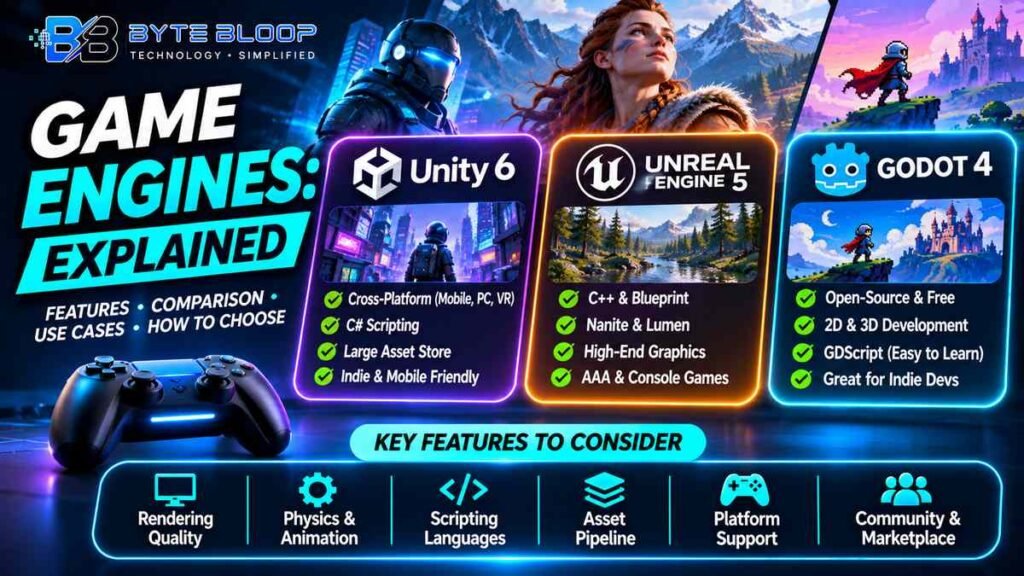
Unity remains the go‑to engine for mobile, VR, and cross‑platform titles. Its 48% share of the mobile market reflects its robust asset store, C# scripting, and rapid iteration cycles. Unity 6 introduces a new rendering pipeline that rivals Unreal’s visual quality while keeping the learning curve gentle. The engine’s licensing is flexible: free for small studios, tiered subscriptions for larger teams.
Getting game engines explained right can make a real difference.
Unreal Engine 5
Unreal powers 31% of Steam revenue and excels in high‑end PC and console games. Its Nanite virtualized geometry and Lumen global illumination deliver cinematic visuals. Developers can script in C++ or use the visual Blueprint system, making it accessible to artists and programmers alike. The engine is free until a game earns $1M in revenue, after which a 5% royalty applies.
That is a core part of understanding game engines explained.
Godot 4
Godot is an open‑source engine that has gained traction for indie developers. It supports both 2D and 3D with a unified editor, and its GDScript language is lightweight and easy to learn. Godot’s recent update adds Vulkan support, improved physics, and a streamlined export system. Because it’s free and modifiable, it’s ideal for studios that want full control over their toolchain.
Many readers look into game engines explained for exactly this reason.
Unreal Engine 5, Unity 6, Godot 4, and Others
Other notable engines include Amazon Lumberyard for cloud‑centric games, CryEngine for photorealistic simulations, and GameMaker Studio for rapid 2D prototyping. Each engine has a niche: Lumberyard integrates tightly with AWS, CryEngine offers out‑of‑the‑box HDR rendering, and GameMaker’s drag‑and‑drop system speeds up learning for novices.
It is worth revisiting game engines explained as things develop.
Key Features to Consider
- Rendering Quality: Real‑time ray tracing, global illumination, and shader flexibility.
- Physics & Animation: Rigid body dynamics, cloth simulation, and blend‑space animation.
- Scripting Languages: C#, C++, GDScript, visual scripting.
- Asset Pipeline: Importers for 3D models, textures, audio, and procedural generation tools.
- Platform Support: iOS, Android, Windows, macOS, Linux, consoles, AR/VR, cloud.
- Community & Marketplace: Asset stores, tutorials, mod support.
Pros and Cons
Unity 6 offers a low barrier to entry and a massive ecosystem but can struggle with very high‑end graphics and large scenes. Unreal Engine 5 delivers cutting‑edge visuals and robust multiplayer tools but requires more hardware and a steeper learning curve. Godot 4 is free and highly customizable, yet its community is smaller and some advanced features are still maturing.
Game Engines Explained remains highly relevant here.
Who Should Use Which Engine?
Indie developers looking for quick prototypes may start with Godot or GameMaker. Mobile and casual game studios benefit from Unity’s rapid iteration and asset store. AAA studios and high‑end PC/console projects typically choose Unreal for its visual fidelity and performance. VR/AR teams often mix Unity’s XR toolkit with Unreal’s rendering prowess.
This is a key consideration when it comes to game engines explained.
Key Takeaways
- Unity 6 dominates mobile with flexible licensing and a strong asset store.
- Unreal Engine 5 leads high‑end PC/console titles with Nanite and Lumen.
- Godot 4 is the top open‑source choice for indie 2D/3D projects.
- Licensing models vary: free until revenue thresholds, subscription tiers, or fully open source.
- Engine choice should align with target platform, team skillset, and project scope.
Frequently Asked Questions
What is a game engine?
A game engine is a software framework that provides core systems—physics, rendering, audio, AI, and networking—enabling developers to build games without reinventing basic functionalities.
This matters directly for anyone exploring game engines explained.
What are the key features of Unity 6?
Unity 6 offers C# scripting, a versatile rendering pipeline, a vast asset store, rapid iteration, and cross‑platform deployment, making it ideal for mobile, VR, and indie projects.
What are the best use cases for Unreal Engine 5?
Unreal excels at high‑end PC and console games that demand photorealistic graphics, complex physics, and robust multiplayer infrastructure.
What are the pros and cons of Godot 4?
Pros include open‑source licensing, a unified 2D/3D editor, and a lightweight scripting language. Cons are a smaller community, fewer third‑party tools, and some features still under development.
Conclusion
Based on the available information and industry analysis, game engines in 2026 continue to evolve as a cornerstone of the gaming ecosystem, offering developers a spectrum of tools that balance visual fidelity, performance, and cost. Choosing the right engine hinges on project goals, platform targets, and team expertise, ensuring that creative vision can be realized efficiently and effectively.
Related Reading
- Top Indie Game Development Tools in 2026
Related Articles