Cloud Storage: Explained
Introduction
Cloud storage is a cloud computing model that lets you store data and files on remote servers accessed through the internet. Unlike traditional on‑premises storage, you pay for what you use and scale up or down without buying hardware. The service is provided by third‑party vendors such as Amazon Web Services, Google Cloud, and Microsoft Azure, who maintain the physical infrastructure, security, and availability. Users interact with cloud storage via web portals, APIs, or desktop sync clients, making it accessible from any device with connectivity. The model supports a range of data types—from simple documents to large media files—and offers features like versioning, encryption, and lifecycle policies. Businesses use it for backups, disaster recovery, and collaborative workflows, while individuals rely on it for personal backups and file sharing. Understanding the core concepts of cloud storage—such as object, block, and file storage—helps you choose the right solution for your needs and optimize costs.
How Cloud Storage Works
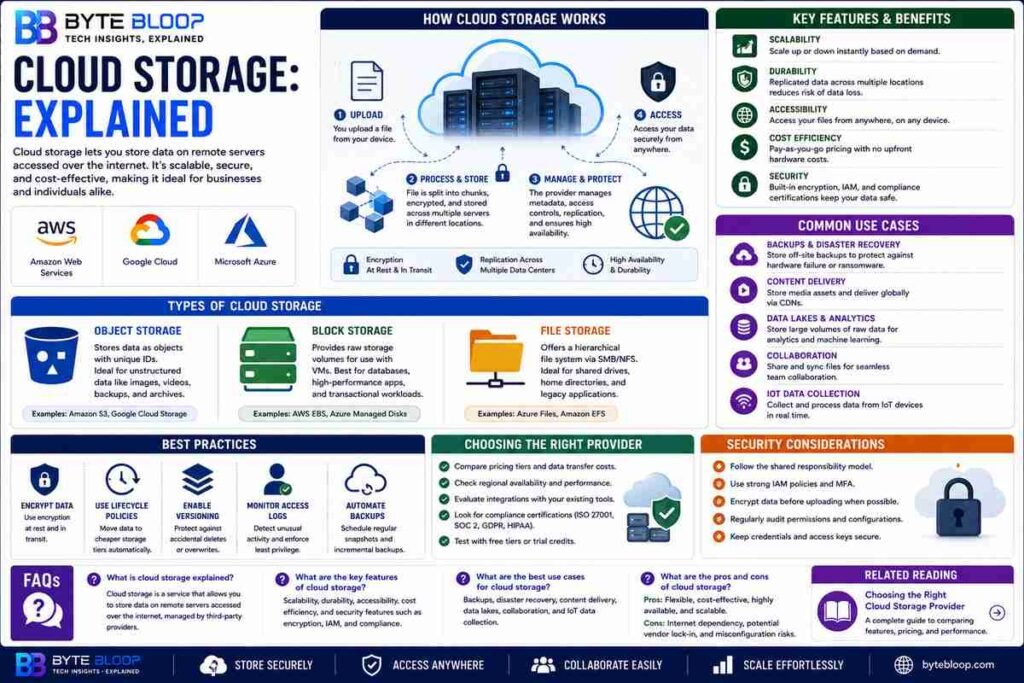
At its core, cloud storage stores data on a network of servers spread across multiple data centers. When you upload a file, it is split into chunks, encrypted, and replicated to ensure durability and availability. The provider’s software layer manages metadata, access controls, and routing, so you never need to worry about physical hardware failures. Access is typically secured via HTTPS and token‑based authentication, and many services offer additional layers like client‑side encryption and multi‑factor authentication.
Types of Cloud Storage
Three main categories dominate the market:
- Object Storage – Ideal for unstructured data such as images, videos, and backups. It stores files as objects with unique keys and supports massive scalability.
- Block Storage – Provides raw storage volumes that can be attached to virtual machines, mimicking traditional hard drives. It’s used for databases and high‑performance applications.
- File Storage – Offers a hierarchical file system accessible via SMB or NFS protocols, suitable for shared drives and legacy applications.
Key Features and Benefits
Cloud storage brings several advantages over local storage:
- Scalability – Increase capacity on demand without capital expense.
- Durability – Data is replicated across multiple locations, reducing loss risk.
- Accessibility – Reach files from anywhere, facilitating remote work and collaboration.
- Cost Efficiency – Pay‑as‑you‑go pricing aligns costs with actual usage.
- Security – Built‑in encryption, identity management, and compliance certifications.
Common Use Cases
Businesses and consumers alike leverage cloud storage for:
- Backups and Disaster Recovery – Off‑site copies protect against hardware failure or ransomware.
- Content Delivery – Media companies store assets in the cloud to serve global audiences via CDNs.
- Data Lakes – Analysts ingest raw data into object storage for AI and machine‑learning workloads.
- Collaboration Platforms – Teams share documents through synced folders or cloud‑based office suites.
- IoT Data Collection – Sensors upload telemetry directly to cloud buckets for real‑time processing.
Choosing the Right Provider
When evaluating vendors, consider factors such as pricing tiers, data transfer limits, regional availability, and integration with existing tools. Many providers offer free tiers or trial credits, enabling hands‑on testing before committing. Additionally, assess the provider’s compliance certifications—ISO 27001, SOC 2, GDPR—to ensure regulatory alignment for sensitive data.
Best Practices for Cloud Storage
To maximize security and cost control, follow these guidelines:
- Implement Encryption at Rest and in Transit – Use provider‑managed keys or bring‑your‑own key management.
- Use Lifecycle Policies – Move infrequently accessed data to cheaper archival tiers automatically.
- Enable Versioning – Protect against accidental deletions or overwrites.
- Monitor Access Logs – Detect unusual activity and enforce least‑privilege access.
- Automate Backups – Schedule regular snapshots or incremental backups to guard against data loss.
Security Considerations
While cloud providers invest heavily in security, customers must adopt a shared responsibility model. This means safeguarding credentials, configuring proper IAM roles, and ensuring data is encrypted before upload. Regular audits and penetration testing can uncover misconfigurations that might expose sensitive information.
Future Trends
Emerging trends include edge storage, where data is cached closer to the user to reduce latency, and AI‑driven data tiering, which automatically moves data based on usage patterns. Serverless storage functions are also gaining traction, allowing developers to trigger storage operations without managing infrastructure.
Conclusion
Cloud storage has become an essential component of modern IT infrastructure, offering unparalleled flexibility, durability, and cost efficiency. By understanding its core concepts, selecting the right provider, and implementing best practices, organizations and individuals can unlock the full potential of this transformative technology.
Key Takeaways
- Cloud storage stores data on remote servers, offering scalable and durable solutions.
- It comes in object, block, and file formats to suit diverse workloads.
- Key benefits include pay‑as‑you‑go pricing, global accessibility, and built‑in security.
- Best practices such as encryption, versioning, and lifecycle policies protect data and control costs.
- Future trends point to edge storage and AI‑driven data tiering for smarter, faster access.
Frequently Asked Questions
What is cloud storage explained?
Cloud storage is a service that lets you store data on remote servers accessed over the internet, managed by third‑party providers.
What are the key features of cloud storage?
Scalability, durability, accessibility, cost efficiency, and robust security controls like encryption and identity management.
What are the best use cases for cloud storage?
Backups, disaster recovery, content delivery, data lakes for analytics, collaboration platforms, and IoT data ingestion.
What are the pros and cons of cloud storage?
Pros include flexibility, pay‑per‑use pricing, and high availability. Cons involve dependency on internet connectivity, potential vendor lock‑in, and the need for proper security configuration.
Conclusion
Based on the available information and industry analysis, cloud storage provides a scalable, durable, and cost‑effective solution for both businesses and individuals. By leveraging its advanced security features, flexible pricing models, and integration capabilities, users can protect, share, and analyze data efficiently while minimizing infrastructure overhead.
Related Reading
- Choosing the Right Cloud Storage Provider