E-readers: Explained
Introduction
E‑readers have evolved from simple e‑ink displays to sophisticated devices that rival tablets in functionality while preserving the comfort of paper. They use electrophoretic screens that reflect ambient light, creating a glare‑free reading surface that feels almost like ink on paper. In 2026, the market offers a wide spectrum of options—from budget‑friendly Kindle Paperwhite to high‑end Boox Go 6 (Gen II) and the newly launched Xteink X4 Pro—each catering to different reading habits and tech preferences. The rise of color e‑ink, improved battery life, and cloud integration has made e‑readers indispensable for students, travelers, and book lovers who value portability without sacrificing content quality. This guide unpacks the core technology, compares the leading models, and helps you decide which device aligns with your reading lifestyle.
How E‑Readers Work
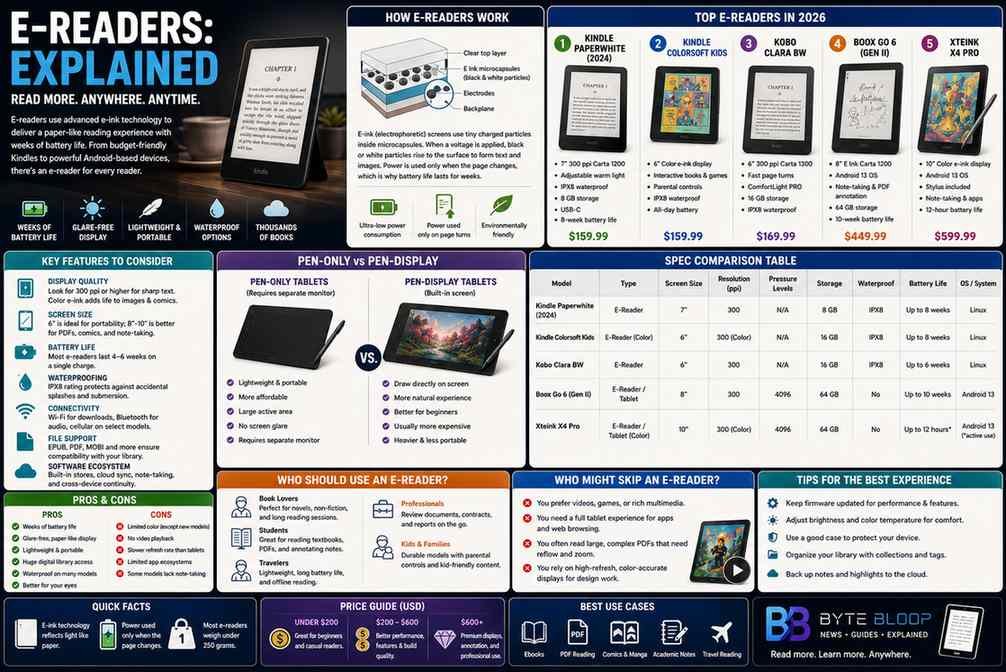
At the heart of every e‑reader is an e‑ink panel that manipulates charged micro‑bubbles to form characters. Unlike LCDs, e‑ink panels consume power only during page turns, allowing a single charge to last weeks. The latest Carta 1300 technology, featured in the Clara BW, offers a 6‑inch display with a resolution of 300 ppi, delivering crisp text and fast page‑turning. Some models, such as the Kindle Colorsoft Kids, introduce color e‑ink, enabling illustrations and interactive content while still maintaining low power draw.
Key Features to Consider
- Display Quality – Look for high resolution (≥ 300 ppi) and, if you need images, a color e‑ink panel.
- Screen Size – 6‑inch screens are standard; larger panels (8‑10 inch) appeal to those who read PDFs or comics.
- Battery Life – Expect 4–6 weeks on a single charge, depending on usage.
- Waterproofing – IPX8 ratings protect against accidental splashes.
- Connectivity – Wi‑Fi, Bluetooth, and optional cellular for instant book downloads.
- File Support – EPUB, PDF, MOBI, and sometimes image formats.
- Software Ecosystem – Built‑in stores, note‑taking, and cross‑device sync.
Top Models in 2026
Amazon Kindle Paperwhite (2024)
The Paperwhite remains the benchmark for value. Its 7‑inch 300‑ppi screen, 8‑hour battery life, and waterproof design make it ideal for casual readers. The latest firmware adds a front light with adjustable color temperature, reducing eye strain during night reading.
Kindle Colorsoft Kids
Targeted at younger audiences, this 6‑inch color e‑ink reader supports interactive books and games. It’s durable, waterproof, and includes parental controls, making it a smart choice for families.
Kobo Clara BW
Featuring the Carta 1300 panel, the Clara BW offers a responsive 6‑inch display that turns pages faster than most competitors. Its lightweight design and support for a wide range of file formats appeal to power readers and students.
Boox Go 6 (Gen II)
Boox’s flagship combines an 8‑inch E Ink Carta 1200 display with Android OS, enabling app installation, note‑taking, and PDF annotation. The device’s 10‑hour battery life and robust build make it a favorite among professionals who need to review documents on the go.
Xteink X4 Pro
The X4 Pro introduces a 10‑inch color e‑ink screen and a stylus for precise note‑taking. Its 12‑hour battery life and support for Android apps position it as a versatile tool for students and designers.
Performance & User Experience
Page‑turn speed is a critical metric. The Clara BW’s Carta 1300 panel delivers near-instant turns, while the X4 Pro’s larger screen can feel slightly slower but remains responsive. Battery longevity is consistent across models, with the Boox Go 6 and X4 Pro offering the longest runtimes due to their larger displays. Comfort varies; lighter models like the Paperwhite are easier to hold for extended sessions, whereas heavier devices provide a more stable reading platform.
Pros and Cons
- Pro: Low power consumption, glare‑free reading, extensive library support.
- Con: Limited color options (except new color e‑ink models), no native video playback.
- Pro: Waterproof designs reduce risk of accidental damage.
- Con: Some models lack advanced note‑taking features.
Who Should Use an E‑Reader?
Book lovers who prioritize portability and long battery life will find e‑readers indispensable. Students benefit from the ability to annotate PDFs and access a vast digital library. Travelers appreciate the lightweight design and water resistance, allowing reading in various environments. Professionals who need to review documents on the go may prefer larger‑screen models with annotation tools.
Who Should Skip an E‑Reader?
If you prefer multimedia content—videos, interactive games, or high‑resolution graphics—an e‑reader’s limited color and lack of video playback may be a drawback. Users who need a full tablet experience for apps, browsing, or gaming might find e‑readers restrictive. Additionally, if you frequently read large PDFs with complex layouts, a tablet or laptop may handle formatting better.
Key Takeaways
- E‑readers use low‑power e‑ink panels that mimic paper for glare‑free reading.
- The latest models offer color displays, waterproofing, and fast page turns.
- Battery life spans weeks, making them ideal for travel and long reading sessions.
- Large‑screen e‑readers support PDF annotation, useful for students and professionals.
Frequently Asked Questions
What is the main advantage of e‑readers over tablets?
E‑readers consume power only during page turns, offering weeks of battery life and a paper‑like display that reduces eye strain.
What are the key features of the latest e‑readers?
High‑resolution e‑ink displays (300 ppi or higher), fast page‑turning panels like Carta 1300, waterproof construction, adjustable front lighting, and support for a wide range of e‑book formats.
What are the best use cases for e‑readers?
Reading books, PDFs, and academic material on the go; students annotating documents; travelers needing a lightweight, durable device; families using child‑friendly color e‑readers.
What are the pros and cons of e‑readers?
Pros: ultra‑long battery life, glare‑free screens, vast digital libraries. Cons: limited color options (except newer models), no video playback, less versatile for non‑reading tasks.
Conclusion
Based on the available information and industry analysis, e‑readers provide a uniquely efficient and comfortable reading experience that balances portability, battery life, and content accessibility. Their continued innovation—especially in color e‑ink and annotation capabilities—ensures they remain a top choice for readers who value a paper‑like feel without the bulk of traditional books.
Related Reading
- Top 5 E‑Book Formats Explained