MongoDB: Explained
Introduction
MongoDB has become the go‑to NoSQL database for developers building scalable, data‑intensive applications. Unlike traditional relational systems, it stores data as JSON‑like documents, allowing fields to vary across records and enabling rapid iteration on schema design. This flexibility is a boon for startups and enterprises alike, as it reduces the friction of data migrations and lets teams ship features faster. MongoDB’s query language is expressive, supporting complex aggregations, full‑text search, and geospatial queries out of the box. Coupled with a rich ecosystem of drivers and cloud services such as Atlas, it offers a seamless path from local development to production deployment. Understanding its core concepts—documents, collections, databases, and indexes—is essential for any developer looking to harness the power of a document store. In this article we’ll walk through the fundamentals, show practical code examples, highlight common pitfalls, and share best practices for building robust applications with MongoDB.
What Makes MongoDB Different?
At its heart, MongoDB is a document database. Each record is a document stored in BSON, a binary JSON format that supports additional data types like dates and binary data. Documents are grouped into collections, which are analogous to tables in relational databases but without a fixed schema. A database can contain many collections, and a single MongoDB deployment can host multiple databases simultaneously.
Because documents can contain nested arrays and sub‑documents, MongoDB naturally models real‑world entities such as user profiles or product catalogs in a single record. This denormalization reduces the need for costly join operations, which are expensive in distributed environments. However, it also means that developers must design data models carefully to avoid data duplication and maintain consistency.
Setting Up a Simple Project
Below is a minimal Node.js example that demonstrates the typical workflow: connecting to a database, inserting a document, querying, and updating. The code uses the official mongodb driver.
const { MongoClient } = require("mongodb");
const uri = "mongodb://localhost:27017";
const client = new MongoClient(uri);

async function run() {
  try {
    await client.connect();
    const db = client.db("shop");
    const products = db.collection("products");

    // Insert
    const insertResult = await products.insertOne({
      name: "Wireless Mouse",
      price: 29.99,
      tags: ["electronics", "accessory"],
      createdAt: new Date()
    });

    // Query
    const product = await products.findOne({ name: "Wireless Mouse" });
    console.log(product);

    // Update
    await products.updateOne(
      { _id: product._id },
      { $set: { price: 24.99 } }
    );
  } finally {
    await client.close();
  }
}
run().catch(console.dir);
Running this script will create a database named shop, add a product, retrieve it, and update its price. The example highlights MongoDB’s declarative syntax and the ease of working with JSON‑style data.
Indexing: The Key to Performance
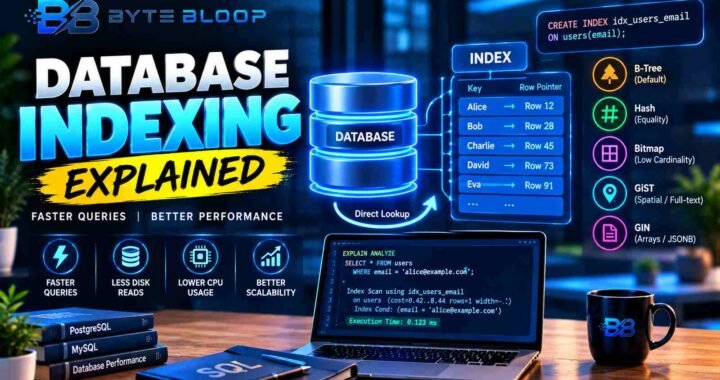
MongoDB automatically creates a primary index on the _id field, but most queries benefit from additional indexes. A single‑field index on name would speed up the findOne call above. Compound indexes are useful when queries filter on multiple fields, such as { name: "X", price: { $lt: 50 } }. MongoDB’s index statistics can be inspected with the explain method, which is invaluable for diagnosing slow queries.
Aggregation Framework: Turning Data Into Insights
The aggregation pipeline lets you transform and combine data within the database. Each stage performs a specific operation—$match filters, $group aggregates, $project reshapes, and $sort orders results. A common use case is computing monthly sales totals:
db.sales.aggregate([
  { $match: { status: "completed" } },
  { $group: { _id: { $month: "$date" }, total: { $sum: "$amount" } } },
  { $sort: { _id: 1 } }
]);
Because aggregations run server‑side, they reduce network traffic and leverage indexes when possible.
Common Pitfalls and How to Avoid Them
- Over‑Denormalization: Storing large arrays can bloat documents beyond the 16MB limit. Keep arrays small or split data into related collections.
- Missing Indexes: Unindexed queries can cause full collection scans. Use
explainregularly during development. - Schema Drift: While flexible, uncontrolled schema changes can lead to inconsistent data. Adopt a versioning strategy or use validation rules.
- Ignoring Replication: In production, enable replica sets to provide high availability and automatic failover.
Best Practices for Production
• Use MongoDB Atlas or a managed replica set to offload operational overhead.
• Enable TLS/SSL to secure data in transit.
• Configure proper user roles and authentication mechanisms.
• Regularly backup with point‑in‑time recovery options.
• Monitor performance with Atlas metrics or Ops Manager.
When Is MongoDB the Right Choice?
MongoDB shines when you need rapid development, flexible schemas, and horizontal scalability. It’s ideal for content management systems, IoT data ingestion, real‑time analytics, and applications that require dynamic data models. If your workload demands strict ACID transactions across multiple entities, a relational database might still be preferable, though MongoDB’s multi‑document transactions have improved significantly in recent releases.
Key Takeaways
- MongoDB stores flexible JSON‑like documents, eliminating rigid schemas
- Collections group documents; databases host multiple collections
- Indexes are critical for query performance; use explain to diagnose
- Aggregation pipelines enable powerful server‑side data processing
- Replica sets and Atlas provide high availability and managed services
- Best for rapid development, dynamic data models, and horizontal scaling
Frequently Asked Questions
What is MongoDB?
MongoDB is a document‑oriented NoSQL database that stores data in JSON‑like BSON documents, allowing flexible schemas and efficient querying.
What are the key features of MongoDB?
Key features include flexible schema design, powerful aggregation framework, full‑text search, geospatial queries, replica sets for high availability, and a rich driver ecosystem.
What are the best use cases for MongoDB?
Ideal use cases are content management, real‑time analytics, IoT data streams, mobile and web applications requiring rapid iteration, and any scenario where schema evolution is frequent.
What are the pros and cons of MongoDB?
Pros: schema flexibility, horizontal scaling, developer productivity, rich query language. Cons: potential data duplication, lack of joins (unless using aggregation), and need for careful index management.
Conclusion
Based on the available information and industry analysis, MongoDB provides a flexible, scalable document store that empowers developers to iterate quickly and handle complex data models without the constraints of rigid schemas. Its robust ecosystem, powerful aggregation framework, and managed services like Atlas make it a compelling choice for modern applications that demand agility and performance.
Related Reading
- Getting Started with MongoDB Atlas
Sources & References