4K vs 1440p: Key Differences
Introduction
This guide covers 4k vs 1440p key differences in detail. Understanding 4k vs 1440p key differences helps readers make better, more informed decisions.
When it comes to choosing a display, resolution is the first thing that grabs your attention. In 2026, the debate between 4K (3840×2160) and 1440p (2560×1440) is more relevant than ever, especially for gamers, content creators, and professionals who demand pixel‑perfect clarity. Both resolutions promise sharper images than the ubiquitous 1080p, but they differ significantly in pixel density, GPU demands, and real‑world visual impact. Understanding these differences helps you decide which display aligns with your budget, performance goals, and usage scenarios. Understanding 4k vs 1440p key differences helps readers make better, more informed decisions.
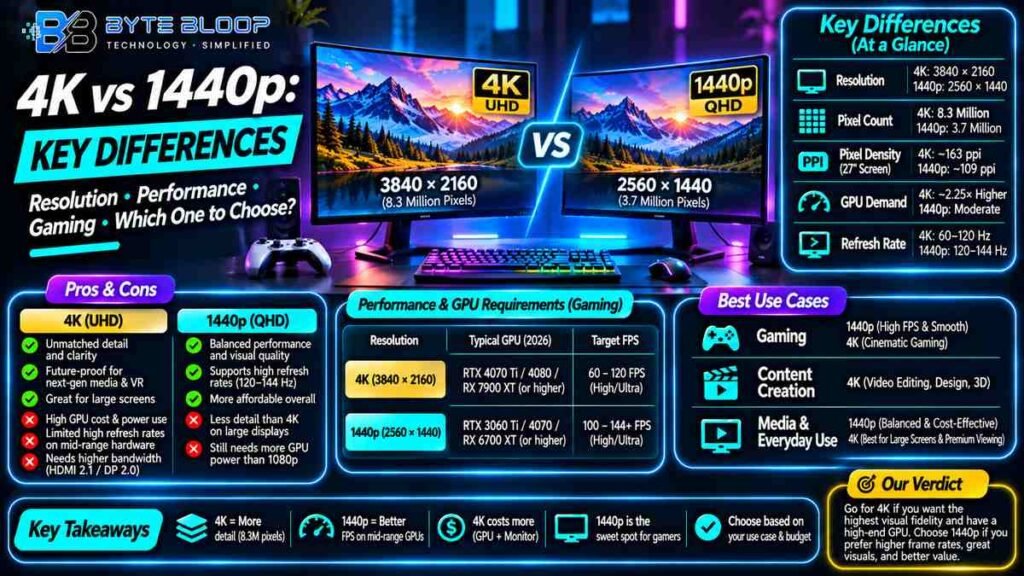
4K packs roughly 8.3 million pixels, more than double the 3.7 million found in 1440p. This extra detail translates into razor‑sharp textures, smoother gradients, and a more immersive experience on larger screens. However, the extra pixels also mean the graphics card must deliver 2.25 times the data, pushing higher frame rates into the realm of high‑end GPUs and demanding more memory bandwidth. 1440p, meanwhile, offers a sweet spot: a noticeable jump in clarity over 1080p while keeping GPU load manageable enough for 60‑Hz or even 144‑Hz refresh rates on mainstream hardware. Understanding 4k vs 1440p key differences helps readers make better, more informed decisions.
In this guide we break down the core differences, performance implications, and practical use cases for both resolutions. We’ll also answer common questions and give you a clear recommendation on which resolution to choose based on your needs. Understanding 4k vs 1440p key differences helps readers make better, more informed decisions.
4K Resolution: The Pinnacle of Visual Fidelity — 4k vs 1440p key differences
4K provides the highest pixel count available in consumer monitors, delivering exceptional sharpness and detail. On a 27‑inch display, 4K yields a pixel density of about 163 ppi, making individual pixels virtually invisible to the average viewer. This clarity is especially valuable for tasks that benefit from fine detail, such as photo editing, 3D modeling, and watching high‑resolution video content. Understanding 4k vs 1440p key differences helps readers make better, more informed decisions.
Gaming at 4K, however, comes with a cost. According to a 2026 gaming monitor guide, achieving 60 fps at native 4K often requires GPUs from the RTX 40 series or equivalent, and even then, many titles struggle to maintain smooth gameplay at higher frame rates. The increased pixel load also demands higher bandwidth, meaning 4K monitors typically feature HDMI 2.1 or DisplayPort 2.0 connections to support the required data rates. Understanding 4k vs 1440p key differences helps readers make better, more informed decisions.
1440p Resolution: The Balanced Middle Ground
1440p sits between 1080p and 4K, offering a 78% increase in pixel count over 1080p. This jump provides a noticeable improvement in sharpness, especially on 24‑ to 27‑inch screens, without the extreme GPU demands of 4K. Many gamers find 1440p to be the sweet spot where high refresh rates (120 Hz, 144 Hz) and solid performance coexist. Understanding 4k vs 1440p key differences helps readers make better, more informed decisions.
From a hardware perspective, a 1440p build can use mid‑range GPUs like the RTX 3060 Ti or AMD Radeon RX 6700 XT and still hit 60 fps or higher in most modern titles. This makes 1440p a cost‑effective choice for players who want a balance between visual quality and performance. Understanding 4k vs 1440p key differences helps readers make better, more informed decisions.
Key Differences at a Glance
Pixel Count & Density – 4K has 8.3 million pixels (~163 ppi on 27”), 1440p has 3.7 million (~109 ppi). The higher density in 4K results in crisper images. Understanding 4k vs 1440p key differences helps readers make better, more informed decisions.
GPU Demand – 4K requires 2.25× the GPU power of 1440p for the same frame rate, pushing high‑end cards. 1440p can run on mid‑range GPUs while still delivering smooth gameplay.
Refresh Rates – 1440p supports 120 Hz–144 Hz on mainstream GPUs; 4K typically caps at 60 Hz–120 Hz unless you use the latest GPUs and connections.
Use Cases – 4K excels in content creation, cinematic viewing, and large‑screen gaming. 1440p is ideal for competitive gaming, office productivity, and everyday media consumption.
Pros and Cons
4K Pros
- Unmatched detail and clarity
- Future‑proof for next‑gen media and VR
- Large screen experience without pixelation
4K Cons
- High GPU cost and power consumption
- Limited high refresh rates on mid‑range hardware
- Requires higher bandwidth connections
1440p Pros
- Balanced performance and visual quality
- Supports high refresh rates on mainstream GPUs
- More affordable overall
1440p Cons
- Less detail than 4K on large displays
- Still demands more GPU power than 1080p
Which One Should You Choose?
If your priority is the sharpest possible image and you have a high‑end GPU, 4K is the way to go. For gamers who value higher frame rates and a more budget‑friendly build, 1440p offers the best compromise. Professionals who edit high‑resolution footage or design detailed graphics will also benefit from the pixel density of 4K. Ultimately, your choice hinges on the balance between visual fidelity and performance you’re willing to accept.
Key Takeaways
- 4K offers more than double the pixels of 1440p, delivering sharper images on large screens.
- 1440p balances visual quality with higher refresh rates on mid‑range GPUs.
- 4K requires high‑end GPUs and bandwidth, raising cost and power consumption.
- 1440p is ideal for competitive gaming and everyday productivity.
- Choosing depends on whether you prioritize pixel perfection or smooth performance.
Frequently Asked Questions
What is the main visual difference between 4K and 1440p?
4K has 8.3 million pixels versus 3.7 million in 1440p, providing a sharper, more detailed image, especially noticeable on larger screens.
What are the key performance requirements for 4K gaming?
To maintain 60 fps at native 4K, you typically need a high‑end GPU like the RTX 40 series, plus HDMI 2.1 or DisplayPort 2.0 for sufficient bandwidth.
What are the best use cases for 1440p?
1440p is perfect for competitive gaming at high refresh rates, office work, and media consumption where a balance of clarity and performance is needed.
What are the pros and cons of choosing 4K over 1440p?
Pros: maximum detail, future‑proofing for media and VR. Cons: higher GPU cost, limited high refresh rates, and greater power consumption.
Conclusion
Based on the available information and industry analysis, 4K resolution delivers unmatched visual fidelity but demands high‑end GPUs and bandwidth, making it ideal for content creators and enthusiasts who prioritize detail. Conversely, 1440p offers a balanced compromise between performance and clarity, fitting well for gamers and professionals who need high refresh rates without breaking the bank. Your decision should align with your primary use case and hardware budget.
Related Reading
- Choosing the Right Gaming Monitor: 1080p vs 1440p vs 4K
Related Articles