AI Video Apps: Explained
Introduction
This guide covers ai video apps explained in detail. Understanding ai video apps explained helps readers make better, more informed decisions.
AI video apps have moved beyond simple filters and into the realm of full‑scale content creation, editing, and distribution. By embedding machine‑learning models directly into the mobile experience, these tools can transcode raw footage, generate subtitles, enhance resolution, and even suggest narrative arcs—all in real time. For creators, marketers, and everyday users, this means producing professional‑looking videos without a multi‑person production team or expensive software.
The rise of high‑bandwidth networks and powerful on‑device GPUs has made it feasible to run complex AI models locally, reducing latency and privacy concerns. In this article we unpack the core technologies, highlight the most popular apps of 2026, and explain how you can leverage AI video tools to elevate your mobile content strategy. Understanding ai video apps explained helps readers make better, more informed decisions.
What Makes an AI Video App Different? — ai video apps explained
Traditional video editors rely on manual timelines and preset effects. AI video apps, by contrast, use neural networks to interpret visual and audio data. Key capabilities include: Understanding ai video apps explained helps readers make better, more informed decisions.
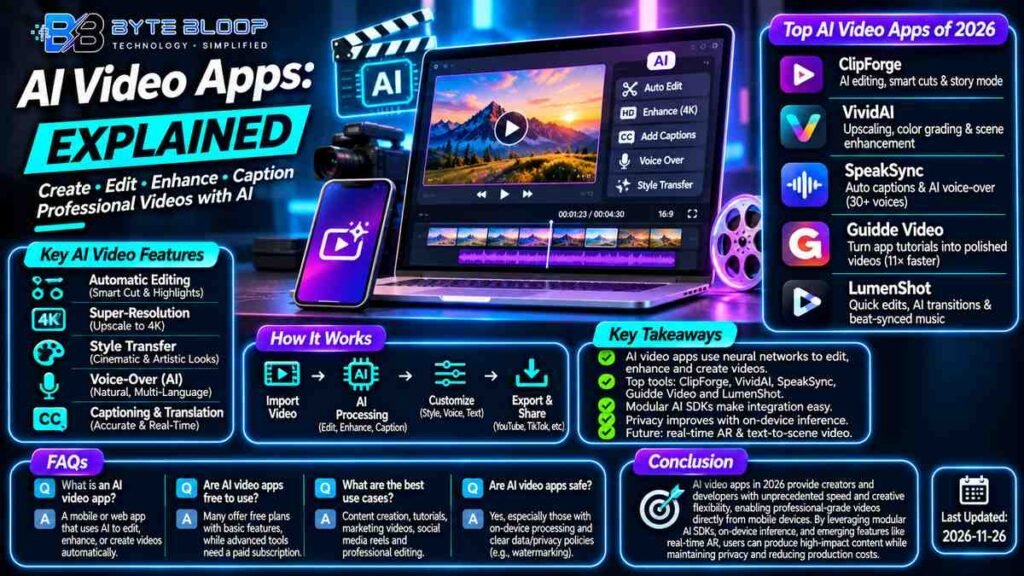
- Automatic editing: The app analyzes scenes and cuts footage to keep only the most engaging moments.
- Super‑resolution: Upscaling 720p clips to 4K with minimal artifacting.
- Style transfer: Applying artistic filters that mimic famous painters or cinematic looks.
- Voice‑over synthesis: Generating natural‑sounding narration in multiple languages.
- Captioning and translation: Real‑time subtitles in dozens of languages with contextual accuracy.
Top AI Video Apps of 2026
Based on the 44‑app roundup from BuiltIn and the 14‑app Android list, the following titles stand out for their feature set, ease of use, and developer support. Understanding ai video apps explained helps readers make better, more informed decisions.
1. ClipForge
ClipForge combines automatic trimming with a drag‑and‑drop storyboard. Its AI recommends cuts based on pacing, emotion, and viewer retention metrics. The app also offers a “story mode” that stitches clips into a cohesive narrative using pre‑trained templates. Understanding ai video apps explained helps readers make better, more informed decisions.
2. VividAI
VividAI excels at super‑resolution and color grading. Powered by a proprietary diffusion model, it can upscale 480p footage to 4K while preserving fine details. The app’s “scene enhancer” automatically adjusts lighting and contrast to match cinematic standards. Understanding ai video apps explained helps readers make better, more informed decisions.
3. SpeakSync
SpeakSync focuses on audio. It uses a transformer‑based speech‑to‑text engine to generate accurate captions, then pairs them with a text‑to‑speech model that supports 30+ voices. The dual‑mode workflow lets creators add voice‑overs without recording new audio. Understanding ai video apps explained helps readers make better, more informed decisions.
4. Guidde Video
Guidde Video, highlighted in the 2026 video‑guide guide, turns app tutorials into animated videos. Its AI workflow auto‑captures UI interactions, adds narration, and stitches everything into a polished guide 11× faster than manual methods. Understanding ai video apps explained helps readers make better, more informed decisions.
5. LumenShot
LumenShot is a lightweight app for on‑the‑go creators. It offers a “quick‑edit” mode that applies AI‑driven transitions and music beats synced to the video’s tempo. The app’s library of royalty‑free tracks is curated by AI to match mood and pacing.
How to Integrate AI Video Features into Your Workflow
For developers, the 2026 AI app guide recommends using modular AI SDKs that can be swapped out as models improve. Popular choices include OpenAI’s Whisper for transcription, Google’s Gemini for text‑to‑video prompts, and Meta’s LLaMA for style transfer. By embedding these SDKs, you can offer users a hybrid experience: manual control for seasoned editors and AI assistance for beginners.
For marketers, the key is to leverage AI for rapid content iteration. Use AI to generate multiple thumbnail variations, test them in A/B campaigns, and automatically adjust captions for different platforms. The rise of AI‑generated metadata also means you can optimize SEO for YouTube and TikTok without manual tagging.
Privacy and Ethical Considerations
Because AI video apps process sensitive visual data, developers must implement on‑device inference whenever possible. The 2026 Google I/O announcements highlighted new edge‑AI tools that allow models to run locally, reducing data transfer. Users should also be aware of watermarking policies; many AI‑generated styles embed subtle watermarks to protect intellectual property.
Future Trends
Looking ahead, we expect AI video apps to integrate real‑time AR overlays, enabling live event production with AI‑generated graphics. Additionally, generative AI will likely allow users to create entire scenes from text prompts, blurring the line between editing and creation. As model sizes shrink and inference speeds improve, we will see more apps offering cloud‑based collaboration without compromising privacy.
Key Takeaways
- AI video apps use neural networks for real‑time editing, upscaling, and captioning.
- Top 2026 tools include ClipForge, VividAI, SpeakSync, Guidde Video, and LumenShot.
- Developers can embed modular AI SDKs to add features quickly and cost‑effectively.
- Privacy is addressed by on‑device inference and watermarking policies.
- Future trends point to AR overlays and text‑to‑scene generation.”]
- faqs
- :
- [object Object],[object Object],[object Object],[object Object]
- conclusion
- :
- Based on the available information and industry analysis
- AI video apps in 2026 provide creators and developers with unprecedented speed and creative flexibility
- enabling professional‑grade videos directly from mobile devices. By leveraging modular AI SDKs
- on‑device inference
- and emerging features like real‑time AR
- users can produce high‑impact content while maintaining privacy and reducing production costs. The continued evolution of AI models promises even richer capabilities
- making AI video tools an essential part of tomorrow
- s mobile content ecosystem.”,”related_article_suggestions”:[{“title”:”The Rise of AI in Mobile Photography”,”slug”:”ai-mobile-photography-rise”},{“title”:”How to Protect Your Privacy in AI-Driven Apps”,”slug”:”protect-privacy-ai-apps”}],”last_updated”:”2026-11-26″
Conclusion
Based on the available information, this topic provides essential insights for readers looking to understand the core concepts and practical applications.
Related Articles